Commercial cleaning scheduling software

Plan jobs, manage cover and keep every site visible

Whether you manage 20 cleaners or 2,000, KleanFlo helps commercial cleaning companies schedule work, fill absences quickly, track attendance, and make sure every site is covered.

Cleaning rotasCover managementMobile schedulesPayroll hours
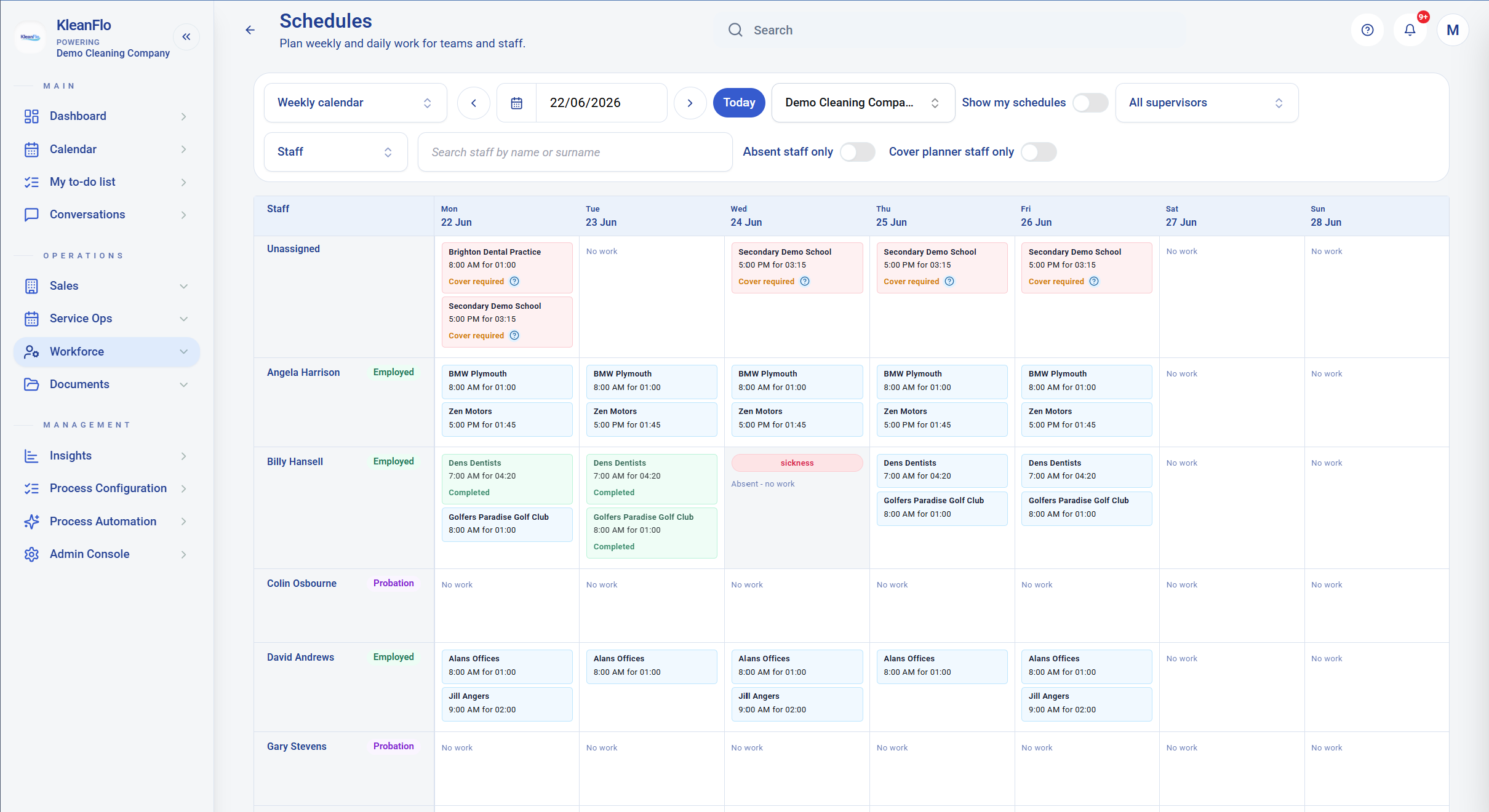
KleanFlo weekly staff schedule showing cleaning shifts, cover requirements, sickness and completed work

Common scheduling problems

Still managing cleaning schedules in spreadsheets?

Spreadsheets can work when the business is small. They become harder to control when you have multiple contracts, split shifts, school term patterns, mobile staff, holiday requests, sickness cover, and payroll deadlines all moving at the same time.

Commercial cleaning operations need scheduling that is connected to the actual work: customers, sites, contracts, employees, attendance, exceptions, and approved hours.

Staff sickness and absence Last-minute cover requirements School term schedules Holiday management Multiple sites and contracts Payroll hour calculations Staff forgetting shifts No visibility of attendance

Real-world example

When a weekly rota starts changing every day

A cleaning company managing 80 cleaners across offices, dental practices, schools and leisure sites may begin the week with a clean rota. By Wednesday, one cleaner is sick, two shifts need cover, one site has a changed access time and the office team still needs to prepare payroll-ready hours.

That is where spreadsheets start to fall apart. The schedule needs to show the plan, the exceptions and the outcome. KleanFlo keeps the weekly view, daily view, absence cover planner, attendance evidence and timesheet review connected so the operations team can see what needs action.

Scheduling features

Everything you need to manage cleaning schedules

KleanFlo brings scheduling, attendance, communication, timesheet review, and payroll preparation together so operations teams are not rebuilding the same information in different systems.

1

Intelligent planner

Schedule cleaners, supervisors, mobile teams, recurring jobs, and one-off work from a central operating view.

2

Cover management

Identify gaps caused by sickness, holidays, or changes in demand so supervisors can arrange cover before service is affected.

3

School term scheduling

Create schedules around term dates, holiday closures, deep cleans, and non-standard school cleaning periods.

4

Mobile workforce management

Give staff their schedules, job information, documents, and updates directly through the KleanFlo staff mobile app.

5

Attendance monitoring

Track check-in and check-out activity with location evidence so managers can see whether planned work has started and finished.

6

Payroll-ready hours

Review planned, actual, and payable duration before exporting or processing approved cleaning hours for payroll.

Planner views

See schedules by staff, customer or day

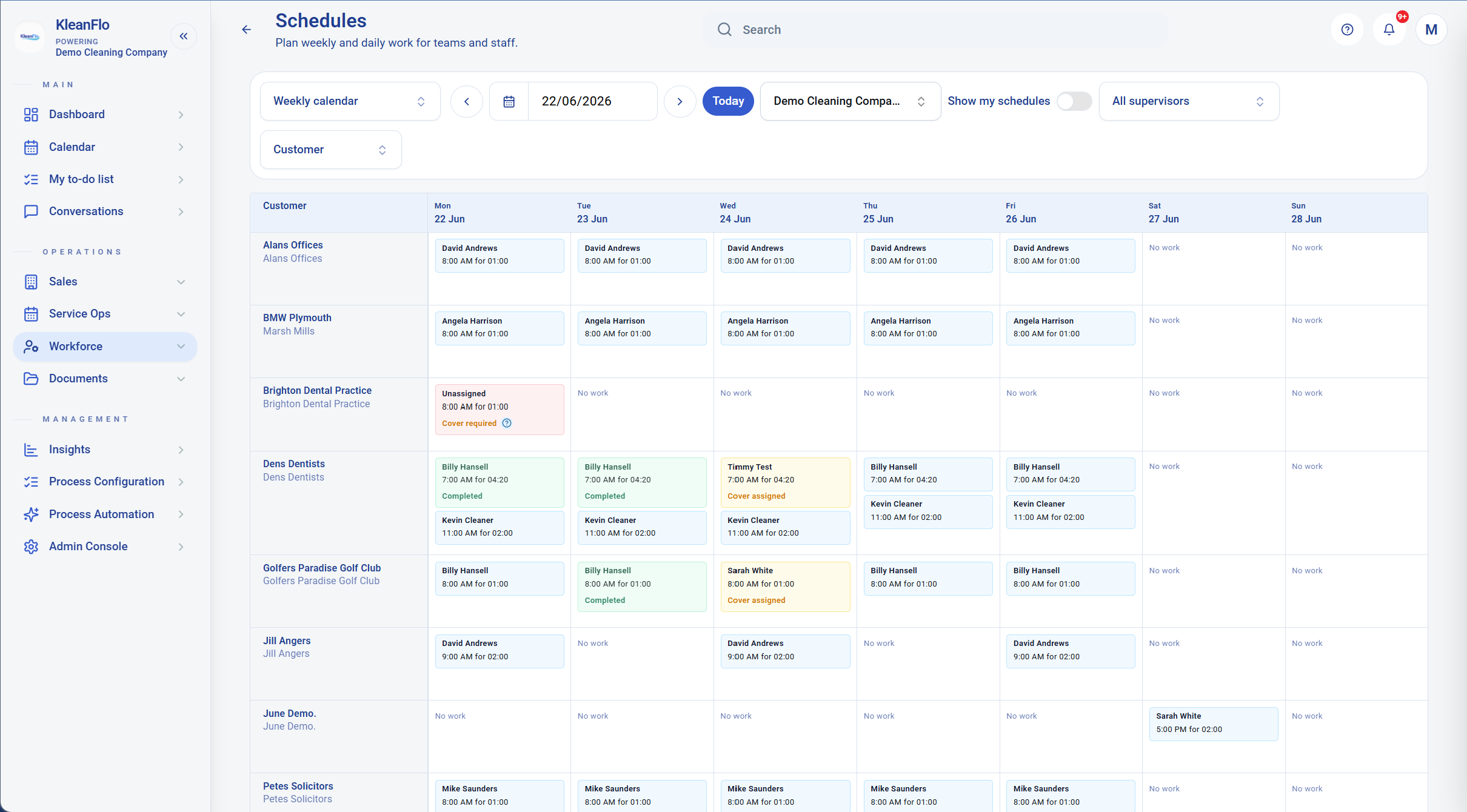
Cleaning schedules are not viewed the same way by every person in the business. Operations teams may need to see which cleaner is working where. Account managers may need to see the customer view. Supervisors may need a daily picture so they know which sites need attention.

KleanFlo gives the office team different ways to review the same schedule, helping managers spot unassigned work, cover requirements, completed visits and gaps before they become service issues.

KleanFlo weekly customer schedule view showing customer sites, assigned staff, completed work and cover requirements Review weekly schedules by customer and site so contract coverage stays visible.
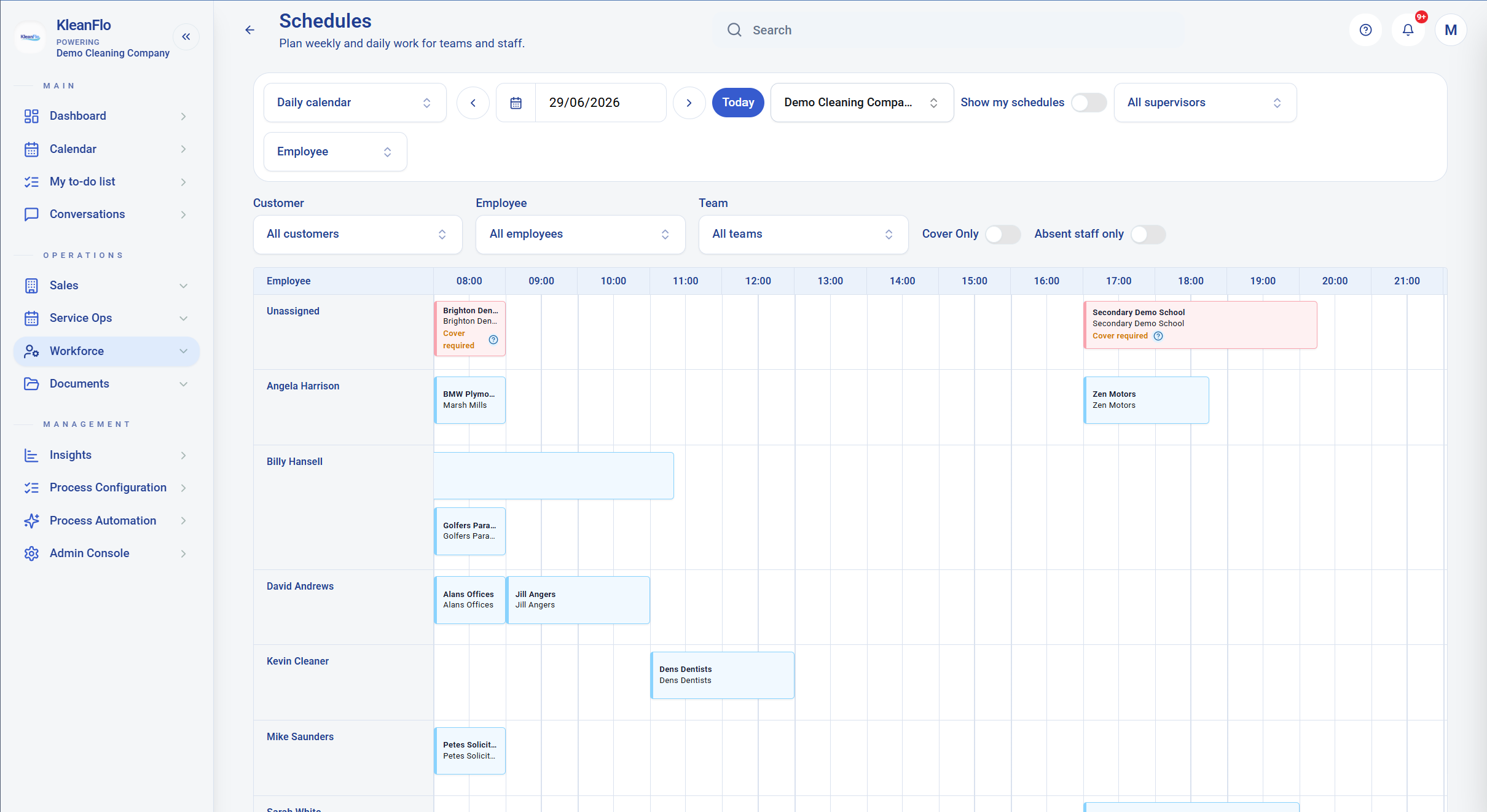
KleanFlo daily schedule view showing cleaning work across the day by employee The daily calendar helps managers see work by time of day, employee and cover requirement.

Daily control

Move from weekly planning to daily action

Weekly planning shows the shape of the contract. Daily planning shows what the team has to deal with today. A daily view is useful when work is spread across early morning, daytime and evening slots, or when mobile teams are moving between sites.

This helps managers focus on the work that needs attention now, rather than searching through a spreadsheet for the one shift that has changed.

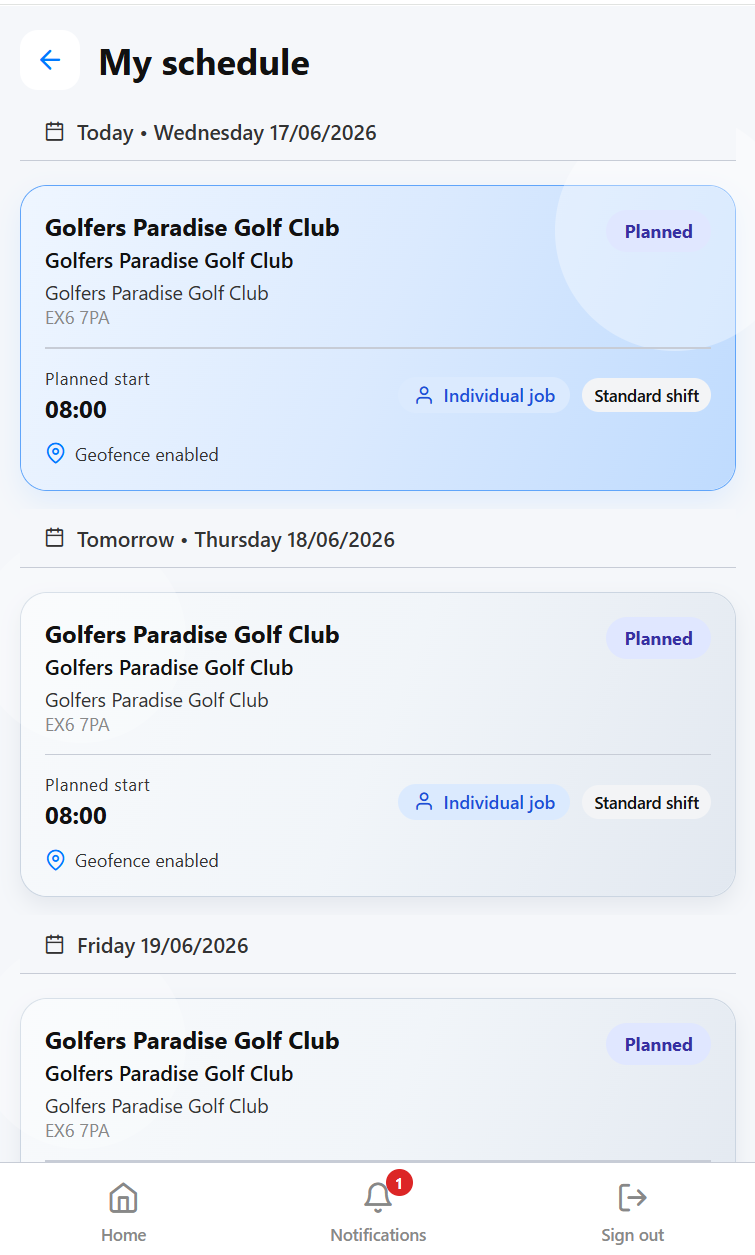
KleanFlo staff schedule shown on a mobile screen Staff can view scheduled cleaning work from their mobile device.

From planner to mobile app

Keep the office, supervisors and cleaners working from the same plan

A cleaning rota is only useful if the people doing the work can see it and managers can tell what happened. KleanFlo connects the planned schedule to mobile staff activity, supervisor follow-up, attendance evidence, and timesheet review.

That means a manager can plan the day, a cleaner can see the right shift on their phone, and the office team can review exceptions before payroll. The schedule stops being a static spreadsheet and becomes part of the daily operating process.

Walkthrough video

See KleanFlo scheduling in action

Watch a short overview of how KleanFlo connects the office, supervisors, staff mobile work and operational records in one platform.

Operational benefits

Why commercial cleaning companies choose KleanFlo

A

Reduce administration

Spend less time updating spreadsheets, chasing shift confirmations, checking missing timesheets, and reconciling hours manually.

B

Improve service delivery

Make sure every site is covered and managers know quickly when a shift has not started, has finished late, or needs attention.

C

Increase visibility

See who is working, where they are, which jobs are complete, and which exceptions need manager review.

D

Support growth

Put scheduling processes in place that can work for 50 employees and still make sense when the business grows to 500.

E

Protect payroll accuracy

Use planned, actual, and approved hours to reduce avoidable payroll disputes and end-of-period spreadsheet checks.

F

Give managers control

Bring schedules, attendance, notes, staff details, and site information into one place instead of private files and message threads.

School cleaning contracts

Built for school cleaning schedules

Many commercial cleaning businesses manage schools as part of their contract base. School cleaning is not the same as a simple office rota. Term dates, holiday periods, inset days, deep cleans, periodic work, inspections, and staff communication all need to be handled without awkward spreadsheet workarounds.

KleanFlo supports the operational detail that school cleaning contracts create, while still fitting into the wider commercial cleaning schedule.

T
School term calendars

Plan work around term-time schedules, closures, and holiday periods.

H
Holiday scheduling

Separate regular term work from holiday work, deep cleans, and changed site access patterns.

D
Deep clean planning

Organise periodic cleaning tasks and site-specific requirements outside the usual daily rota.

I
Site inspections

Connect scheduling with audits, checks, and follow-up activity so standards remain visible.

C
Staff communication

Keep cleaners and supervisors informed when school schedules change.

Cover management

Handle absence before the customer feels it

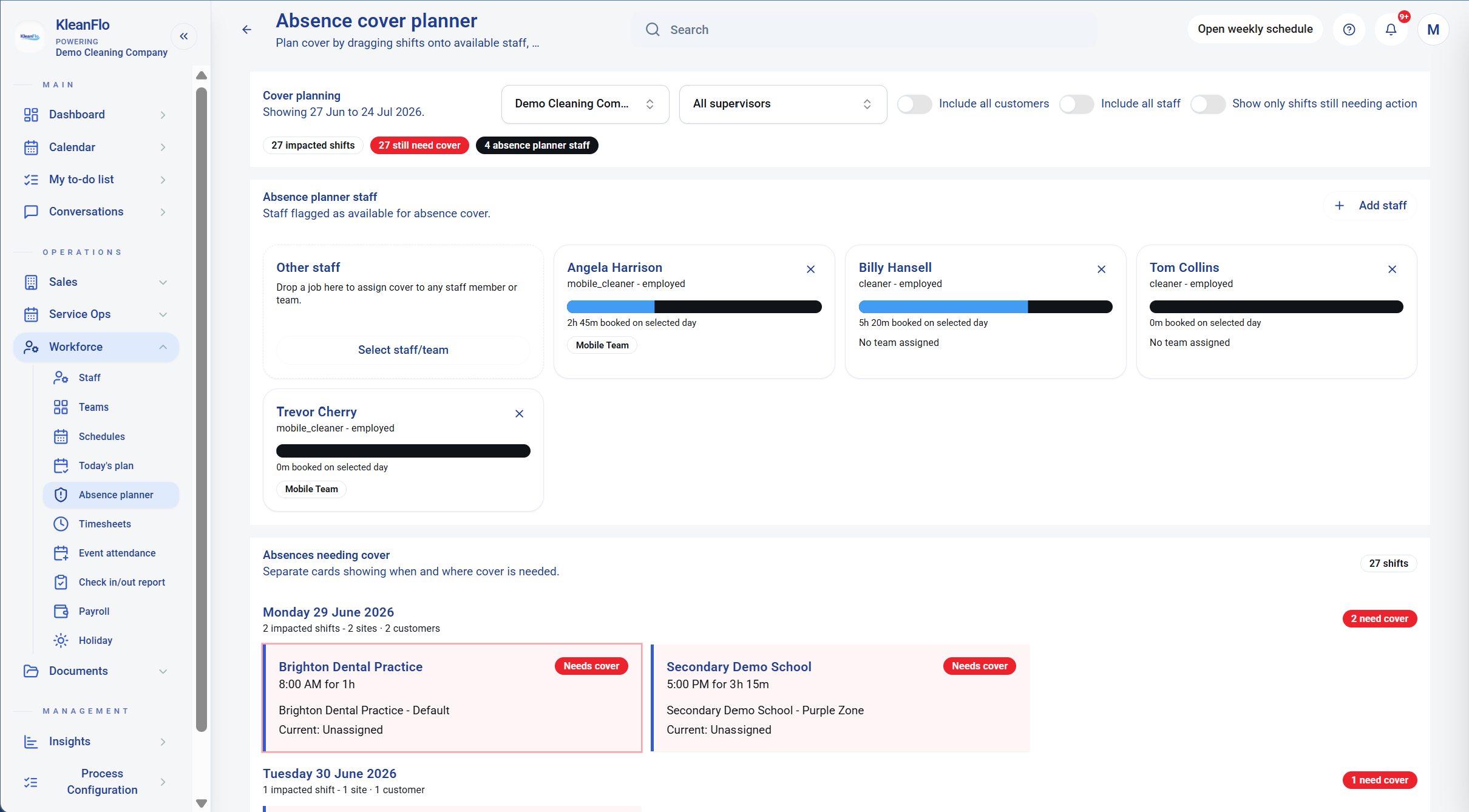
Cleaner absence is one of the biggest day-to-day scheduling pressures in commercial cleaning. It is not enough to know that someone is off. Managers need to know which shifts are affected, who can cover them and which visits still need action.

KleanFlo's absence cover planning view helps teams review impacted shifts and available cover staff so the work can be reassigned with less manual chasing.

KleanFlo absence cover planner showing impacted shifts and staff available for cover Use the absence cover planner to see impacted shifts and staff available for cover.
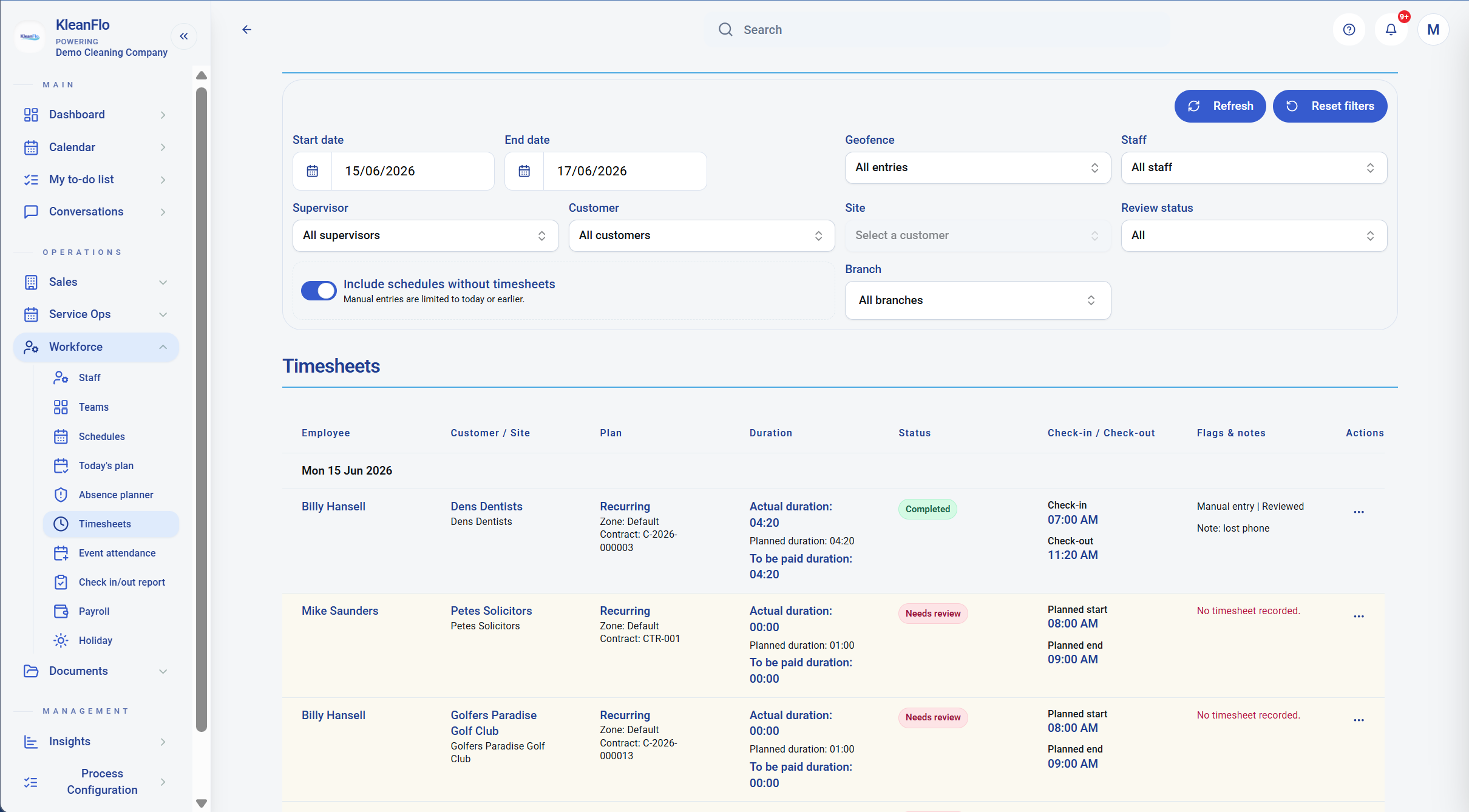
KleanFlo timesheet review showing planned duration, actual duration, payable duration and missing timesheets Review planned, actual and payable durations before payroll hours are approved.

Timesheets and payroll

Turn scheduled work into reviewed hours

Scheduling is not finished when the rota is published. The office still needs to know what happened: who checked in, who missed a timesheet, which records need review and what duration should be paid.

KleanFlo helps managers review planned, actual and payable hours so payroll is based on controlled records rather than a last-minute spreadsheet exercise.

Attendance evidence

Review geofenced check-ins and exceptions

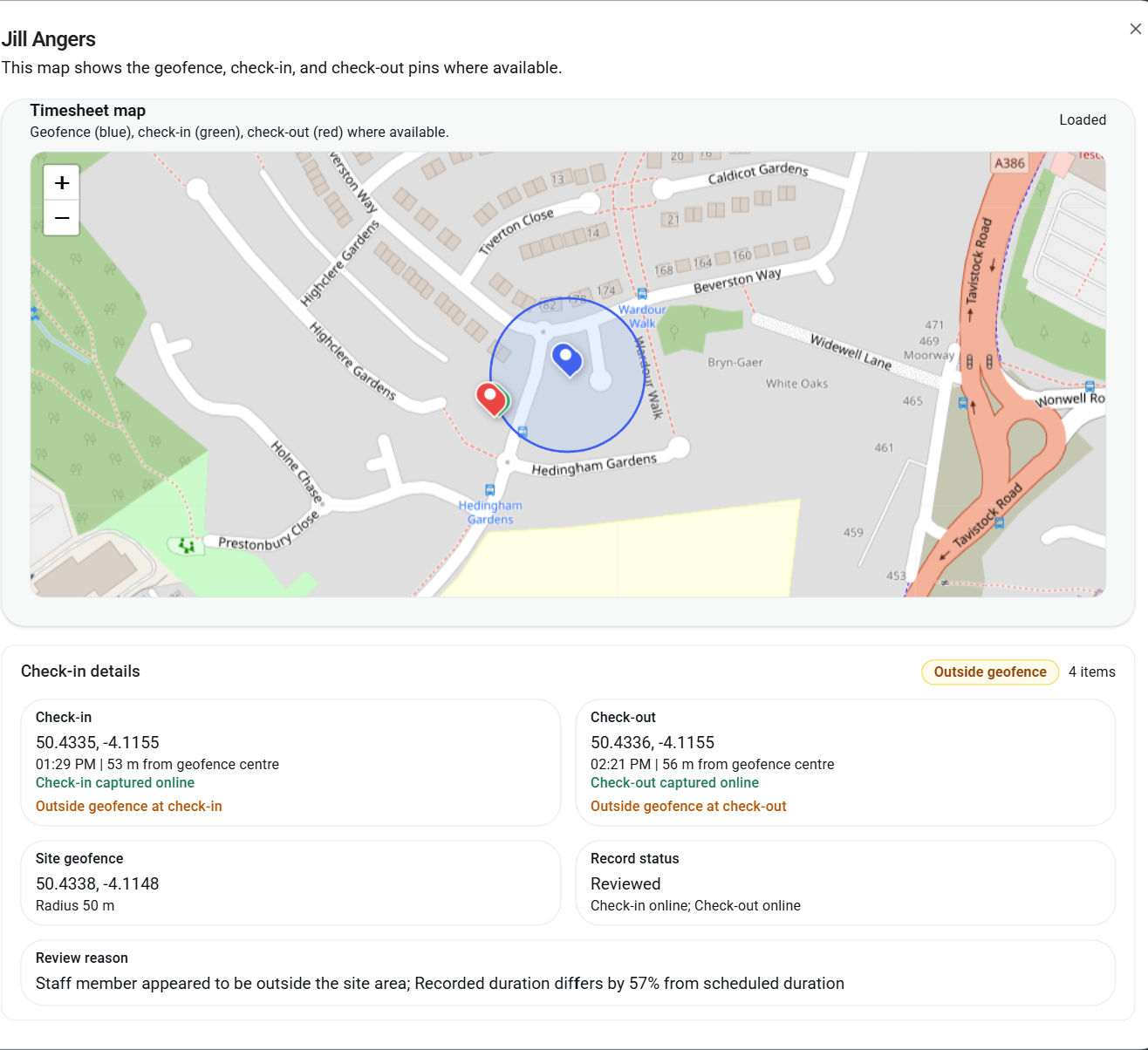
Mobile check-in gives managers more visibility, but the important part is being able to review exceptions clearly. If a check-in is outside the expected site area, or the recorded duration differs from the planned duration, the office needs a record it can understand.

KleanFlo can show check-in and check-out location evidence where available, including the site geofence and the reason a timesheet needs review.

KleanFlo timesheet map showing geofence, check-in pin, check-out pin and review reason Geofence review helps managers understand where check-in and check-out activity happened.
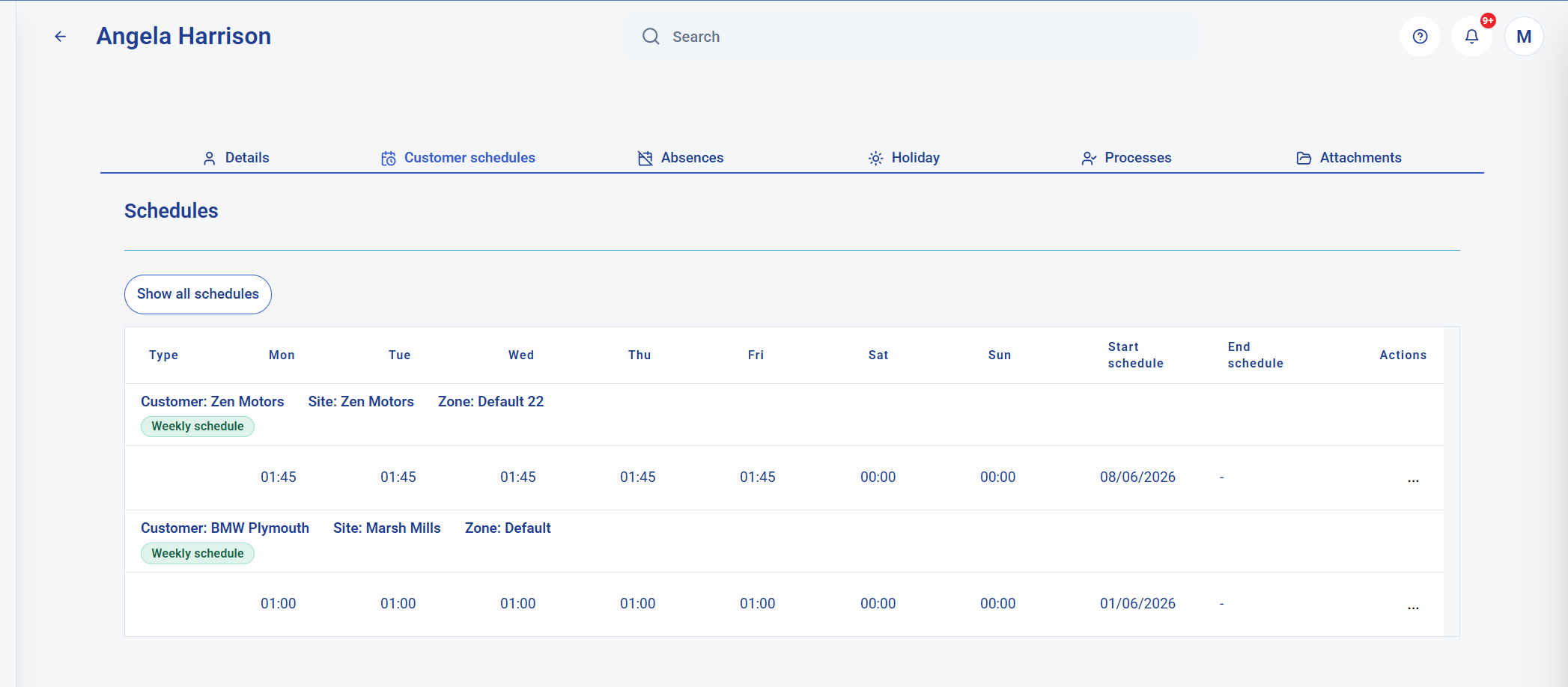
KleanFlo staff record showing customer schedules assigned to an employee Staff records show the schedules assigned to each employee.
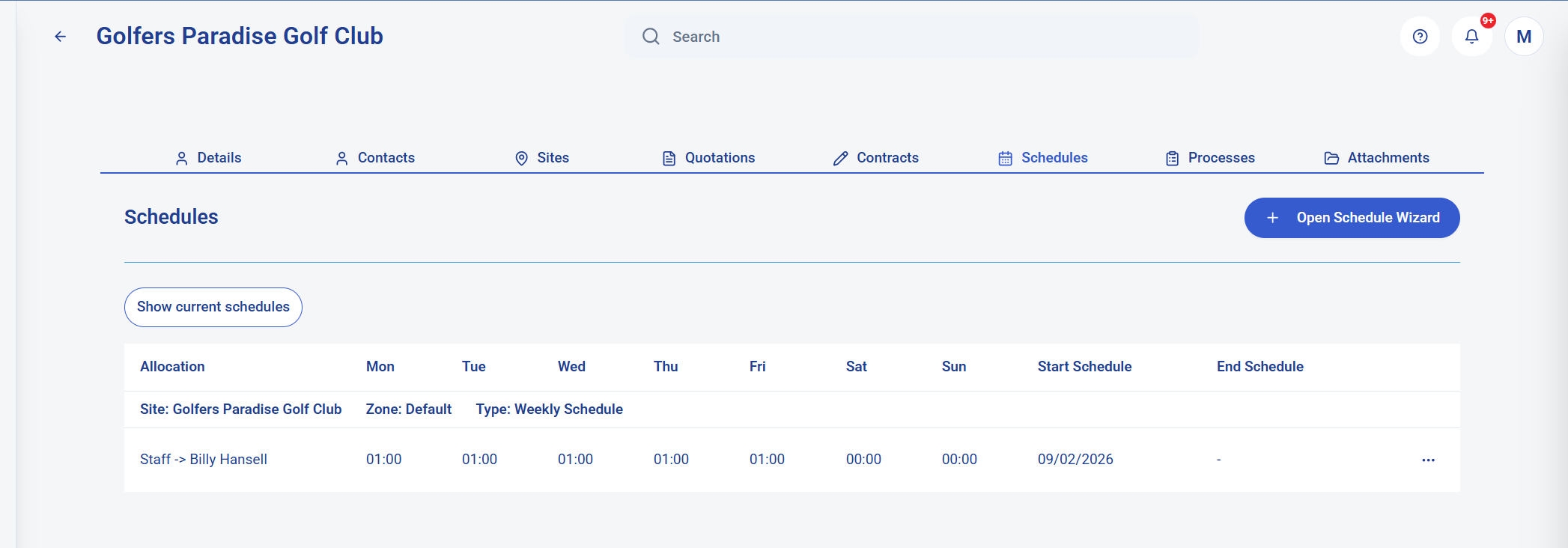
KleanFlo customer record showing schedules for a customer site Customer records show the schedules connected to each site and contract.

Connected records

Keep schedules attached to the customer and employee record

A schedule should not live in isolation. It belongs to a customer, a site, a contract, an employee and a service promise. When that relationship is visible, managers can answer questions faster and avoid rebuilding context from separate files.

This is especially important as a cleaning company grows and schedules become part of wider customer management, staff management, audits, processes and reporting.

Communication

Stop using WhatsApp for operational scheduling

WhatsApp is useful for quick messages, but important scheduling information can quickly become lost in individual chat threads. Cover requests, shift changes, site issues, and customer updates need context.

KleanFlo keeps operational communication closer to the contract, employee, site, and customer record.

Communication stays connected

  • Staff messaging for schedule questions and updates
  • Supervisor messaging for operational follow-up
  • Customer communications through the customer portal
  • Conversation history with image evidence
  • Site-specific records that are easier to find later

Industry experience

Built by people who understand cleaning operations

KleanFlo was not created as a generic calendar with a cleaning label added later. The platform has evolved from long experience supporting commercial cleaning operations across schools, offices, and multi-site contracts.

That matters because scheduling in cleaning is not just about moving names around a rota. It affects customer service, payroll, contract profitability, supervisor workload, staff communication, compliance evidence, and the daily confidence that each site has been covered.

Good cleaning scheduling software should help the operations team answer practical questions quickly: who should be on site, who actually checked in, what needs cover, which hours need review, and what should payroll use?

FAQs

Commercial cleaning scheduling software questions

What is commercial cleaning scheduling software?

Commercial cleaning scheduling software helps cleaning companies plan recurring and one-off work, assign cleaners and supervisors, manage cover, track attendance, and prepare approved hours for payroll.

How do cleaning companies manage staff schedules?

Many cleaning companies start with spreadsheets, shared calendars, or paper rotas. As the business grows, a connected scheduling system makes it easier to manage sites, contracts, staff availability, holidays, absences, mobile updates, and payroll review.

Can cleaning schedules be viewed on mobile phones?

Yes. KleanFlo gives staff access to schedules, job details, documents, site notes, and check-in tools through the staff mobile app.

How can I manage sickness cover for cleaners?

KleanFlo helps managers see scheduled work, identify gaps, communicate with staff, and keep cover activity connected to the wider contract and site record.

Does KleanFlo support school term schedules?

Yes. KleanFlo supports school cleaning operations that need term calendars, holiday scheduling, deep clean planning, inspections, and staff communication.

Can cleaning hours be exported for payroll?

KleanFlo helps managers review planned, actual, and payable duration before approving payroll-ready cleaning hours.

How does geofenced attendance tracking work?

Cleaners can check in and out from mobile. Location evidence can show whether the check-in or check-out happened near the expected site, giving managers a clearer attendance record to review.

Can KleanFlo show both weekly and daily cleaning schedules?

Yes. KleanFlo can show weekly and daily views so managers can review schedules by staff, customer, site, date and time of day.

How does KleanFlo help with cleaner cover?

KleanFlo includes absence cover planning so managers can see impacted shifts, staff available for cover and work still needing action.

Can schedules be connected to customer and staff records?

Yes. KleanFlo keeps schedules connected to customer, site, contract and employee records, so the office team can see the context behind the rota.

Can KleanFlo help review missing timesheets?

Yes. Managers can review planned work, missing timesheets, actual durations, payable durations and records needing attention before payroll hours are approved.

Ready to simplify cleaning scheduling?

Book a personalised demonstration and see how KleanFlo can help your business reduce administration, improve visibility, and deliver better service.

Book Demo