Your process. Your way.

Cleaning process automation and a builder you control

Build the processes your cleaning business needs, from staff onboarding and return-to-work reviews to vehicle checks and corrective actions. Choose your steps, questions, documents and approvals, then decide when the process should start.

Build it yourself or use AI-assisted creation for a first draft that you review and adjust. Your team can work through actions on mobile, keeping the instructions, answers and progress together.

Custom workflowsAI-assisted setupDocuments and signaturesSupervisor approvals
KleanFlo custom process automation preview

Graphical process builder

Your process, laid out step by step

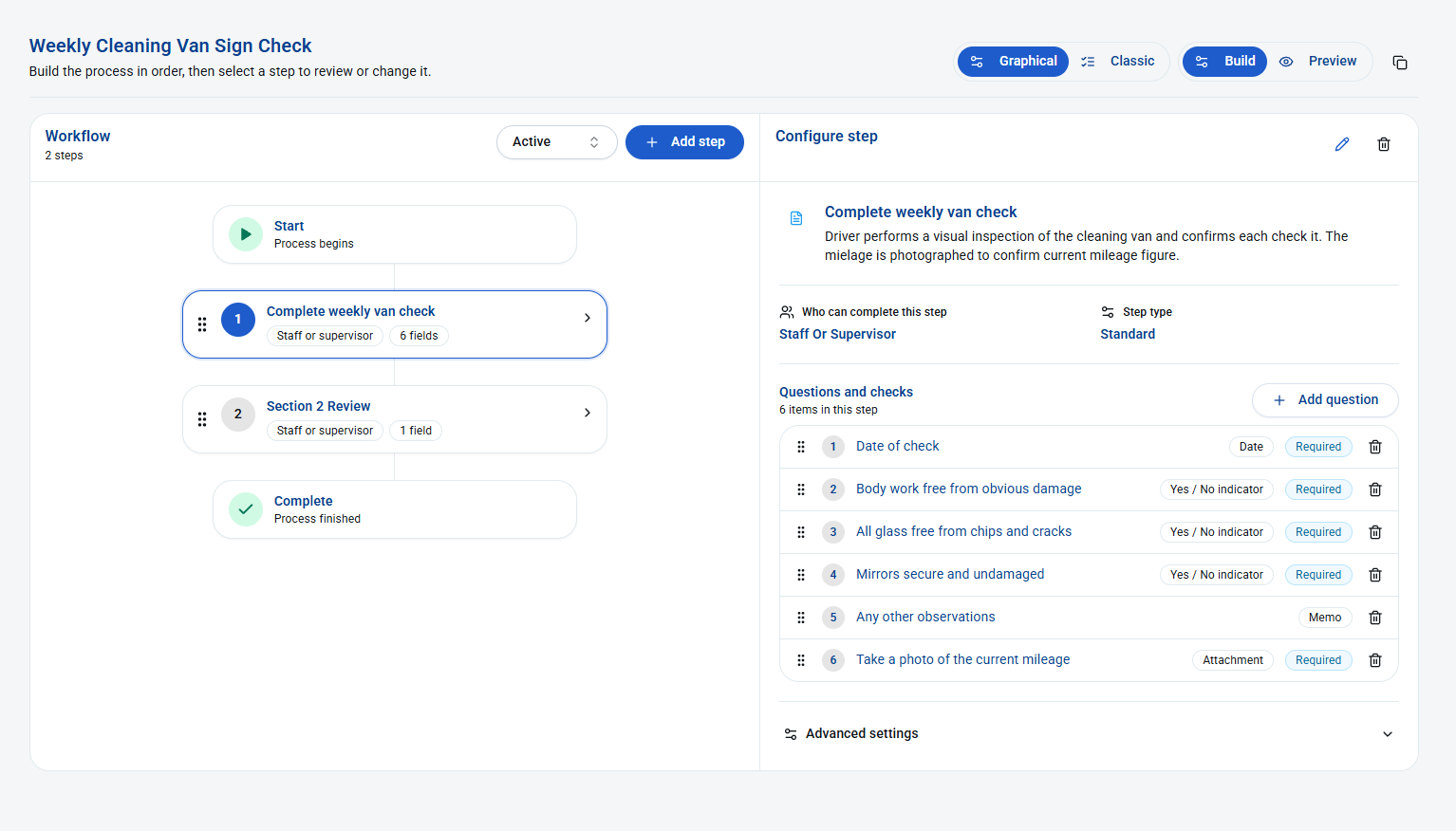
This weekly van check shows how you can build a process around your own checks. The workflow runs from Start through the van check and a review step to Complete. Select a step to see its instructions, who can complete it and the questions it contains.

In this example, the first step includes a date, yes/no checks for bodywork, glass and mirrors, a space for observations and a required mileage photo. You choose which questions are required and can add more questions or steps to suit the work.

KleanFlo graphical process builder showing a weekly van check and review workflow, with six configurable questions including required yes/no checks and a mileage photo attachment
A weekly van check in the graphical builder. Open the image to inspect the workflow and question settings at full size.

Use the same builder for your own onboarding, offboarding, return-to-work or corrective-action process, choosing the steps and information your business needs.

Process automation

Set it up once. Stop relying on someone remembering.

Building the process is one part of the job. Remembering to start it every week is another. Our automation setup lets you choose when a process should start and which records it applies to, reducing the manual admin that can get forgotten or missed.

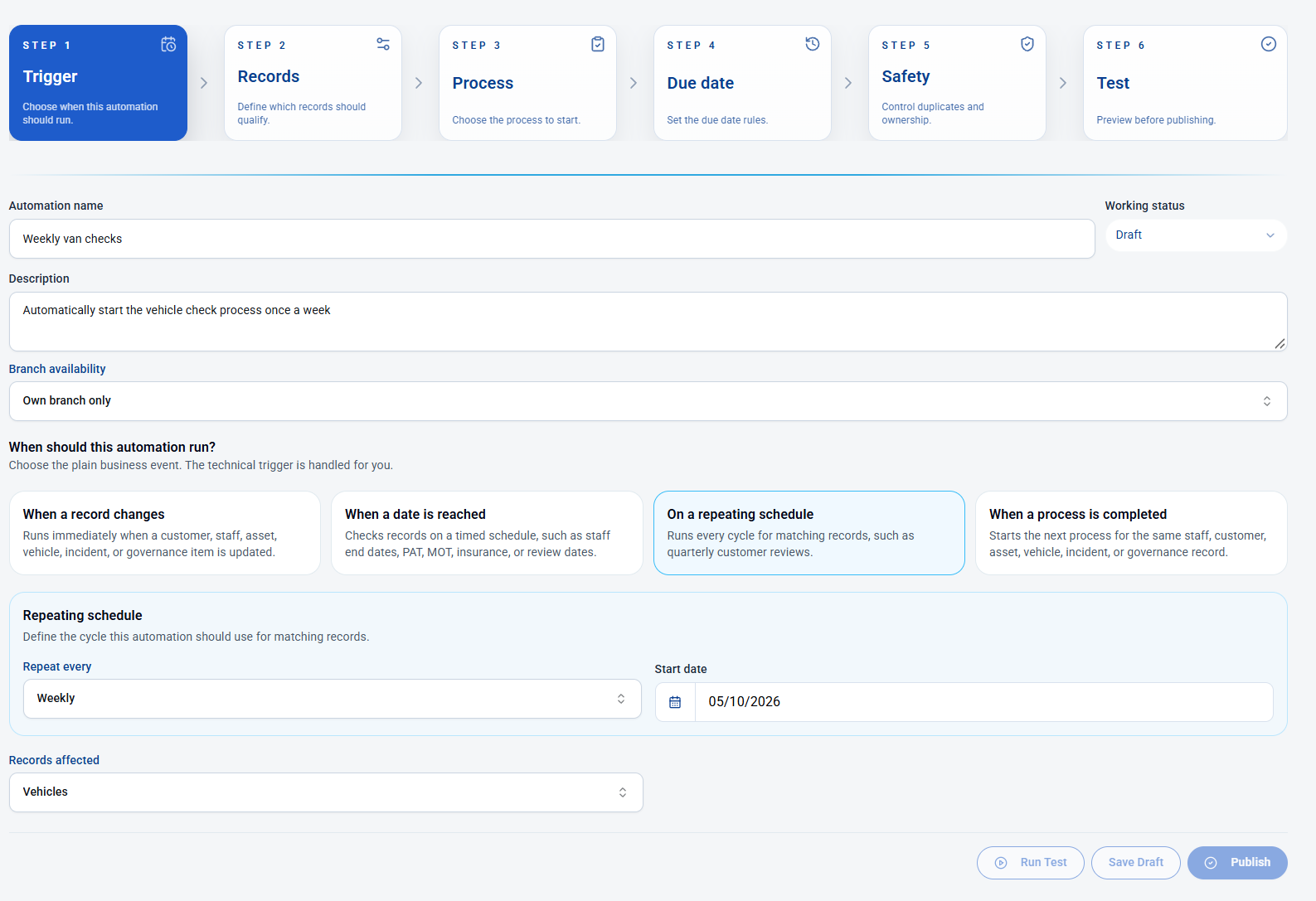
This example shows a draft automation for weekly van checks: a repeating weekly schedule, a start date and vehicle records. Once configured, tested and published, the rule can start the chosen check process for the vehicles that qualify. Your team still carries out the checks; the automation handles starting the process.

KleanFlo draft automation for weekly van checks, showing a repeating weekly schedule for vehicle records and setup stages for trigger, records, process, due date, safety and testing
Weekly van-check automation being configured. The example is a draft, with testing and publishing controls shown.

Choose what starts the process

  • A record changes: start from an update to a customer, staff, asset, vehicle, incident or governance record.
  • A date is reached: use dates such as a staff end date, MOT, insurance or review date.
  • A repeating schedule: start regular work for matching records, such as weekly vehicle checks.
  • Another process finishes: start the next process for the same record.

The setup then takes you through qualifying records, the process to start, due-date rules, duplicate and ownership controls, and a test before publishing. You decide when the work should begin, rather than depending on a diary note or someone remembering to create it.

The process on a phone

Your checks, in your team's hands

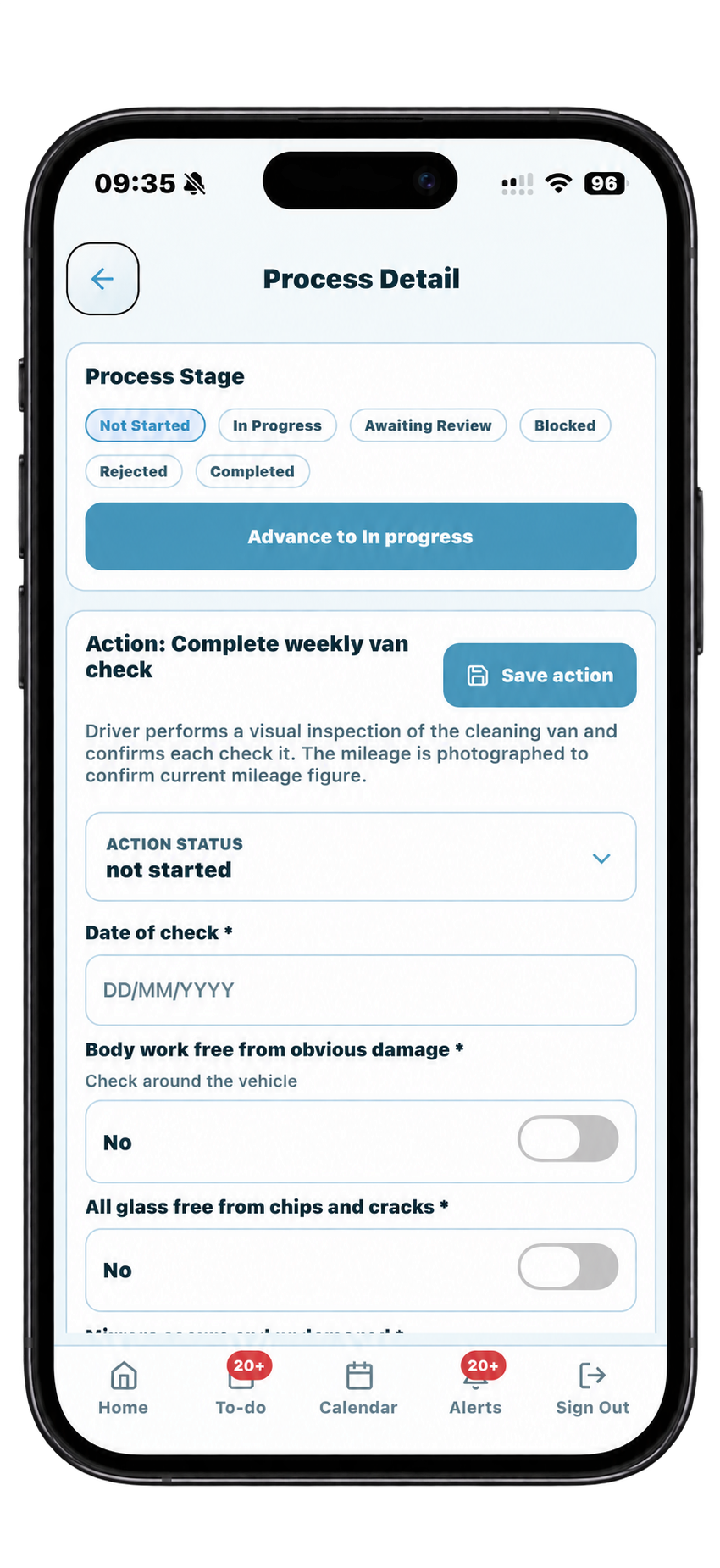
The weekly van check is now ready to work through on a phone. The action shows the instructions and questions set up in the builder, including the check date and required yes/no checks for bodywork and glass.

The person doing the check can enter their answers, save the action and update its status. The screen also shows the overall process stage, with options including In Progress, Awaiting Review, Blocked and Completed.

This example is still marked Not Started. It shows how the check is presented to the person carrying it out, rather than a completed inspection.

Build it your way. Start it automatically. Work through it on a phone. The process brings the instructions, answers and progress together, so the work does not depend on a separate paper checklist or message thread.

KleanFlo mobile process detail showing a weekly van check with instructions, process stages, action status, check date and required bodywork and glass questions
The weekly van-check process ready to be started on a phone. Open the image for a full-size view.

Process progress

See what is moving and what still needs attention

Starting a process is not the same as finishing it. The process review page brings the record, overall status, supervisor, last update and individual action statuses into one view, so you can see where the work has reached.

In this weekly van-check example, the process and the check are In Progress, while the second review step is Not Started. That makes the outstanding review visible without opening each action separately.

KleanFlo process review showing a weekly vehicle check in progress and a second review step not started, with filters for branch, supervisor and process status
The process review page shows overall progress alongside the status of each action. Open the image at full size to read the details.

Select the process, search for a record or filter by branch, supervisor and process status to focus the list. You can see which steps are complete, in progress, not started, rejected or blocked.

Build it. Start it automatically. Work through it on mobile. Review what is still outstanding. The full workflow keeps progress visible as well as giving your team the instructions.

1

Build your own flow

Create action sets for the way your business works instead of forcing every task into a fixed process.

2

Ask AI for a draft

Use AI-assisted process creation to generate a first version of a workflow, then refine the actions, owners, documents and approvals before it goes live.

3

Link it anywhere

Use processes for onboarding, return to work, failed audit follow-up, site issue escalation, equipment replacement, vehicle MOT renewal and more.

4

Trigger the next step

Automation rules help the right process start at the right time, improving productivity, accuracy and consistency.

Flexible process control

Cleaning operations have more than one workflow. KleanFlo helps keep those workflows visible and repeatable.

  • Manual or automated process starts
  • Staff updates from the mobile app
  • Supervisor updates from web or On the Move
  • Documents, forms and signature actions
  • Action tracking, review steps and completion evidence

Related KleanFlo pages

Processes support audits, staff management, site work, documents and reporting.

Staff onboarding example

Turn onboarding into a controlled process, not a loose checklist

Cleaning companies often onboard staff through emails, paper forms, messages, spreadsheets and manager memory. That can work while the team is small, but it becomes hard to prove what was issued, what was signed, what was explained and what still needs approval.

With KleanFlo, a user can create an onboarding process that matches their own business. The process can be started manually by a supervisor or triggered by automation rules where the company wants the workflow to begin from a defined event.

1
Create the employee onboarding workflow

Add the actions your company needs: right-to-work confirmation, payroll setup, manager review, site allocation, mobile setup, policy issue and first-week check-in.

2
Attach documents and forms

Use process actions to issue contracts, handbooks, site rules, COSHH information, risk documents, uniform records or custom forms that need to be completed.

3
Send signature actions to staff mobile

Where a document needs acknowledgement or signature, the action can be sent to the staff mobile app so the employee can review and complete it without separate email chasing.

4
Control approval before completion

Supervisors and users can review actions, approve steps and keep the onboarding record visible before the process is marked complete.

What process actions can include

Build workflows around real cleaning operations

Processes are useful when a task needs ownership, evidence, follow-up or consistency. That applies across HR, quality, compliance, equipment, vehicles, site issues and customer service.

D

Documents

Issue documents, link supporting files and keep key information connected to the employee, site, audit, incident or process record.

S

Signatures

Ask staff to review and sign documents from the mobile app where a process step needs a clear acknowledgement.

F

Custom forms

Use forms to capture structured information instead of relying on free-text notes, screenshots or messages.

A

Approvals

Give supervisors or managers control over review stages before a process can move forward or be closed.

M

Mobile updates

Let staff update process actions from the Staff app, while supervisors can progress actions from On the Move or the web app.

R

Records

Keep the history of what happened, who completed it and what still needs attention in one operational record.

Examples cleaning companies can automate

  • New starter onboarding
  • Return to work after absence
  • Failed audit corrective action
  • Customer complaint follow-up
  • Site issue escalation
  • Equipment repair or replacement
  • Vehicle MOT or insurance renewal
  • New contract mobilisation checks

Why this matters

Most cleaning businesses already have processes. The problem is that they often live in people's heads, old spreadsheets, message threads or paper files.

KleanFlo turns those steps into visible actions with owners, records and follow-up. That helps reduce missed steps, improves consistency and gives managers clearer evidence when questions arise.

Questions about cleaning process automation

What is a process builder for a cleaning business?

A process builder lets you turn a way of working into a set of actions with instructions, responsible people and review steps. In KleanFlo, you can include questions, forms, documents, signatures and approvals, rather than keep the process in separate spreadsheets or messages. See the graphical builder example.

What is the difference between a process and an automation?

The process defines the work: what needs doing, who does it and what information is needed. The automation defines when to start that process and which records qualify. In our example, the process is the van check and review; the automation starts it on a weekly schedule. See the automation setup.

Which cleaning company processes can I customise?

You can build workflows for staff onboarding, offboarding, return-to-work reviews, vehicle checks, site issues and corrective actions. Choose the steps and information your business needs. Bring an existing process to a demo so we can show how it fits the available actions and settings.

Can I automate recurring vehicle checks?

Yes. The example on this page shows a weekly repeating schedule for vehicle records. Configure the qualifying records, process, due-date rules and safety settings, then test and publish the automation. It starts the work; your team still needs to carry out and record the checks.

Can staff complete process actions on a phone?

Yes. Staff can update process actions in our Staff app, while supervisors can work from On the Move or the office system. The mobile van-check example shows instructions, required questions, saved answers and status controls.

Can we use our own onboarding documents and review steps?

Yes. Build the onboarding flow around your own actions, documents, forms, acknowledgements and manager reviews. You can also define offboarding steps such as returning keys and equipment. Our staff onboarding guide walks through the onboarding example.

Can corrective actions follow our own process?

Yes. Tailor the actions, ownership, supporting records and review stages to the issue being addressed. Our cleaning audit tools support corrective-action follow-up, and a customised process can organise the work needed to resolve the issue.

Does AI publish the process for us?

AI-assisted creation provides a starting draft for you to review and adjust. You remain responsible for checking the actions, owners, documents and approvals before using the workflow. The automation setup also includes a test stage before publishing.

Bring your process. See how it works in KleanFlo.

Walk through your own checks, documents and approvals with us.

Book a demo