Record contracted non-term hours
Track the extra hours expected outside term time for the academic year.

School cleaning software
School cleaning contracts have term dates, inset days, holiday deep cleans, non-term working, salary checks and availability questions that do not fit neatly into a standard office cleaning schedule.
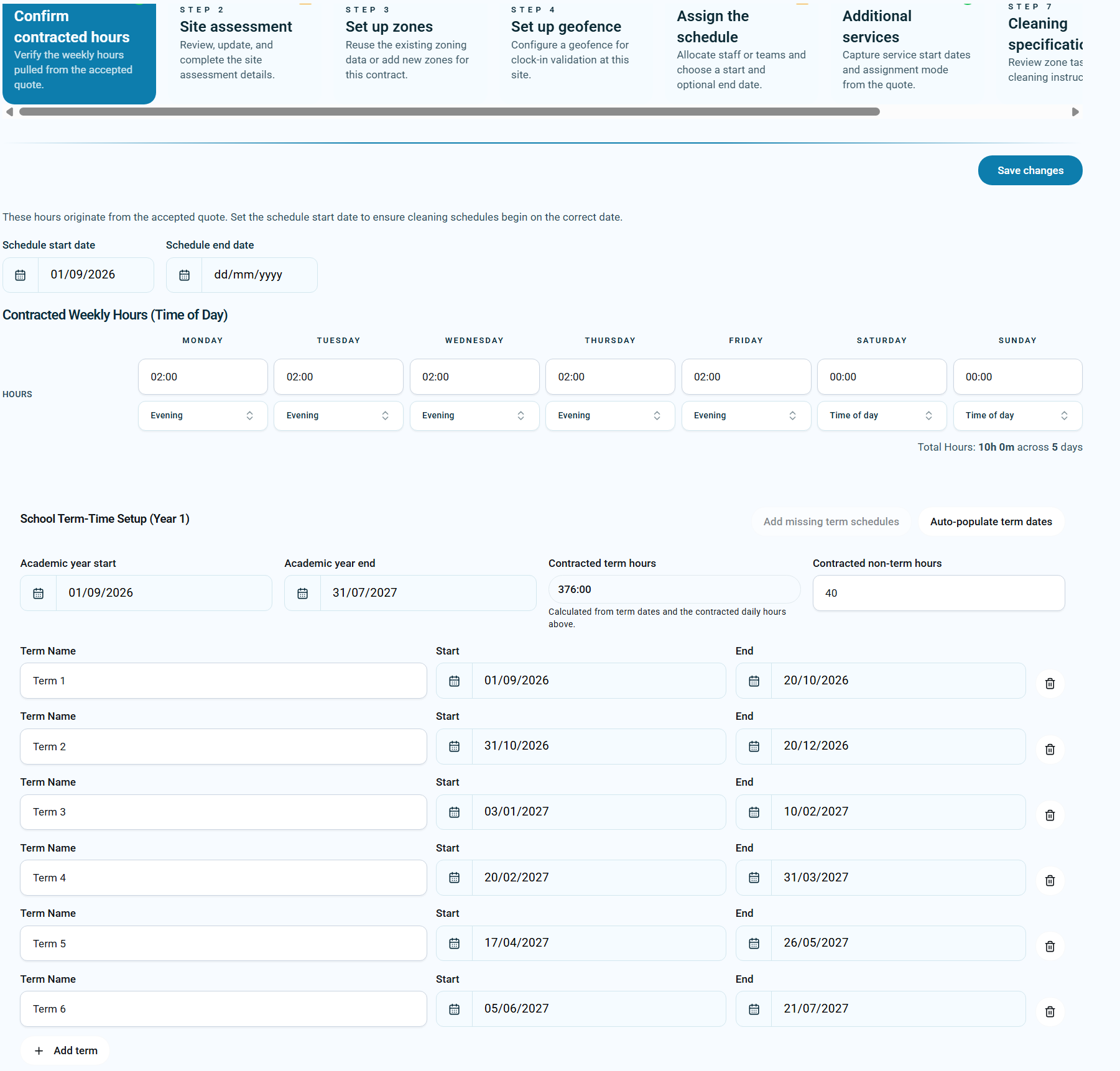
Built for school cleaning contracts
School cleaning is not the same as cleaning an office every week of the year. A school contract often has a term-time pattern, restricted staff holidays during term, inset days, bank holidays, deep-clean periods, and extra work during school holidays.
Some staff may be paid a salary, some may work contracted term hours plus agreed non-term hours, and the business still needs clear records so holiday entitlement, salary checks and planning decisions are correct.
KleanFlo treats school cleaning as its own scheduling problem. It helps you convert term dates into working schedules, plan non-term cleaning, record staff availability and keep the contract hours visible.
AI term date import
Schools often publish term dates on a website or provide them as a PDF. KleanFlo can use a term dates URL or uploaded PDF, then AI interprets the document and converts the academic year into term records.
That reduces the manual work of reading school calendars, copying dates into spreadsheets, checking inset days and trying to make sure each term is entered correctly.
Once the term dates are created, they can be used by the schedule wizard to quickly create the cleaning schedules for each term in one step.
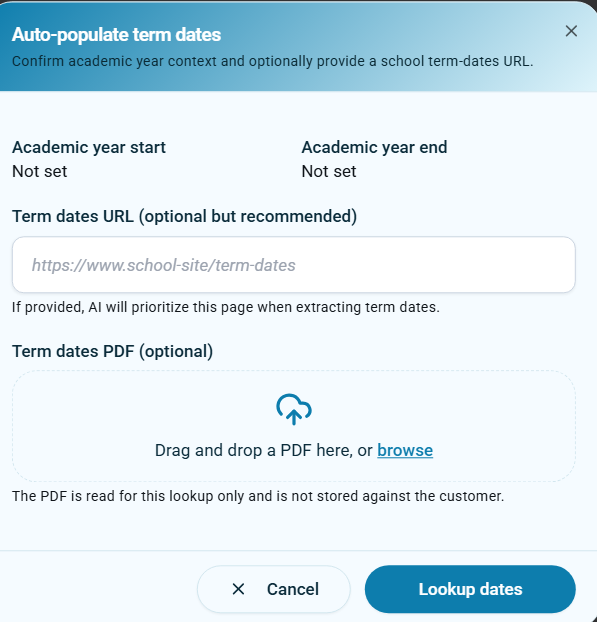 Add a school term dates URL for AI lookup.
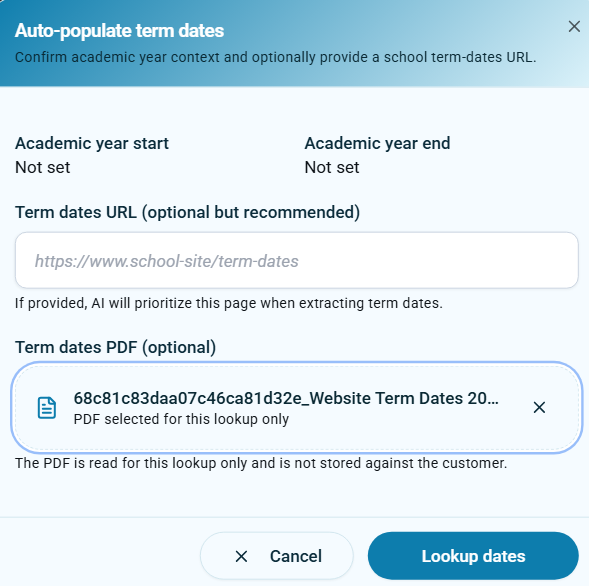 Upload a PDF when the school provides term dates as a document.
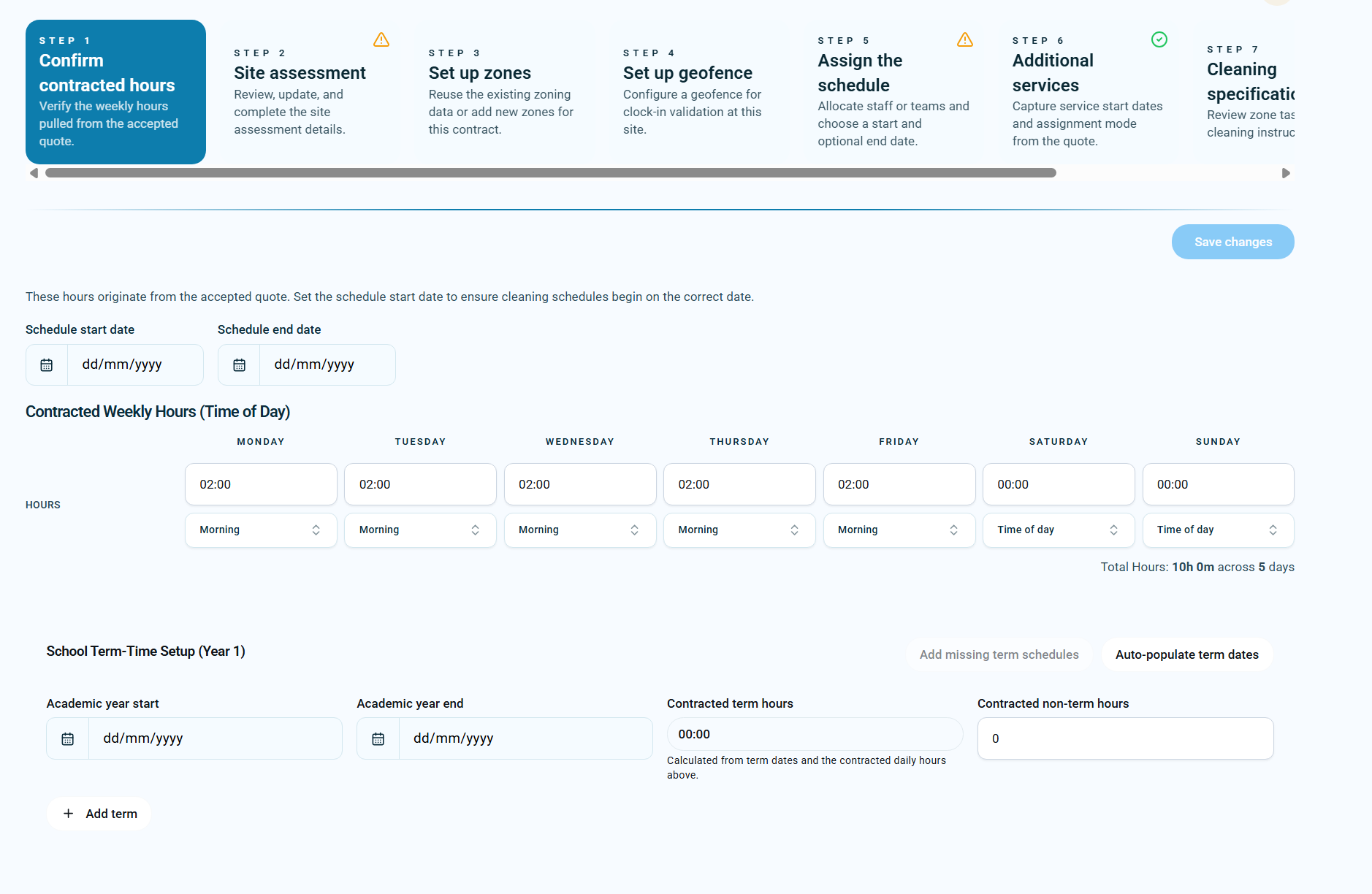 Start with contracted weekly hours, academic year dates and non-term hours.
Schedule wizard
Once term dates are in place, KleanFlo can use them in the schedule wizard. Instead of building a generic 52-week schedule and then deleting school holidays by hand, the term dates become part of the schedule creation process.
This helps the office team create cleaner schedules faster, reduce errors, and make sure term-time work follows the school calendar.
The wizard also keeps contracted weekly hours visible, including day-by-day hours and time-of-day rules, so the planned schedules reflect the accepted quote and contract setup.
Walkthrough video
This short walkthrough shows the school-specific workflow: starting from contracted hours, importing term dates, creating term schedules, planning non-term cleaning and checking salary details.
Term schedules
After the term dates are confirmed, KleanFlo can create planned schedules for the school terms. Each schedule has its own start and end date, so the rota follows the academic year rather than a generic calendar year.
This is particularly useful when a cleaner works the same hours during term time, but those hours should stop during the school holidays and resume at the start of the next term.
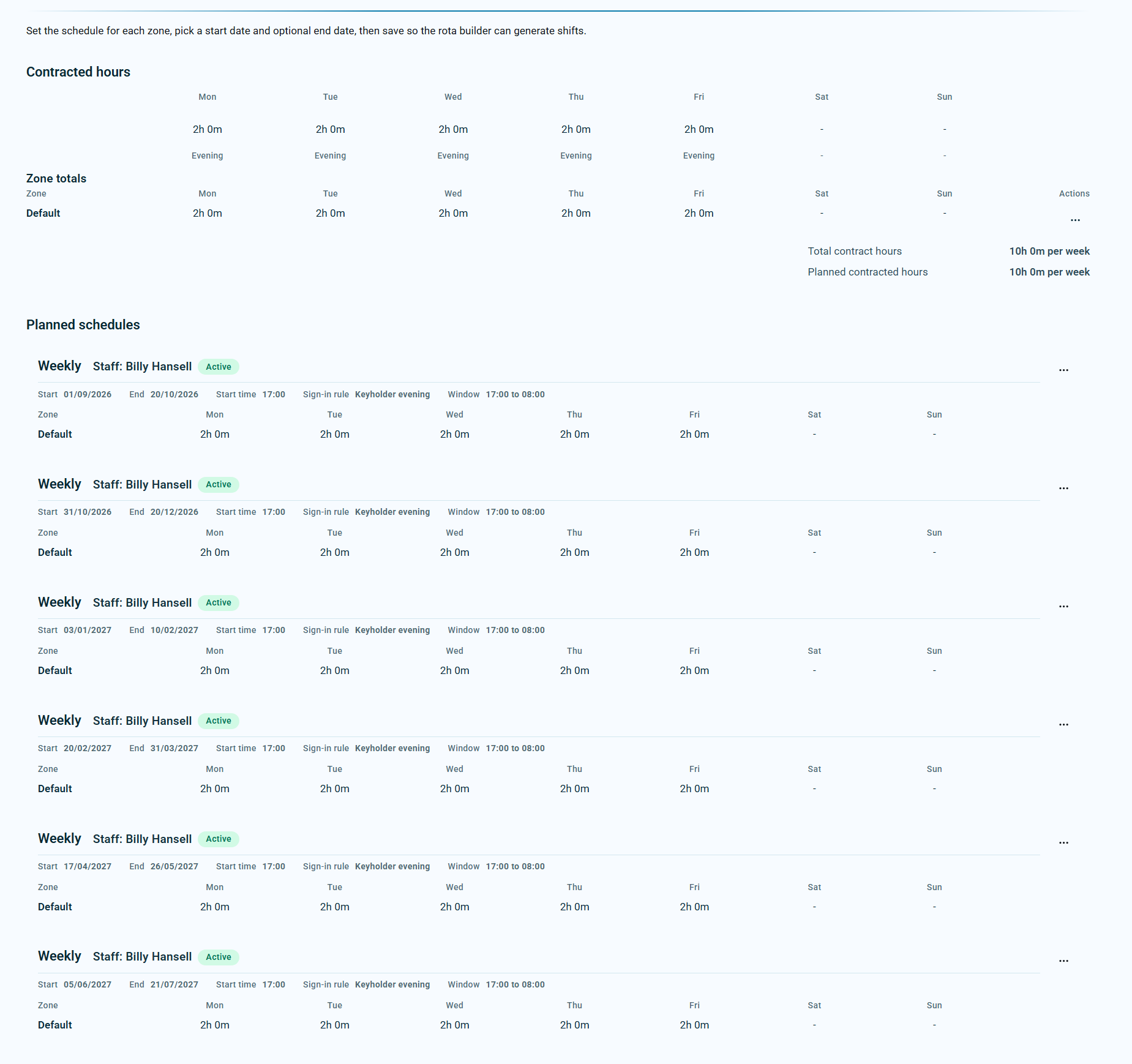 Term dates create a clean set of planned schedules for the academic year.
Non-term work
School cleaning often includes work outside normal term dates. Deep cleans, return-to-school preparation and other non-term tasks need to be planned separately from normal term-time schedules.
Staff can advise dates they are not available during school holidays. These records are advisory for planning; they are not booked as holiday and do not affect holiday ledgers or payroll holiday pay.
KleanFlo keeps the non-term work, the staff availability and the booked extra hours visible so the office can plan accurately.
Track the extra hours expected outside term time for the academic year.
Let school cleaners advise when they cannot work outside term time without booking it as holiday.
Plan deep cleans and holiday work against available non-term weeks.
Maintain records of extra hours so holiday entitlement and salary checks stay accurate.
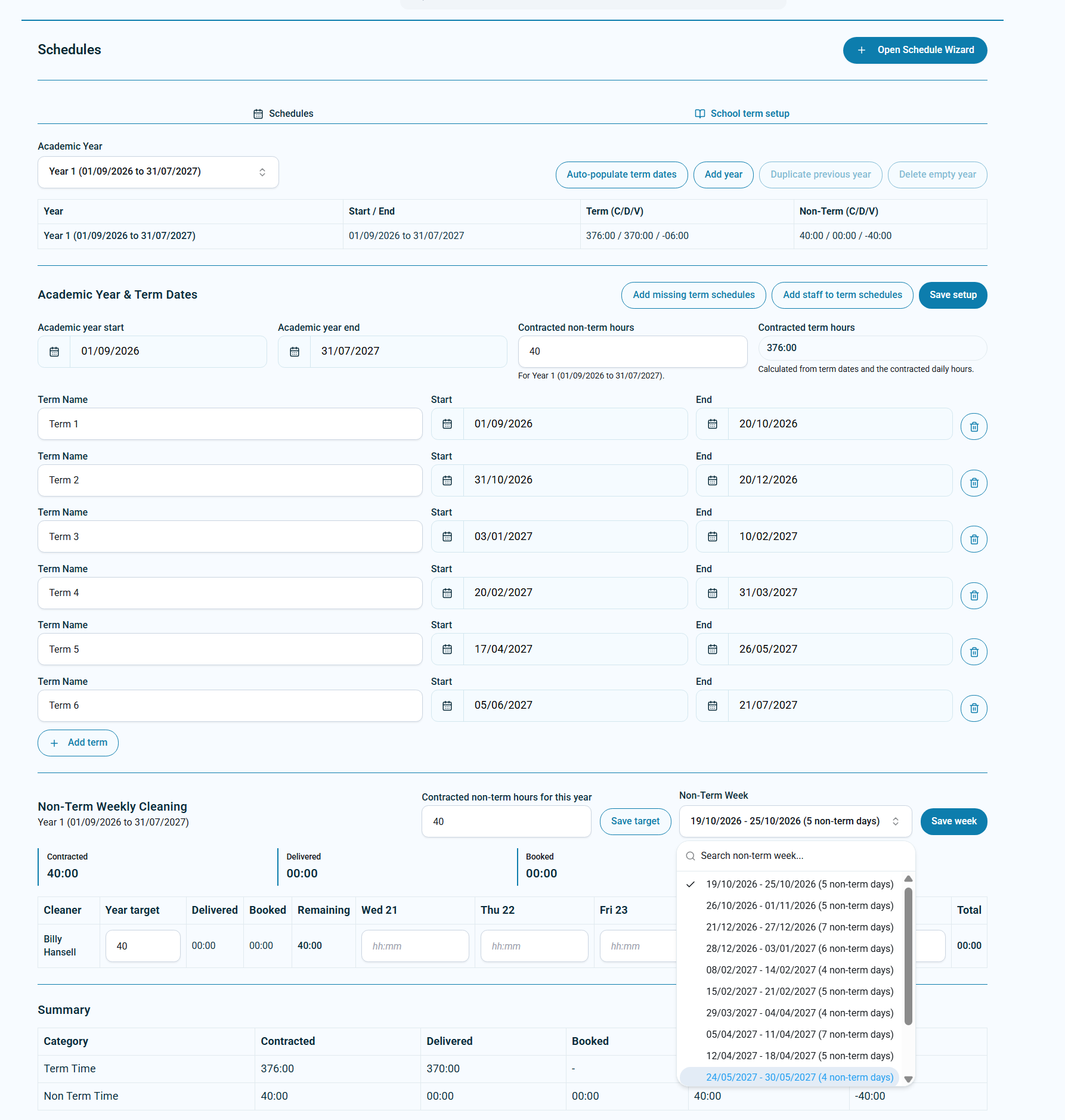 Non-term weeks can be selected and booked against staff hours.
Holiday deep cleans
Holiday work is often where school cleaning becomes hard to manage. Staff may need to work extra hours during a deep clean, but they may also have family commitments, bank holidays or unavailable dates that need to be respected when planning.
KleanFlo separates contracted term hours, non-term targets, delivered hours and booked hours so the business can see what has been planned and what remains.
Staff availability
In many school contracts, holiday is not usually allowed during term time. But staff may still need to tell the business when they are unavailable during school holidays.
KleanFlo records these dates as non-term availability information. They help the planning process without incorrectly treating the time as holiday absence.
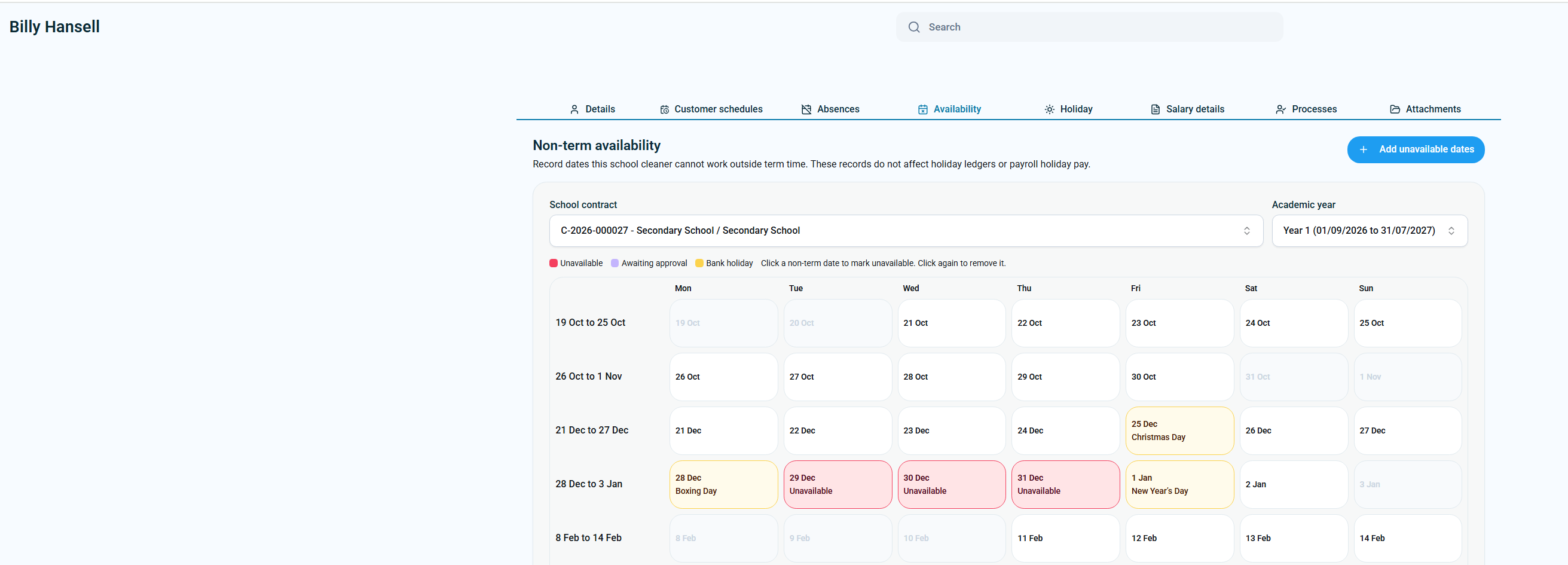 Staff unavailable dates are recorded for non-term planning, not holiday booking.
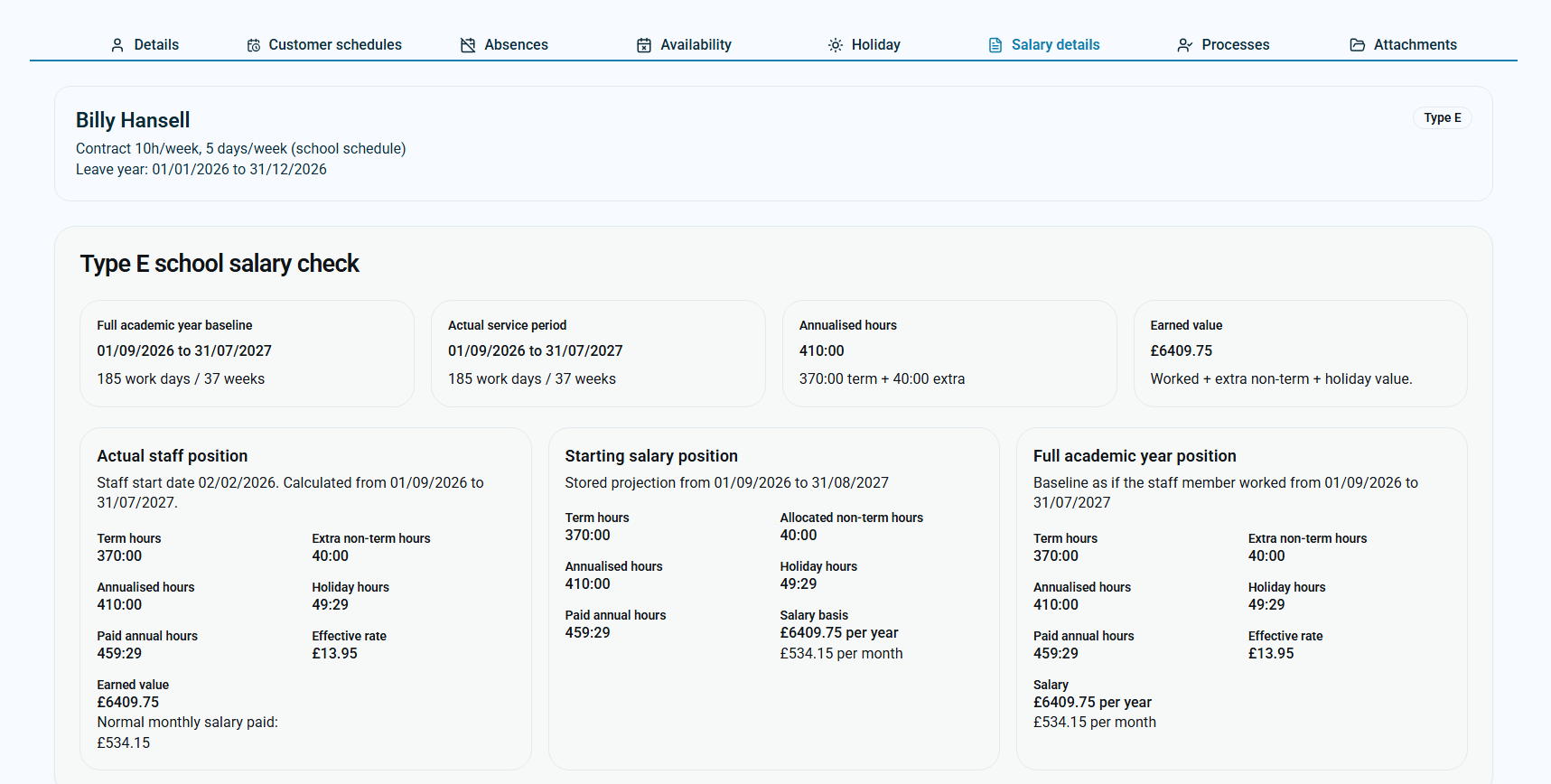 Salary details show term hours, extra non-term hours, holiday hours and earned value.
Salary and holiday calculations
Some school cleaners are paid on a salary basis. That means the business needs to understand the full academic year position, not just the weekly rota.
KleanFlo can help compare term hours, allocated non-term hours, annualised hours, paid annual hours, holiday hours, effective rate and salary basis. That gives the office team clearer records when staff work extra non-term hours or when salary and holiday entitlement need to be checked.
Why it matters
Most cleaning scheduling tools can create a weekly rota. School cleaning needs more than that. It needs academic-year planning, term date intelligence, non-term work records and staff calculations that match how school cleaning contracts are delivered.
Use a school website or PDF to create term records faster instead of manually entering every start and end date.
Let term dates drive the schedule wizard so each term schedule follows the academic calendar.
Track contracted non-term hours and book work into school holiday weeks.
Record when staff cannot work outside term time without treating those dates as holiday.
Keep term hours, non-term hours, annualised hours and holiday calculations visible.
Use repeatable school-specific setup instead of rebuilding each contract in spreadsheets.
FAQs
School cleaning follows academic years, term dates, inset days, holiday closures, non-term cleaning periods and often salary-based staff arrangements. A standard 52-week schedule does not handle those details well.
Yes. Users can provide a term dates URL and KleanFlo can use AI to interpret the page and convert the dates into term records.
Yes. Users can upload a PDF term dates document for the lookup. The document is used for the lookup and term date extraction.
Yes. Once term dates are created, they can be used in the schedule wizard to quickly create schedules for each term in one step.
KleanFlo can track non-term contracted hours, show non-term weeks, record booked work and keep the totals visible for planning.
No. Non-term unavailable dates are advisory for planning school holiday work. They are not booked as holiday and do not affect holiday ledgers or payroll holiday pay.
Yes. KleanFlo can show term hours, non-term hours, annualised hours, holiday hours, effective rate and salary basis so school staff calculations are easier to review.
For a practical walkthrough of the planning steps, read our guide to scheduling school cleaners around term dates.
School cleaning scheduling sits alongside wider commercial cleaning scheduling, cover management, attendance and payroll-hour review.
See how KleanFlo can help you import term dates, build term schedules, plan non-term work and keep school staff calculations clear.