Task audits
Use task audits when you want the most detailed check. Supervisors can work through individual cleaning tasks, mark results such as meets specification, minor or major, add notes, and attach photos where evidence is needed.

Commercial cleaning audit software
KleanFlo helps UK cleaning contractors schedule QC visits, complete task, designation and zone audits, capture proof of clean evidence, share customer-ready reports, and keep corrective actions connected to the sites and teams that need them.
Audit walkthrough video
This short walkthrough shows how KleanFlo supports task audits, designation audits, zone audits, mobile audit completion, customer portal results and operational follow-up.
Rather than treating audits as a separate document or spreadsheet, KleanFlo keeps scores, notes, photo evidence, published results and corrective actions connected to the cleaning operation.
Quality control for cleaning contracts
Cleaning audits are often treated as a quality exercise that happens away from the day-to-day operation. A supervisor checks a site, writes down a score, takes a photo on a phone, sends a message, and someone in the office tries to turn that into a customer update later.
That creates gaps. Results are hard to find, photos sit in private camera rolls, actions are missed, customers do not always see the evidence, and managers cannot easily compare standards across sites.
KleanFlo keeps audits close to the real work. Audit schedules, audit types, scores, comments, photos, customer visibility, staff feedback, corrective actions and follow-up all sit inside the same cleaning operations platform.
Audit types
Different cleaning contracts need different levels of detail. KleanFlo supports task, designation and zone audits so supervisors can use the right structure for the job.
Use task audits when you want the most detailed check. Supervisors can work through individual cleaning tasks, mark results such as meets specification, minor or major, add notes, and attach photos where evidence is needed.
Use designation audits when you want one score for each area or designation, such as reception, washrooms, kitchen, bins or workspaces. This gives managers and customers a clearer performance summary without overloading the inspection.
Use zone audits when a site is split into operational zones. This is useful for larger buildings, schools, multi-floor offices, healthcare settings, retail spaces and other contracts where responsibility or standards vary by area.
Why choose KleanFlo?
KleanFlo is built for cleaning operations where quality checks have to connect back to sites, staff, customers and corrective action, not sit in a separate form tool.
Use KleanFlo for practical supervisor QC visits, scheduled inspections and formal customer-facing audit reports.
Supervisors can complete assigned audits on mobile, score tasks, add notes, attach photos and submit results from site.
Share selected audit reports with customers so service evidence is visible without creating separate PDFs or email trails.
Move failed audit items into follow-up workflows so issues are assigned, tracked and visible after the inspection.
Publish relevant audit results and correction tasks to staff so cleaners can see what is on target and what needs attention.
Keep audits connected to customers, sites, schedules, documents, conversations and the wider commercial cleaning record.
Audit advantage
If you are comparing KleanFlo with older FM platforms, generic job-management tools or lighter cleaning apps, this is where the difference matters. KleanFlo audits are not just a digital checklist. They are part of the way supervisors, staff, customers and managers keep contract standards visible.
Older systems often record that an inspection happened. KleanFlo is built to make the whole audit workflow easier to run: plan the visit, complete it on mobile, capture useful evidence, score the result clearly, share it with the customer, and turn failures into corrective action.
Supervisors can complete audit work on a clean mobile interface built for site visits, not a desktop form squeezed onto a phone. That matters when a QC visit has to be done quickly between sites and still produce a usable record.
Failed items can move into follow-up workflows so problems become assigned work, not notes that sit inside a finished audit report. Managers can see the issue, the location, the evidence and the follow-up route in one place.
Share selected audit results through the customer portal so clients can see scores, comments, actions and quality evidence without waiting for a PDF. This gives contract reviews and complaint conversations a clearer factual record.
Audits connect with the supervisor mobile app, site context, calendar visibility and operational follow-up. QC visits sit alongside the work supervisors already manage, instead of becoming a separate admin task.
Use detailed task audits, area-based designation audits or zone audits depending on the contract, building size and reporting level required. A small office, a school block and a multi-floor site should not all be forced into the same audit structure.
Attach photos and notes to the audit record so managers and customers can understand exactly what was found and where action is needed. Evidence stays with the audit instead of disappearing into camera rolls, WhatsApp messages or email threads.
Score audits in a way that reflects the importance of different checks, so critical standards carry more weight than minor observations. This makes the final result more meaningful for contract managers and fairer for site teams.
Keep audit setup, visibility and connected workflows aligned to the branch, so multi-branch cleaning companies can manage standards without losing local control. Each branch can work with its own customers, sites and operational setup.
Traceable quality records
A cleaning audit trail records when an inspection was completed, which customer and site it covered, who submitted it, the scores awarded, notes and photographs added, and any corrective action that followed.
KleanFlo keeps this evidence connected to the operational record so managers can review inspection history instead of searching through paper forms, spreadsheets, emails and camera rolls.
Service evidence
Proof of clean software creates evidence that standards were checked rather than relying on an unstructured message saying the work was completed. Scores, comments, photographs and follow-up can be reviewed internally or shared through the customer portal.
Web audit results
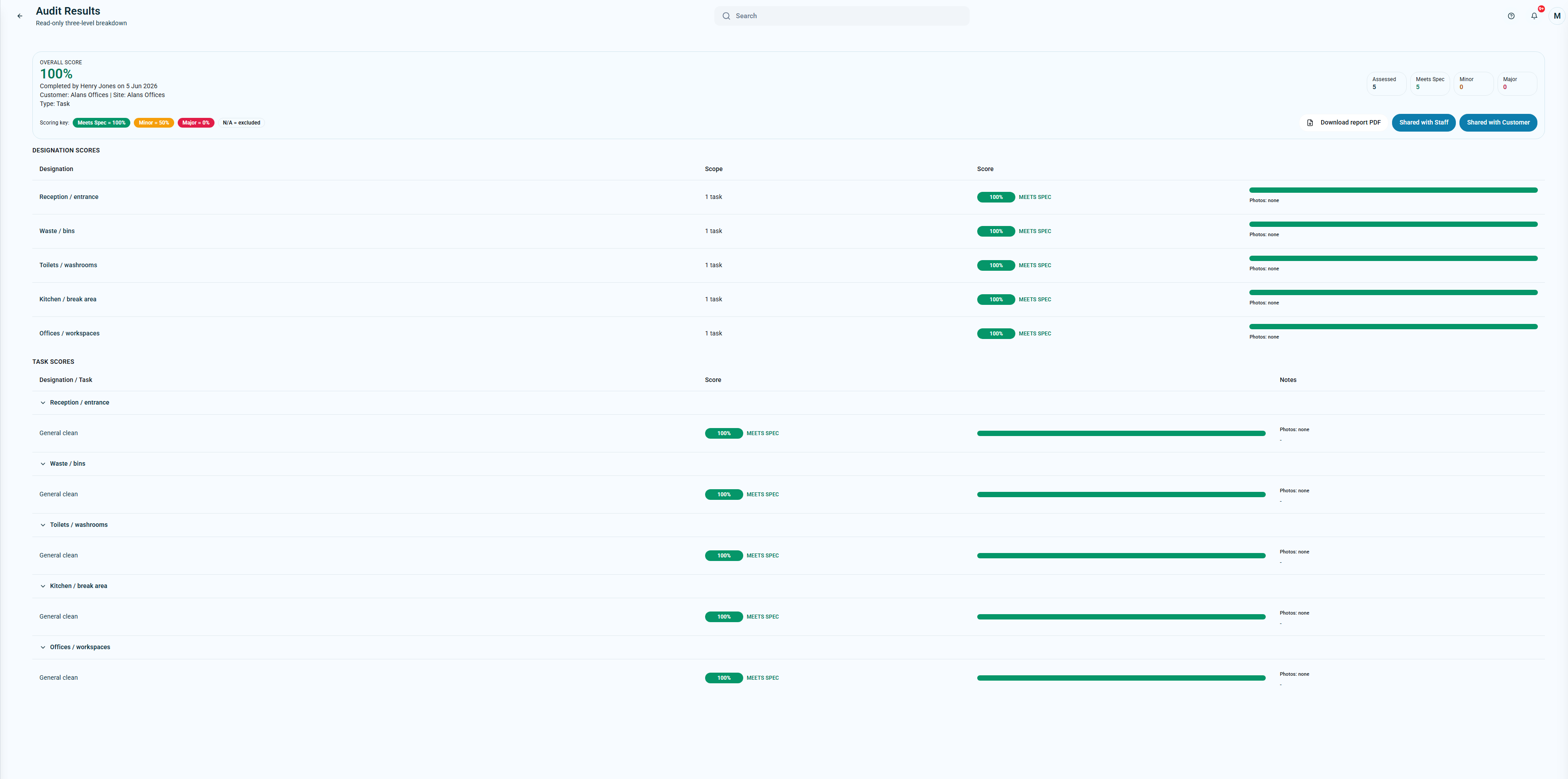
The web view gives office teams and managers a read-only breakdown of audit results, including overall score, scoring key, designation scores, task scores, notes, photo status and sharing actions.
When a customer asks how a site is performing, the answer is not buried in a message thread. The score, result, comments and evidence can be reviewed in the same place as the operational record.
Web audit results with scoring key, designation breakdown and task-level evidence.
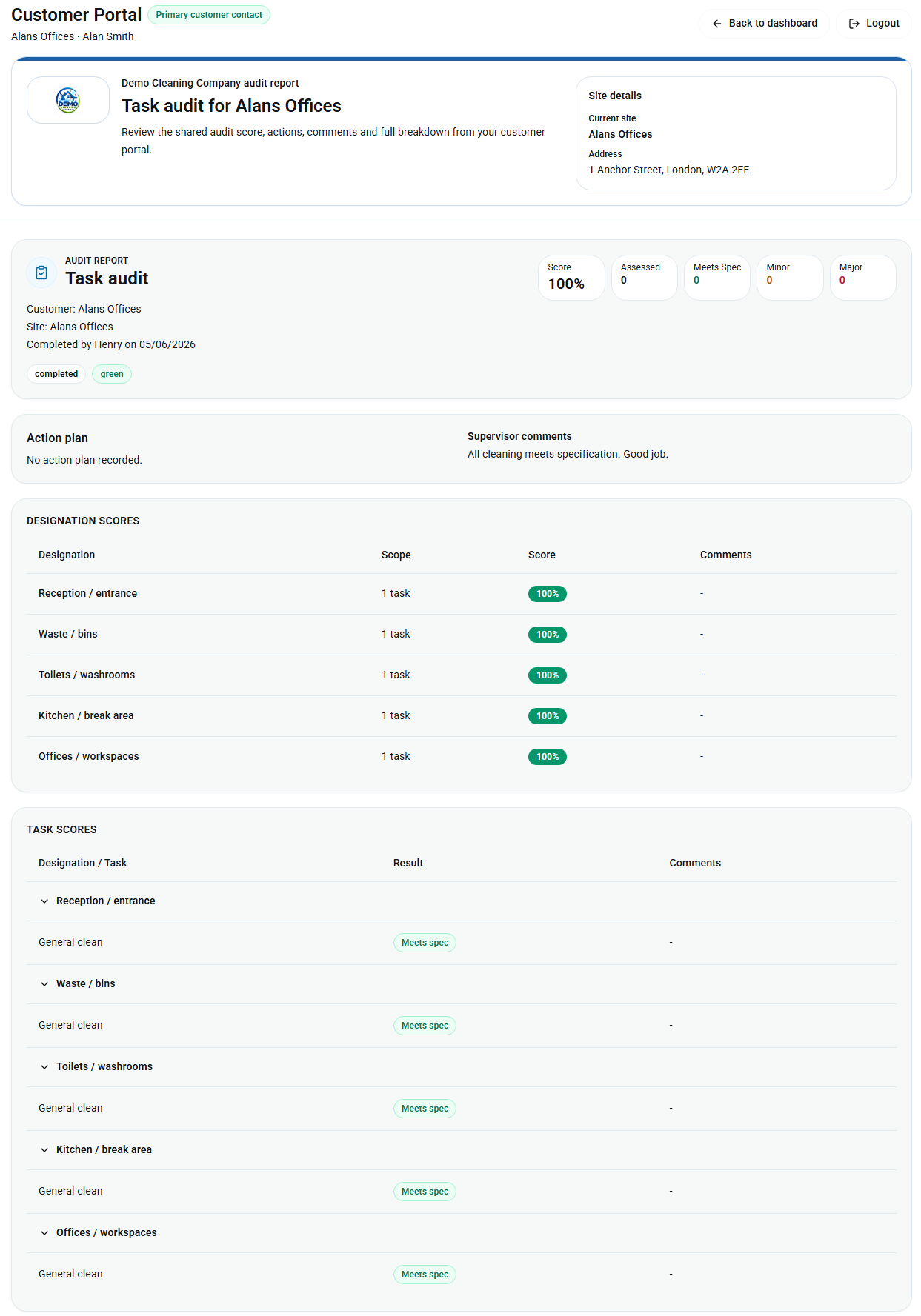 Customer portal view: shared audit scores, comments and breakdowns.
Customer portal audit reports
Customers can view shared audit reports from the KleanFlo customer portal. They can see the score, site details, action plan, supervisor comments, designation scores and task scores in a clean report view.
This matters because commercial cleaning customers do not just want to know that an audit happened. They want confidence that standards are being checked, issues are visible, and comments are recorded in a way that can be reviewed later.
KleanFlo can also support customer-completed audits, so the customer portal is not only a place to consume information. Where it makes sense, customers can add their own audit feedback and help build a clearer service record.
Commercial cleaning audits often need to prove that contract standards are being checked across offices, washrooms, receptions, communal areas, retail spaces, education sites and managed properties. KleanFlo keeps those checks connected to the customer, site, audit result, evidence and follow-up action.
That gives contract managers, supervisors and customer service teams a clearer audit trail than a spreadsheet, PDF form or photo message thread. The business can see what was checked, what failed, what evidence was captured and what action was agreed.
School cleaning audits need a slightly different rhythm. Daily term-time checks, school holiday deep-clean inspections, classrooms, washrooms, halls and kitchens may all need different audit detail.
KleanFlo supports school cleaning audit workflows with mobile checks, task, designation and zone scoring, customer-visible reports and corrective action follow-up. See the school cleaning audits guide for the operational process.
Mobile audit app
Supervisors and field teams can work through assigned audits on mobile, see overdue and upcoming audits, complete task-level checks, add notes, attach photo evidence and submit results without waiting to get back to the office.
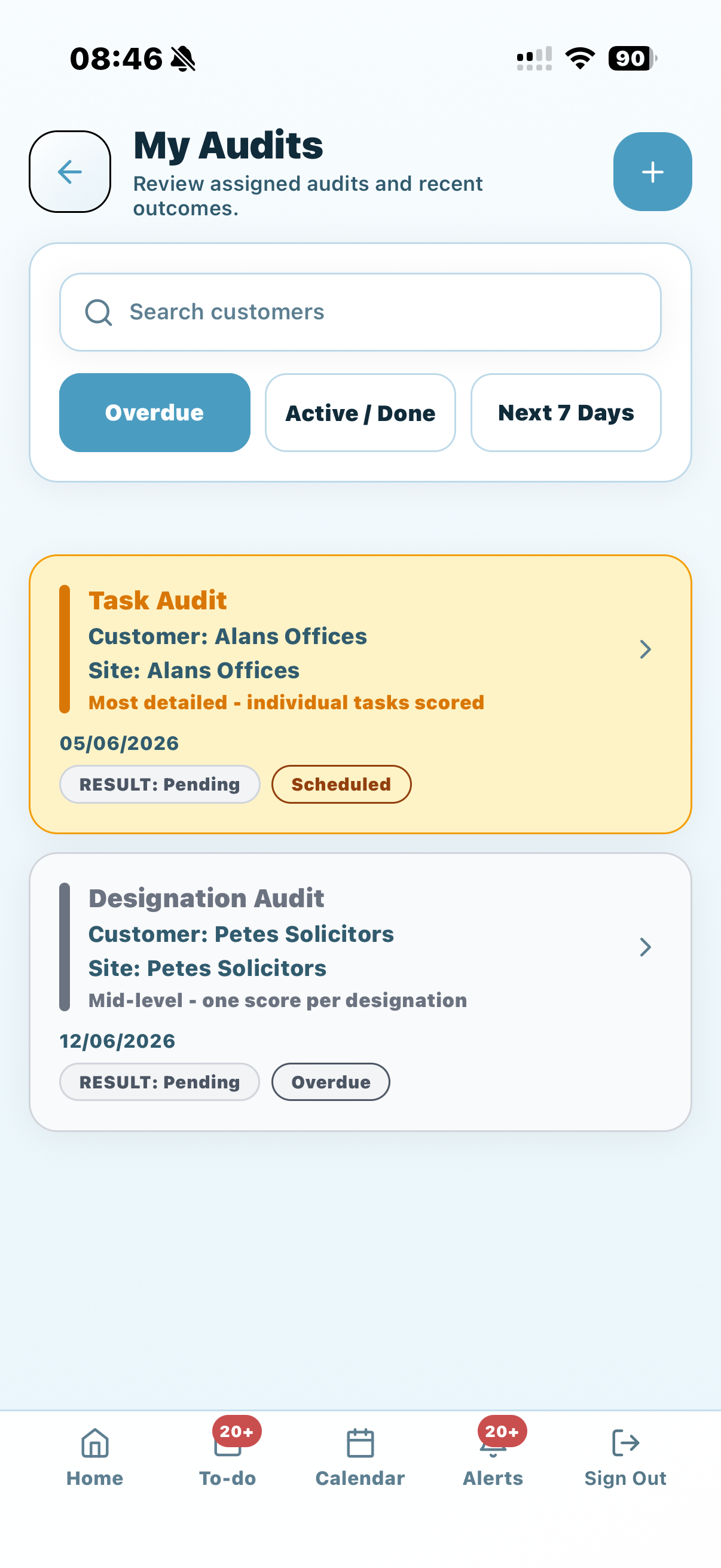 Assigned audits, overdue audits and upcoming audit work.
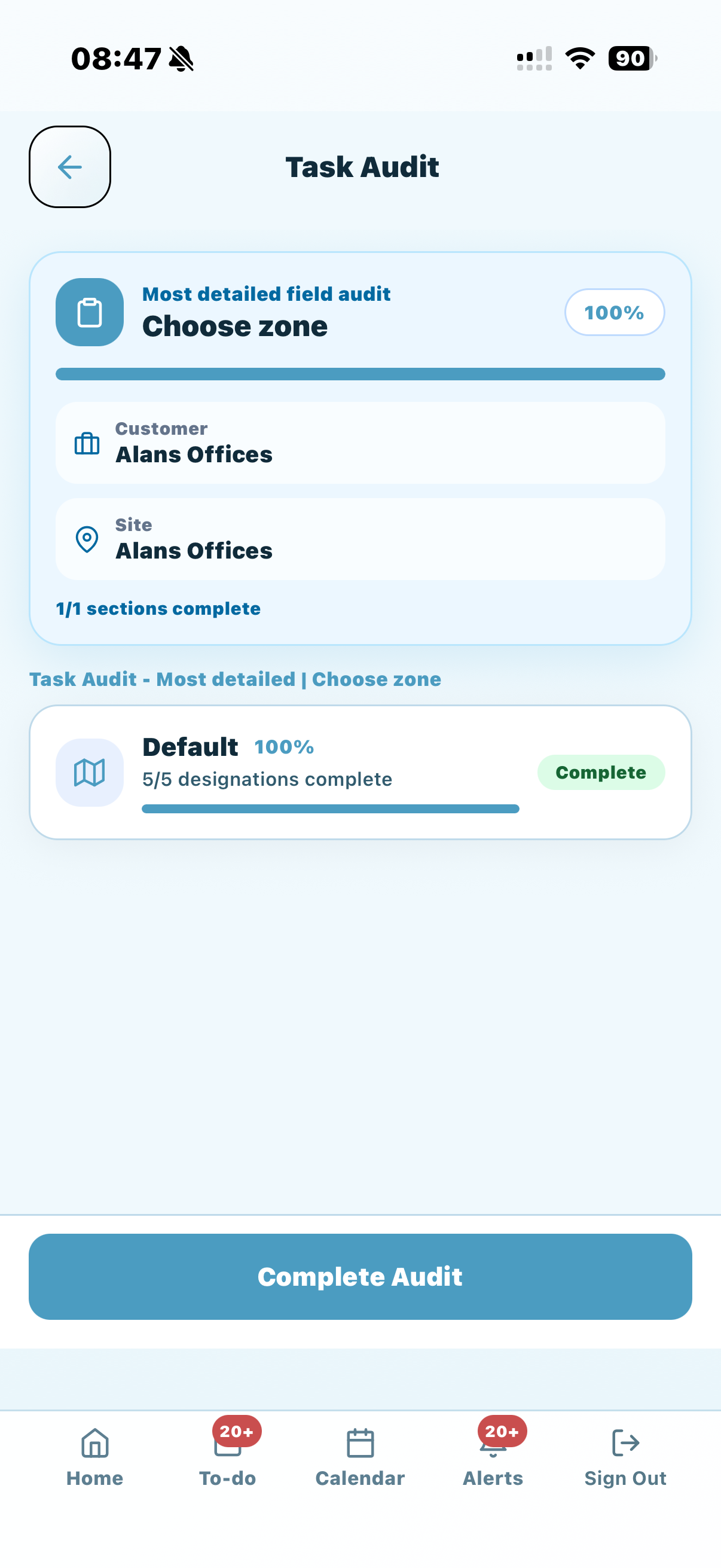 Zone selection for detailed task audits.
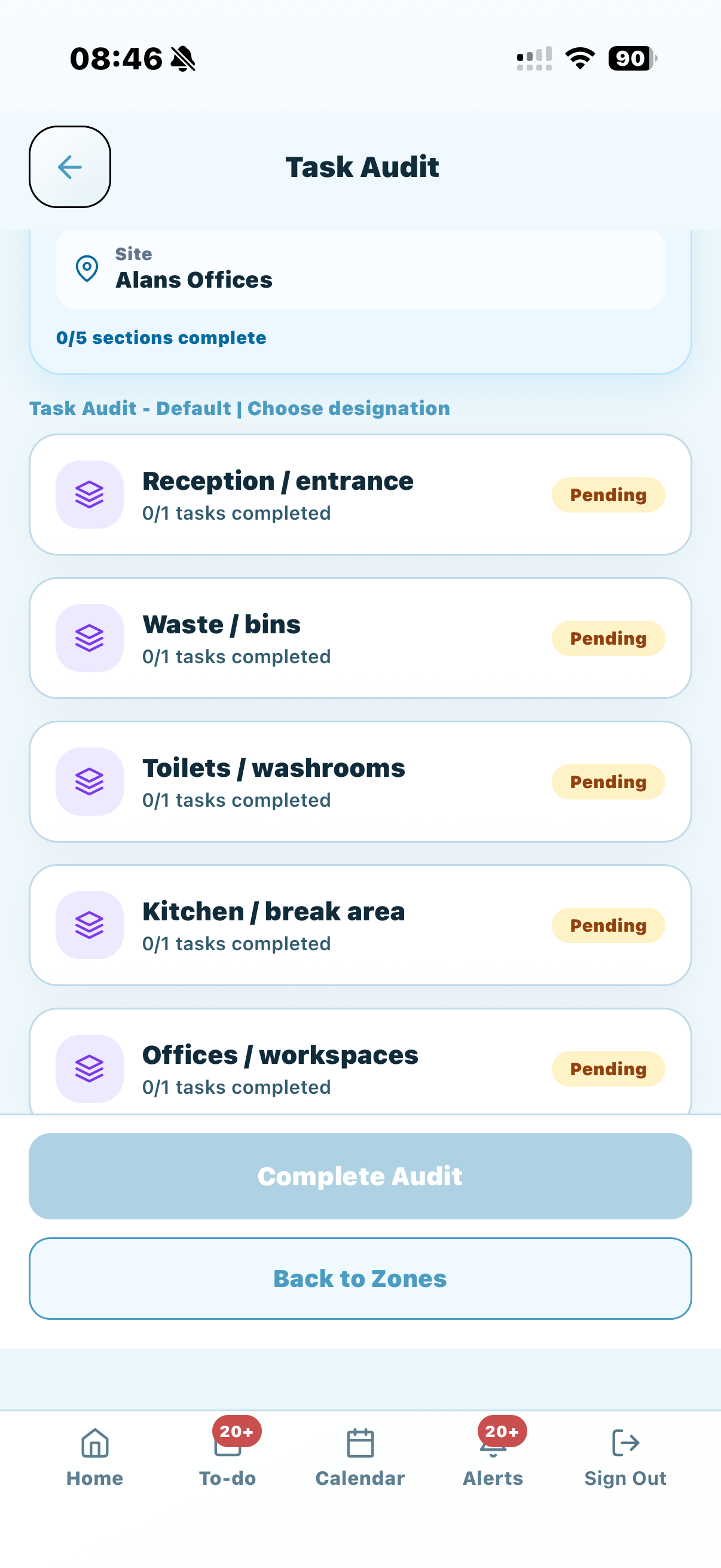 Designation progress by area.
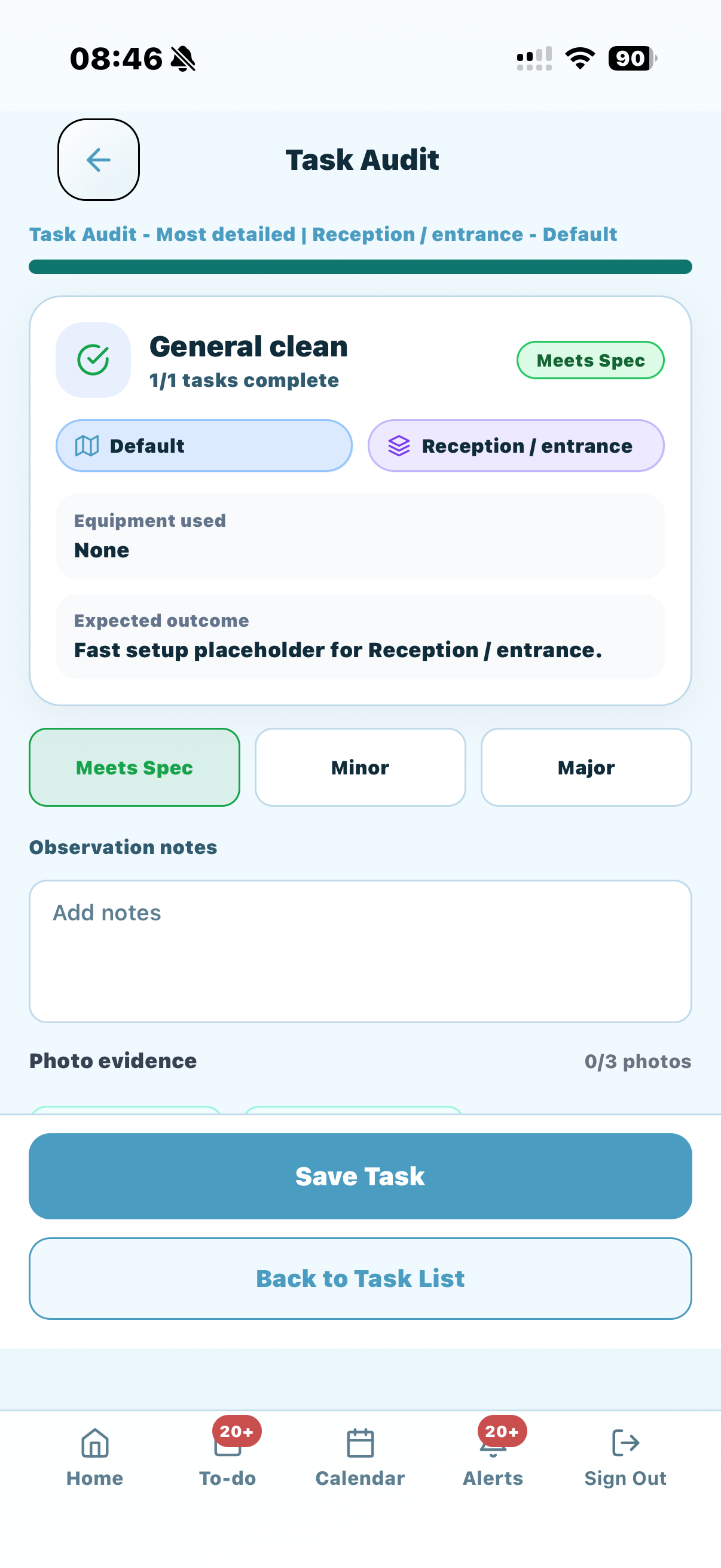 Task scoring with observation notes and photo evidence.
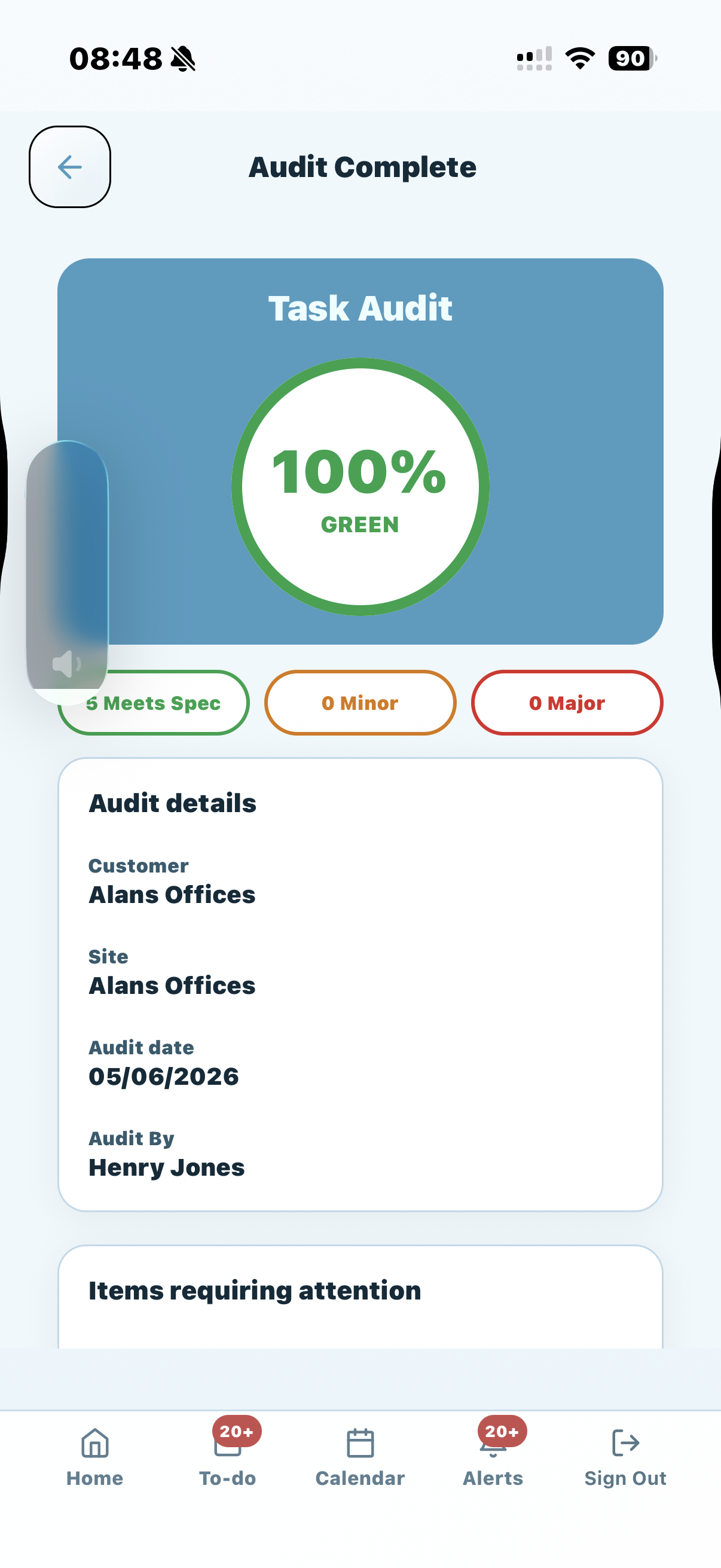 Completed audit result with score and audit details.
Scheduled audits
Cleaning companies need a reliable rhythm for quality checks. KleanFlo lets you schedule audits so they appear in the calendar and can be planned around customer visits, contract requirements, school terms, supervisor routes or internal quality programmes.
Supervisors can be notified on audit days, helping the right person see what needs completing without the office having to chase. If an audit needs to be added outside the normal schedule, manual audits can be created as well.
Plan routine inspections for customers, sites, areas and contracts.
Give managers a clearer view of what quality checks are due.
Help supervisors see the audits that need attention on the day.
Create an audit when an extra inspection is needed outside the usual plan.
Staff mobile results
Audit results are more useful when they are visible to the right people. KleanFlo can publish audit results to staff, and staff can see the relevant results when they work in the zone covered by the audit.
That means audit feedback is not only a management report. Cleaners and site teams can understand what is on target, what needs attention, and which areas require action.
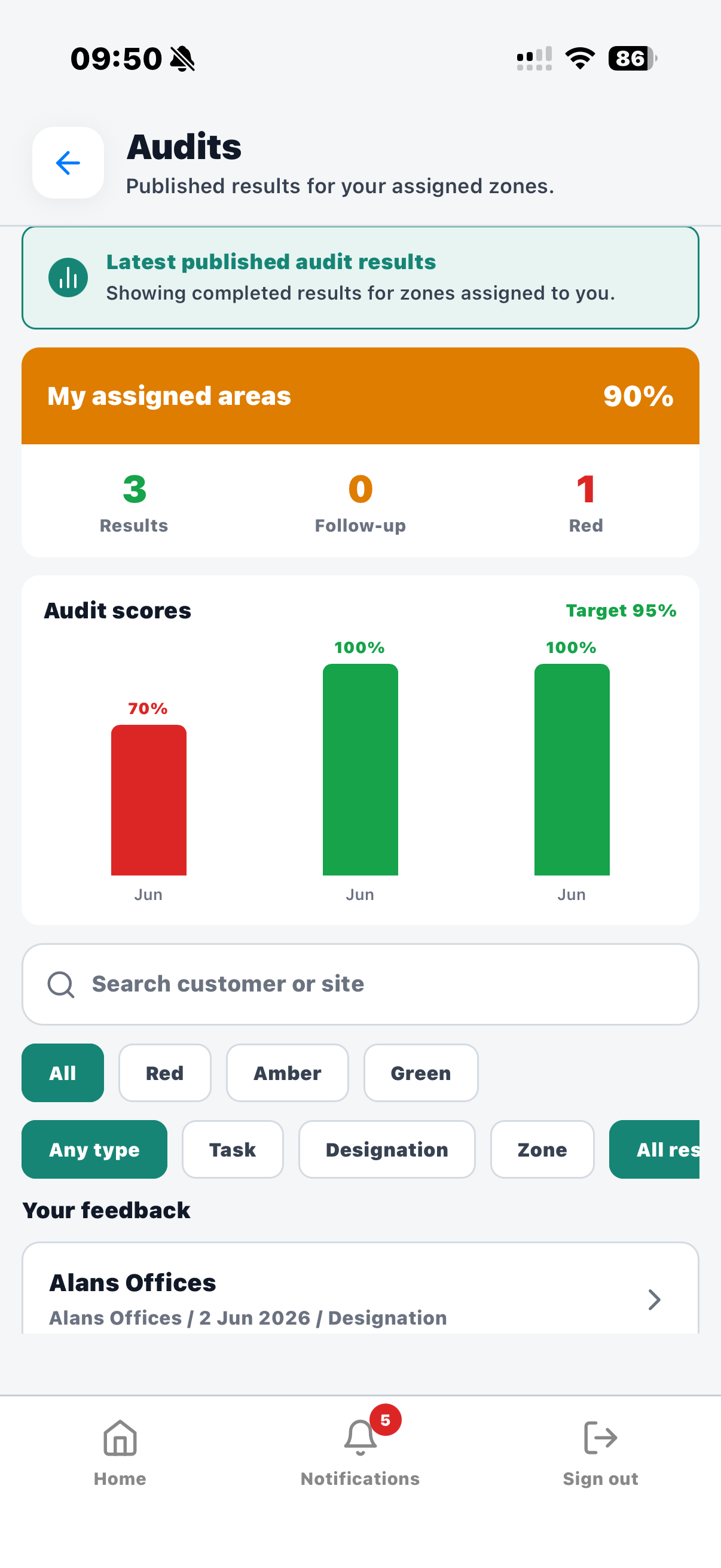 Published audit results shown to staff who work in the audited zone.
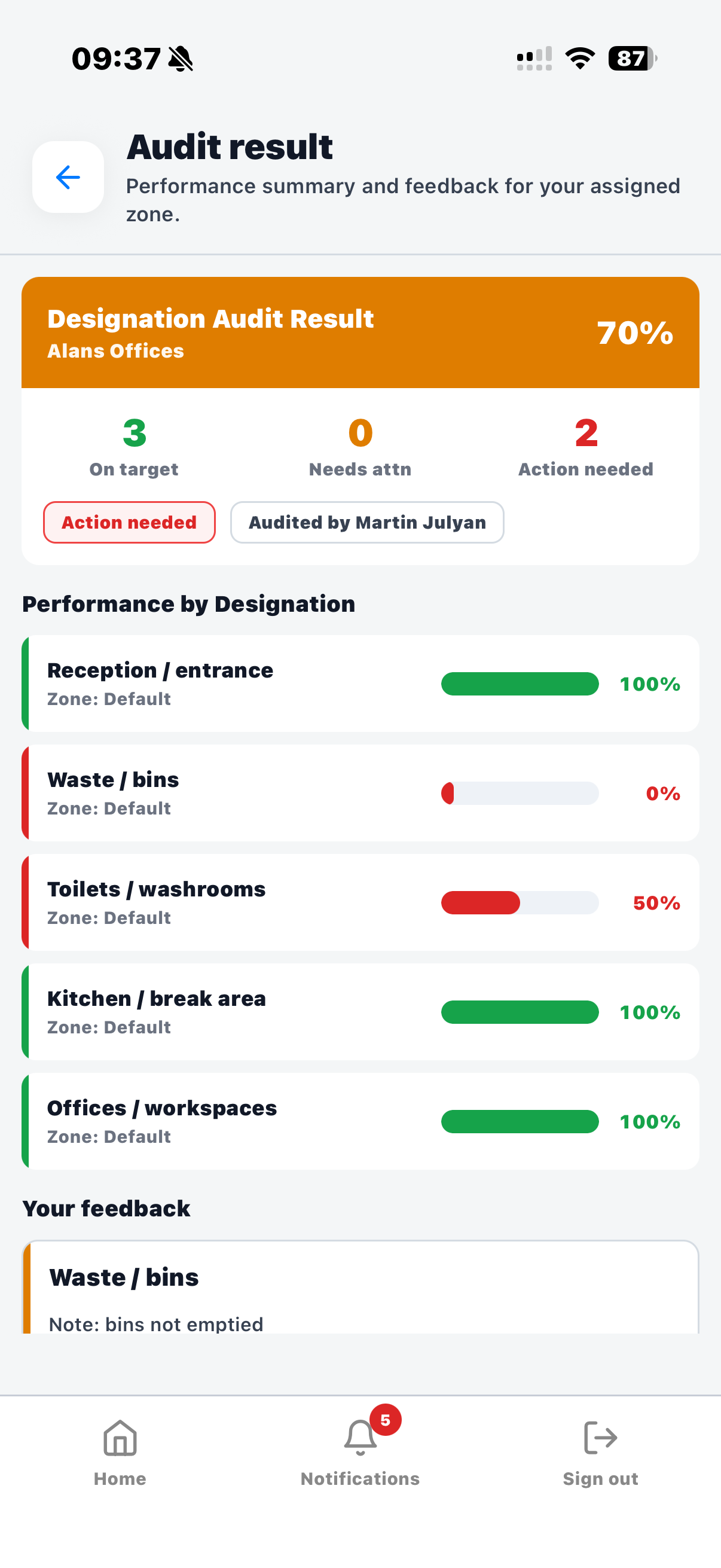 Feedback highlights areas that need attention.
Corrective actions
When an audit does not meet expectations, KleanFlo can use processes to help create automated corrective action reports. Instead of leaving issues as comments in an audit result, the business can move them into a clear follow-up workflow.
Actions can be sent to staff so the right people know what needs fixing, where the issue was found, and what follow-up is expected. That makes audit results practical for the site team, not just useful for managers and customers.
Minor or major audit findings can highlight work that needs attention.
Use KleanFlo processes to support automated reporting when standards fall short.
Give staff clear actions so they know what needs to be fixed on site.
Managers can see that issues have moved from audit finding to operational action.
Why it matters
Cleaning audits are not just a compliance tick-box. They protect customer confidence, support supervisors, help staff improve, and give the business a clearer record of service quality.
See audit status, scores, results and follow-up in one place rather than across spreadsheets, emails, PDFs and mobile photos.
Share clear audit results through the customer portal so customers can see standards are being checked and recorded.
Give supervisors audit schedules, mobile workflows, site context and task-level scoring while they are on location.
Keep notes and photos with the audit record so managers can understand the result without chasing screenshots later.
Use repeat audit scores to understand where standards are strong and where extra training, cover or customer discussion may be needed.
Turn audit findings into corrective actions that can be sent to staff, instead of leaving them as comments in a report that nobody revisits.
KleanFlo audit software can support quality checks across commercial offices, schools, healthcare settings, communal areas, retail sites, leisure facilities, managed properties and multi-site cleaning contracts.
Audits work best when they are connected to schedules, customers, sites, staff, documents, process actions, conversations and reporting. KleanFlo keeps those operational records together.
Audit, inspection and verification software
Commercial cleaning companies and facilities teams use different language for the same quality-control problem. KleanFlo brings cleaning audit software, cleaning inspection software, proof of clean records and automated compliance reporting into one workflow.
Those searches also include cleaning audit app, cleaning audit trail software, commercial cleaning audit software and digital cleaning log software. The important requirement is the same: a repeatable record of what was checked, who completed it, what evidence exists and what follow-up happened.
Schedule routine audits, score standards, record findings, publish results and keep follow-up connected to the customer, site and contract.
Give supervisors and field teams a mobile inspection app for site checks, task results, notes, photos and submitted records. For the supervisor workflow, see the cleaning inspection app for supervisors guide.
Create a clearer proof of clean record by keeping scores, comments, photos, staff visibility and customer reports in the same system.
Move away from paper logs and isolated spreadsheets so audit history, site evidence and follow-up can be reviewed later.
Use audit results, customer portal visibility and process workflows to support cleaning compliance reports and corrective action records.
Support janitorial, commercial cleaning, facilities management, school cleaning and multi-site service quality checks.
Related Cleaning Audit Resources
Build a stronger audit process with practical guides that explain the workflow, scoring, customer value and common mistakes before choosing the software.
FAQs
Commercial cleaning audit software helps cleaning companies schedule inspections, complete quality checks, score cleaning standards, capture notes and photos, share results, and manage follow-up across customers, sites and contracts.
Yes. KleanFlo supports task audits for detailed checks, designation audits for area-level scoring, and zone audits for larger sites or operational areas.
Yes. KleanFlo can be used for quick supervisor QC visits, cleaning inspections and more formal scored audits, with notes, photos, customer reports and corrective action follow-up.
Yes. Supervisors and field teams can complete audits on mobile, work through assigned areas, add notes, record scores and attach photo evidence.
Yes. Audit results can be shared through the customer portal so customers can review scores, comments, action plans and breakdowns.
Yes. Where configured, customers can complete audits through the customer portal and add their own quality feedback.
Yes. KleanFlo can schedule audits, show them in the calendar and notify supervisors on audit days.
Yes. Manual audits can be added when an inspection is needed outside the regular schedule.
Yes. Audit tasks can include observation notes and photo evidence, helping managers and customers understand what was found.
They overlap. Cleaning inspection software usually describes the mobile site check, while cleaning audit software also covers scheduling, scoring, customer reports, proof of clean records and follow-up.
Proof of clean software helps cleaning companies record what was checked, who completed the check, what evidence was captured and what result was shared with managers or customers.
Yes. KleanFlo can help turn audit and inspection results into customer-visible reports and use process workflows to support automated corrective action reporting.
Yes. KleanFlo can support janitorial, commercial cleaning, facilities management, school cleaning and multi-site audit workflows where teams need site checks, evidence, reports and follow-up.
Yes. KleanFlo can use processes to help create automated corrective action reports when audits do not meet expectations. Actions can be sent to staff so issues are fixed and followed up.
See how KleanFlo can help your team schedule audits, complete checks on mobile, share customer-ready results and keep follow-up visible.