Cleaning inspection app for supervisors managing site standards on mobile
Published: 14 August 2026Last updated: 14 August 2026Reading time: 13 minutes
Cleaning supervisors need more than a generic mobile checklist. They need to see which
sites require attention, complete inspections while walking the building, capture useful
evidence, submit clear results and start follow-up before the issue disappears into a
message thread.
Supervisors are usually the first people to notice whether a site is drifting away from
the expected standard. They see the washroom that keeps failing, the staff member who
needs coaching, the access issue that stops work being completed and the customer area
that needs a better routine.
A generic checklist app can capture a tick-box result. A stronger cleaning inspection
app for supervisors connects that result to the customer, site, area, staff feedback,
audit trail and corrective action. That connection is what makes the inspection useful
after the supervisor leaves the building.
The supervisor inspection app should reduce the gap between seeing a quality issue
and getting it fixed.
What supervisors should see before starting an inspection
The best inspection starts before the first score is recorded. A supervisor needs
context: which customer they are visiting, what site they are inspecting, what areas
are in scope, whether previous issues exist and whether the visit is planned or
triggered by a complaint.
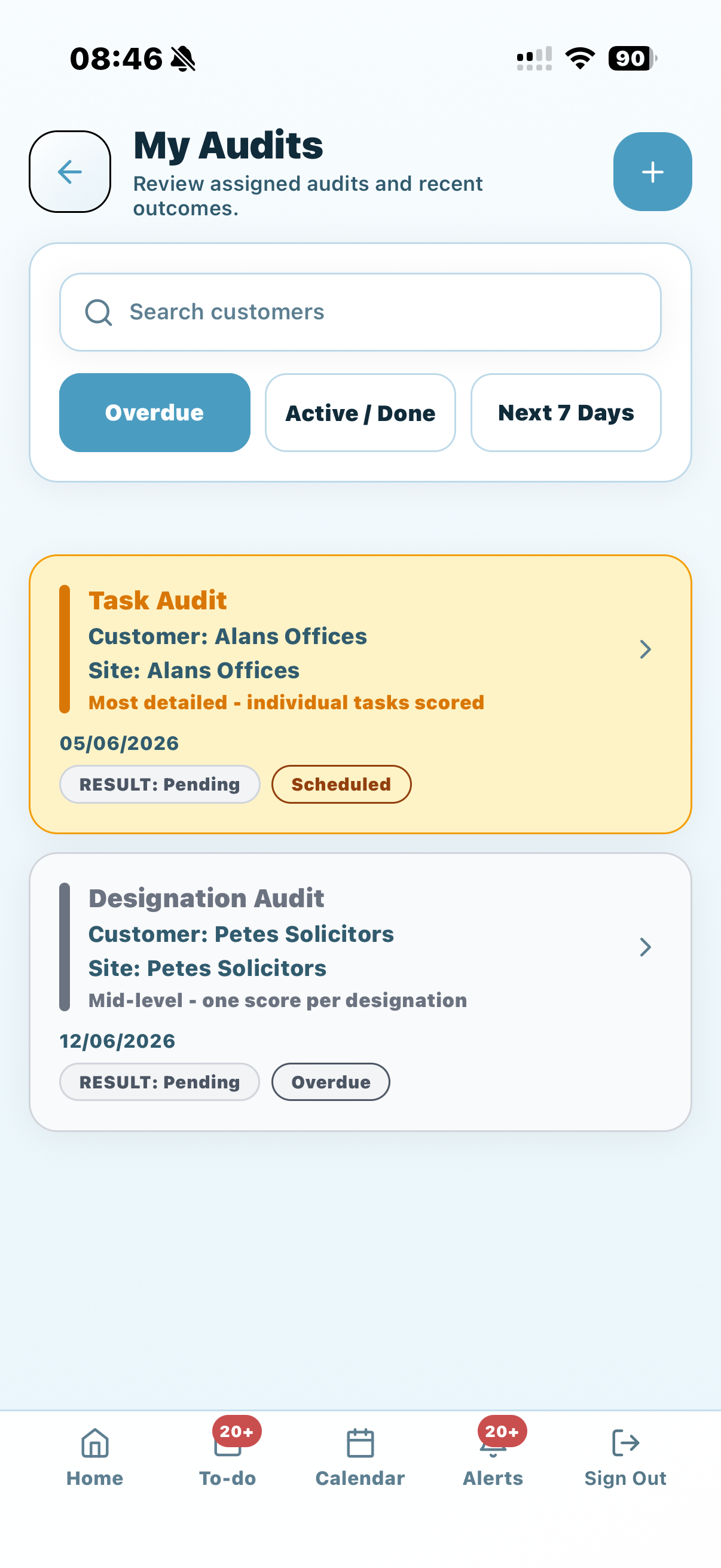
Assigned, overdue and upcoming inspection work.
Customer and site details, including contacts and access notes.
Inspection type: routine, ad hoc, complaint follow-up or reinspection.
Relevant areas such as reception, washrooms, offices, classrooms, kitchens or zones.
Previous failures, recurring issues or customer comments where available.
Any site-specific instructions that affect what can be checked.
Supervisors need a clear view of assigned, overdue and upcoming inspection work.
Task, designation and zone inspections for supervisors
Supervisors should not have to inspect every site in the same way. Some visits need a
detailed task-level check. Others need a faster area score. Larger sites need zones so
the result maps to the way the building is managed.
Inspection typeBest use for supervisors
Task inspectionDetailed checks for bins, floors, washroom items, touchpoints, desks, glass or agreed contract tasks.
Designation inspectionArea-level checks such as reception, toilets, kitchens, classrooms, offices or communal spaces.
Zone inspectionLarger sites where floors, buildings, wings or responsibility areas need separate results.
Manual inspectionExtra checks after a complaint, cover change, mobilisation, incident or customer visit.
What supervisors should capture during the inspection
A supervisor does not need to write an essay for every item. The record should be
precise enough for the office, customer or staff member to understand the result later.
That usually means a clear score, a useful note and photo evidence only where it adds
value.
The customer, site, area and inspection type.
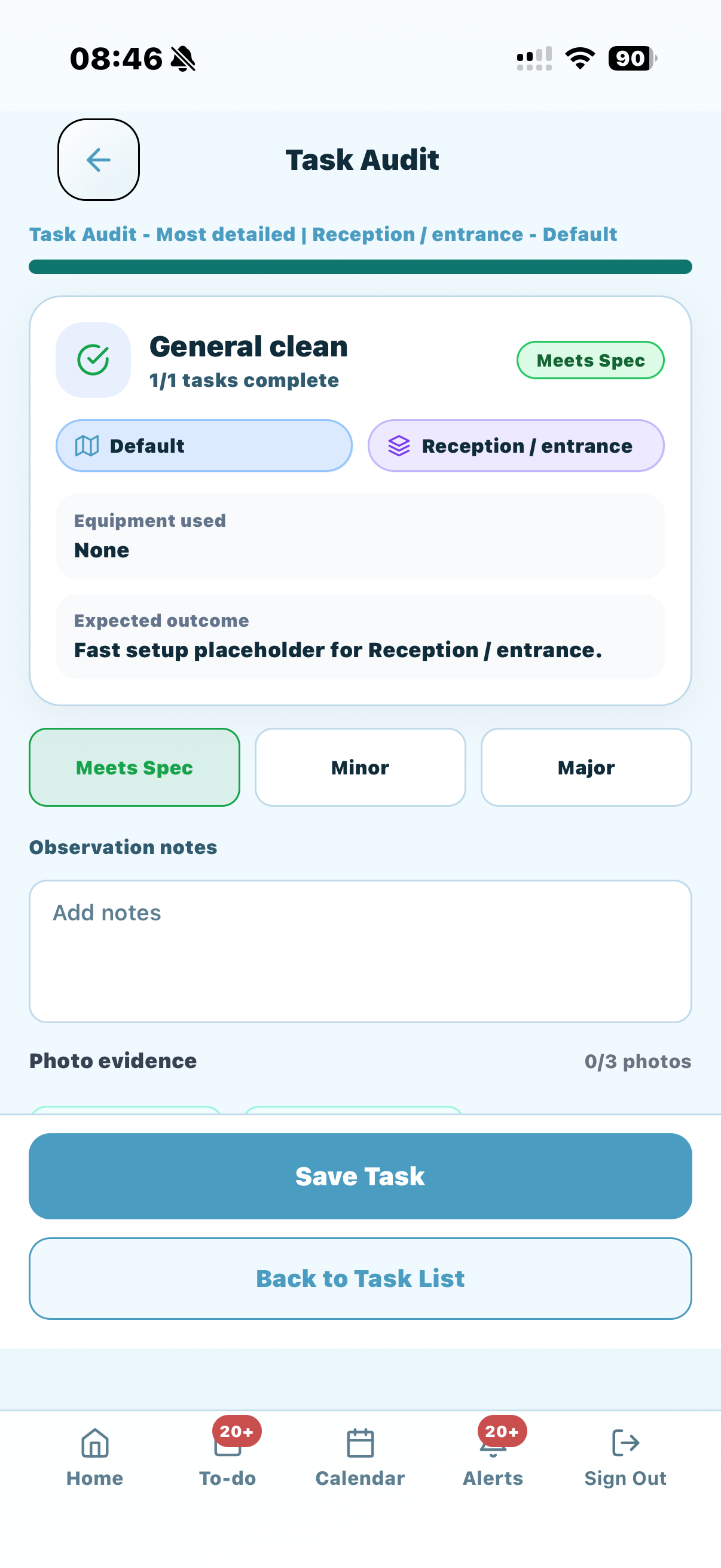
The score or result for each relevant task, designation or zone.
Short notes explaining failed items or important context.
Photos for failures, repeated issues or completed corrective work.
Access problems, customer restrictions or areas that could not be checked.
Any follow-up needed for staff, managers or customers.
Task-level inspections help supervisors record the score, note and evidence together.
How supervisor inspections become corrective actions
The inspection should not end at submit. If a site fails a washroom check or a repeated
issue appears, the next step matters more than the score itself. Someone needs to own
the follow-up, complete the work and close the loop.
This is where supervisor inspections connect to cleaning process automation.
A failed item can become a corrective action, a staff task, a supervisor revisit or a
customer update. The action should be linked back to the inspection so the business can
see what changed.
Inspection findingSupervisor follow-up
One missed itemAssign the action to the relevant person and record completion.
Repeated poor scoreReview training, schedule time, access, specification clarity and staffing.
Customer complaintCapture evidence, agree action and use reinspection to prove improvement.
Access issueRecord why the area could not be checked and raise it with the customer contact.
Why mobile inspection history matters
Supervisors often know the history of a site in their head. That does not scale. When
the business grows, managers need a visible record of what was checked, what evidence
was captured and what follow-up happened.
A connected cleaning audit trail
helps the business review inspection history by customer, site, area, supervisor, score
and corrective action status. That makes the mobile app more than a field checklist.
Customer reporting from supervisor inspections
Not every inspection result should be sent to the customer. Some findings are internal
coaching points. Others are useful proof that standards are being managed. The
supervisor inspection app should support both: internal operational follow-up and
customer-visible reporting where appropriate.
KleanFlo can connect inspection results to the customer portal,
so customers can see the right audit information without the office rebuilding a report
from screenshots, notes and spreadsheets.
What supervisors need on the day of the inspection
Mobile inspection software works best when it matches the way supervisors actually
move through their day. A supervisor might start with a complaint visit, check a
scheduled audit, answer a staff question, inspect a washroom standard, raise an
incident and then move to another customer site. The app needs to support that pace.
A quick route into assigned inspections without searching through unrelated records.
Site context so the supervisor understands customer expectations before scoring.
Simple mobile screens that work while walking the building.
Photo capture attached to the exact finding, not just the general site.
Fast note entry for exceptions, access problems and customer comments.
Clear submit and review flow so the office can trust the record.
Follow-up routes for staff actions, customer updates and management review.
Buying checklist for supervisor inspection apps
Many mobile apps can collect checklist answers. Fewer can support the full supervisor
workflow for a cleaning company. When comparing apps, check whether the inspection
result stays connected to the cleaning operation or becomes another isolated form.
RequirementWhy it matters
Customer and site recordsInspections need to sit against the right contract, location and operational context.
Mobile audit typesSupervisors need task, designation, zone and manual checks for different site types.
Evidence and audit trailScores, notes and photos should be reviewable later without rebuilding the history.
Corrective action workflowFailed checks should lead to owned follow-up, not just another report.
Customer visibilitySome inspection results need to support customer reports and account reviews.
Staff feedbackThe people doing the work need clear, relevant feedback when standards need attention.
Supervisor inspection checklist
Use this checklist when designing how supervisors should complete mobile site checks.
For a broader site-level checklist, use the
commercial cleaning audit checklist.
Confirm the customer, site, inspection type and reason for the visit.
Check whether previous failures or customer concerns should be reviewed.
Choose task, designation, zone or manual inspection depth.
Score each area consistently using agreed definitions.
Add notes where the result needs explanation.
Attach photo evidence only where it supports the finding.
Record access restrictions or out-of-scope areas.
Assign corrective action for failed or repeated items.
Decide what should be visible to staff, managers or customers.
Review trends across sites and supervisors, not only one visit.
How KleanFlo supports inspection apps for supervisors
KleanFlo On the Move
gives supervisors mobile access to audits, customers, sites, schedules, conversations,
staff, incidents, processes and documentation. Supervisors can complete checks while
they are on location and keep the result connected to the wider operation.
What is a cleaning inspection app for supervisors?
A cleaning inspection app for supervisors helps mobile managers complete site checks, score standards, add notes, capture photos, submit results and start follow-up while they are on site.
Is this different from a cleaner staff app?
Yes. A staff app is mainly for cleaners completing assigned work. A supervisor inspection app gives mobile managers wider access to customers, sites, inspections, evidence, incidents and corrective action follow-up.
Should supervisor inspections include photos?
Photos should be used where they explain a finding, prove a completed action or support customer reporting. They should be attached to the right inspection item, not left in a camera roll.
Can failed inspection items be assigned to staff?
Yes. KleanFlo can support corrective action workflows so failed items can be assigned, completed and reviewed.
Want supervisors to inspect and follow up from mobile?
See how KleanFlo keeps mobile inspections, evidence and corrective actions connected.

 Task-level inspections help supervisors record the score, note and evidence together.