Cleaning inspection app for mobile site checks and quality evidence
Published: 8 July 2026Reading time: 5 minutes
Cleaning inspections only improve standards when the result can be trusted, understood and followed up. A paper checklist or a phone photo can show that someone visited the site, but it does not give the business a reliable record of what was checked, what failed, who needs to act and what changed afterwards.
Mobile checksPhoto evidenceCustomer reportsCorrective actions
In this guide
What a cleaning inspection app should actually solve
Why paper checklists and camera rolls create weak evidence
How to choose between task, designation and zone checks
What supervisors need in the field
How inspection results become customer reports and staff actions
How KleanFlo connects inspections to the wider operation
Need full audit workflows?
This page focuses on the mobile inspection use case. The audit page covers the wider KleanFlo audit module.
A useful cleaning inspection app should help supervisors work through the site while the detail is fresh. That means seeing the right customer, site, zone, designation or task, adding notes where needed, capturing photo evidence and submitting the result without rebuilding the report later.
It should also keep the inspection connected to the rest of the operation. If a washroom fails, the issue should be visible to managers. If a customer needs an update, the result should be easy to share. If staff need to correct something, the action should not live only inside the inspection comment.
That is the difference between a checklist and an operational inspection system. A checklist records an observation. A good inspection app helps the business decide what the observation means, who should see it and what should happen next.
The goal is not just to complete an inspection. The goal is to create a record that helps the team improve the site and prove what happened.
Where manual inspections break down
Photos sit on a supervisor phone instead of the customer or site record.
Scores are typed into spreadsheets after the visit.
Failed items are mentioned in comments but never assigned as work.
Customers get a PDF without a clear action trail.
Managers cannot compare inspection results across sites.
The quality-control questions an inspection should answer
Before choosing software, it helps to be clear about the questions your inspection process needs to answer. Most cleaning quality issues are not caused by the absence of a checklist. They are caused by weak follow-up, poor visibility or inspection results that are too vague to act on.
Which customer, site and area was inspected?
Was the inspection planned, overdue, ad hoc or customer-triggered?
Which standard was checked and what result was recorded?
Is the finding minor, major or simply a note for awareness?
Is there photo evidence that explains the issue?
Should the customer see the result?
Does the finding need a corrective action for staff or supervisors?
Is this a one-off issue or a repeating pattern across the site?
How KleanFlo handles mobile inspections
KleanFlo cleaning audit software supports mobile inspection workflows for task, designation and zone-based checks. Supervisors can see assigned inspections, work through the relevant areas, add notes, attach evidence and submit results from the field.
The inspection record can then support web review, staff feedback, customer portal visibility and corrective actions through KleanFlo processes.
Supervisors can see assigned, overdue and upcoming inspection work.Managers can review submitted scores, notes and evidence from the web system.
Choosing the right level of inspection detail
One reason inspection programmes fail is that every site is checked with the same level of detail. A high-risk site may need task-level evidence. A stable office contract may only need a summary score by area. A large school or multi-floor building may need zone-based checks so responsibility is clearer.
Task inspectionUse when you need detailed evidence against individual tasks such as bins, desks, washrooms, floors, glass or touchpoints.
Designation inspectionUse when the supervisor should score broader areas such as reception, toilets, classrooms, kitchens or communal spaces.
Zone inspectionUse for larger buildings where standards, access, staff responsibility or customer expectations differ by zone.
Manual inspectionUse when a site needs an extra check after a complaint, incident, mobilisation, cover change or customer visit.
What good photo evidence looks like
Photo evidence should help the reviewer understand the inspection result. It should not become a gallery of random site photos. The best evidence is specific, relevant and attached to the right finding.
Use photos to show failed standards, repeated problems or completed corrective work.
Attach the photo to the task or area it relates to.
Add a short note so the office does not have to guess what the photo means.
Avoid taking photos where they add no operational value.
Keep evidence connected to the customer and site record for later review.
From inspection result to corrective action
The most important part of an inspection often happens after the score is submitted. If an inspection identifies a failing, someone needs to decide whether the issue requires staff feedback, a supervisor visit, a customer conversation, a process action or a change to the schedule.
KleanFlo can support that follow-up by keeping inspection records connected to staff, sites, customers, conversations and process actions. That makes the inspection more than a report. It becomes part of the operating rhythm for improving standards.
Practical checklist for cleaning inspections
Agree which sites need routine inspections and how often.
Use task-level checks where standards need detailed evidence.
Use designation or zone checks where a summary score is enough.
Capture photos only where they explain the finding.
Turn failed items into follow-up work with an owner and due date.
Review trends across sites, not just one inspection at a time.
Decide which results should be shared with customers and which should stay internal.
Use repeated findings to guide training, cover planning and contract review.
Related KleanFlo pages
Cleaning inspections work best when they are connected to audits, schedules, staff updates and customer visibility.
A cleaning inspection app gives supervisors a mobile way to complete site quality checks, record scores, add notes, capture photo evidence and submit results for management review.
Is a cleaning inspection app the same as audit software?
They overlap. A cleaning inspection app is usually the mobile field experience. Cleaning audit software includes the wider scheduling, reporting, customer sharing and follow-up workflow.
Can customers see inspection reports?
Yes. KleanFlo can share audit and inspection results through the customer portal where the business chooses to make them visible.
Can inspection findings be sent to staff?
KleanFlo can publish relevant audit feedback to staff and use process actions where follow-up needs to be assigned.
Should every inspection include photos?
No. Photos are useful when they explain a finding, prove a standard or support follow-up. They should be attached to meaningful observations rather than used as decoration.
Can cleaning inspections be scheduled?
Yes. KleanFlo supports scheduled audit and inspection workflows, including visibility for supervisors and managers.

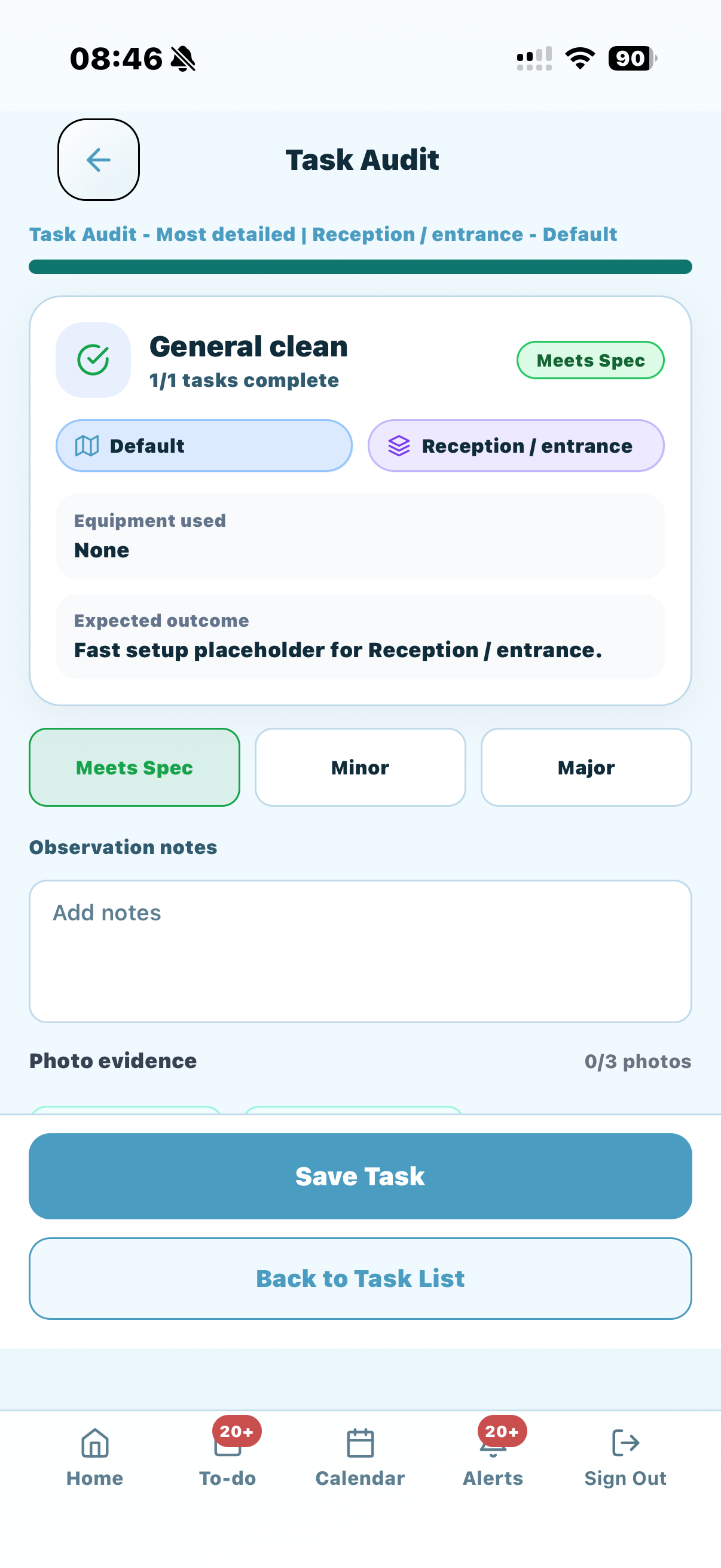
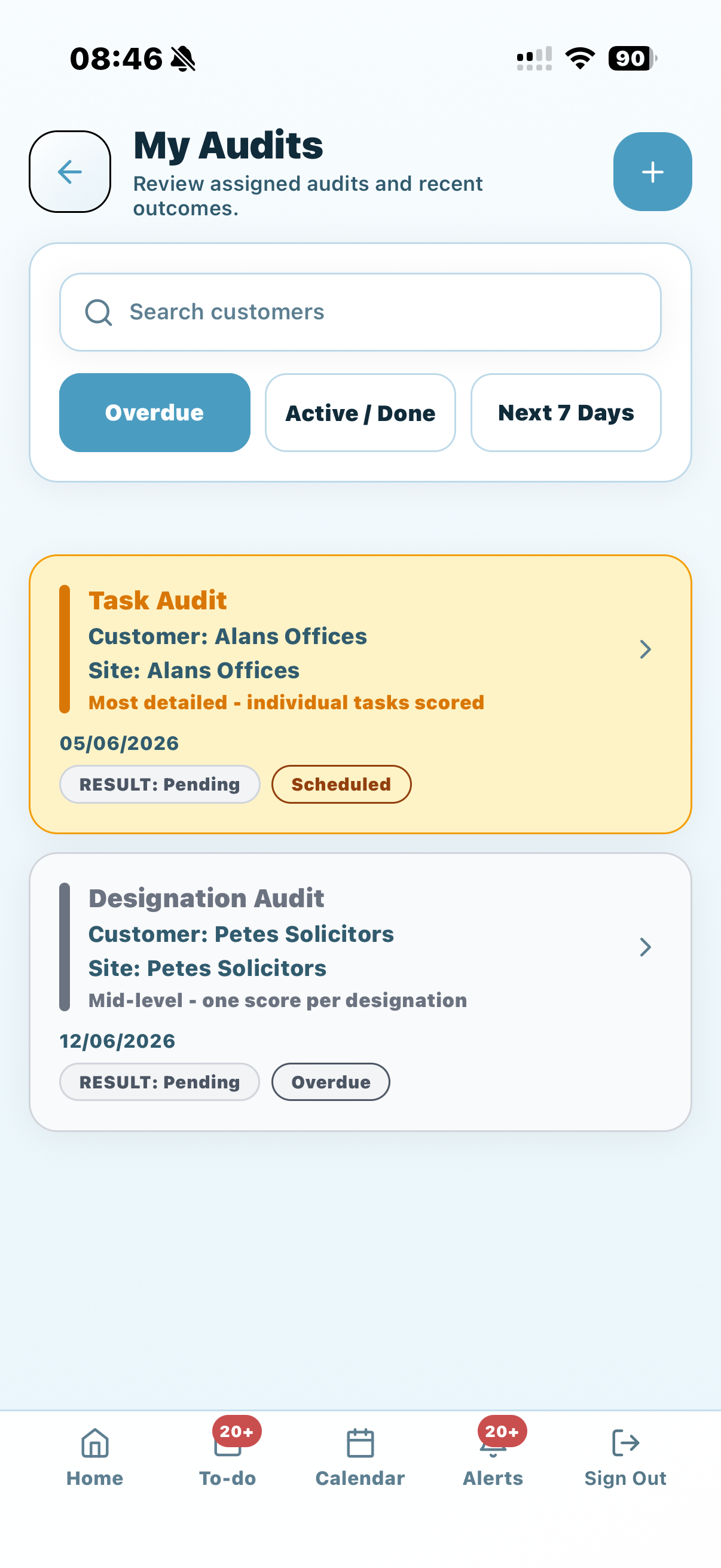 Supervisors can see assigned, overdue and upcoming inspection work.
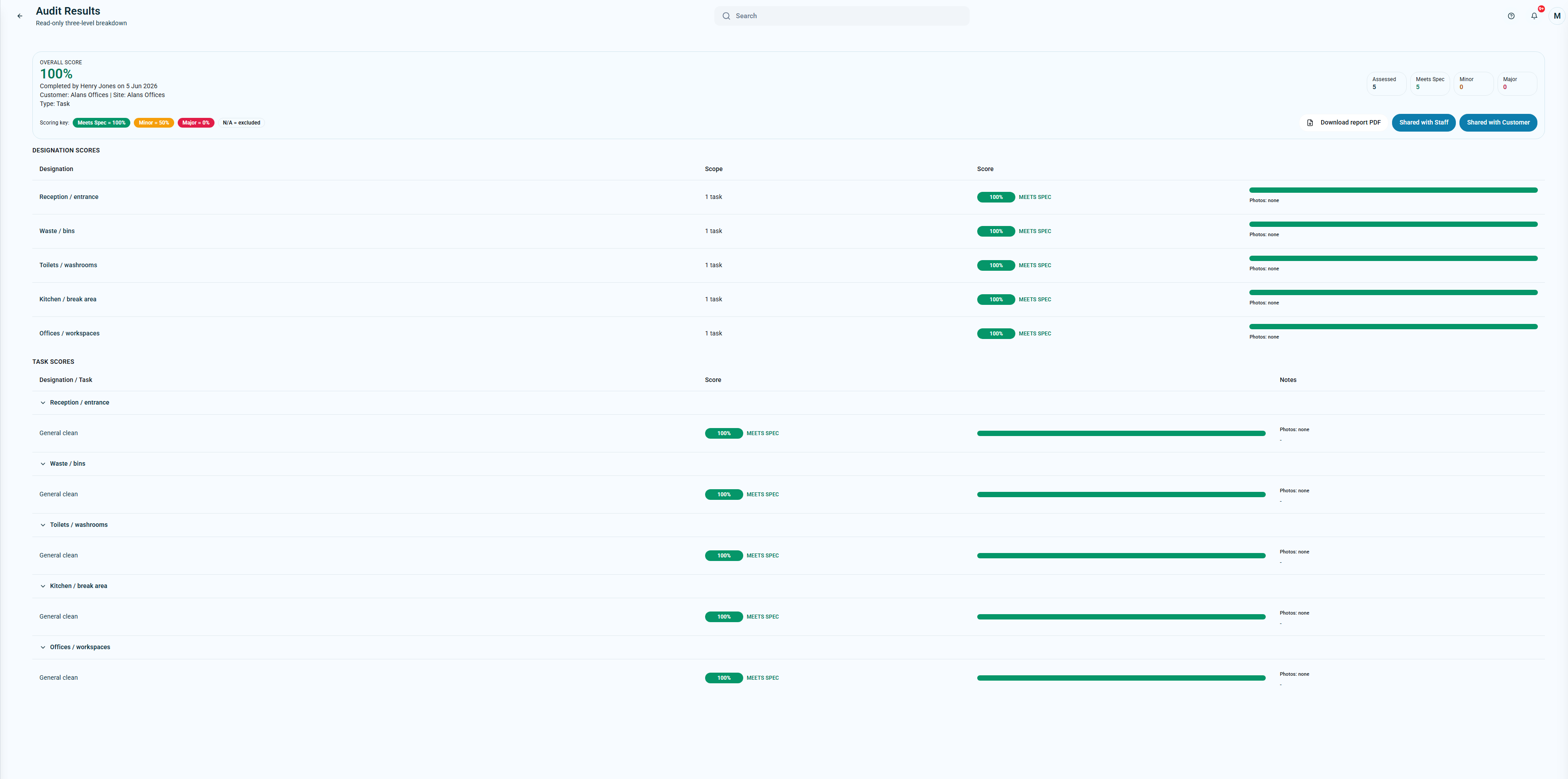 Managers can review submitted scores, notes and evidence from the web system.