How to report cleaning audit results to customers without losing the follow-up
Published: 14 August 2026Last updated: 14 August 2026Reading time: 8 minutes
Cleaning audit results should give customers confidence that standards are being
checked, understood and followed up. The strongest reports do more than show a score.
They connect the customer view to the evidence, the corrective action process and the
staff member or supervisor responsible for closing the loop.
A customer audit report should answer the obvious questions
Customers do not usually want a raw checklist dump. They want to know whether the
service is under control. A useful cleaning audit report explains what was checked,
what the result means, what evidence supports the result and what will happen next
when something falls short.
This makes the report different from the internal cleaning audit trail.
The audit trail can hold the full operational history. The customer report should show
the right level of customer-facing detail.
Report sectionWhat it should explain
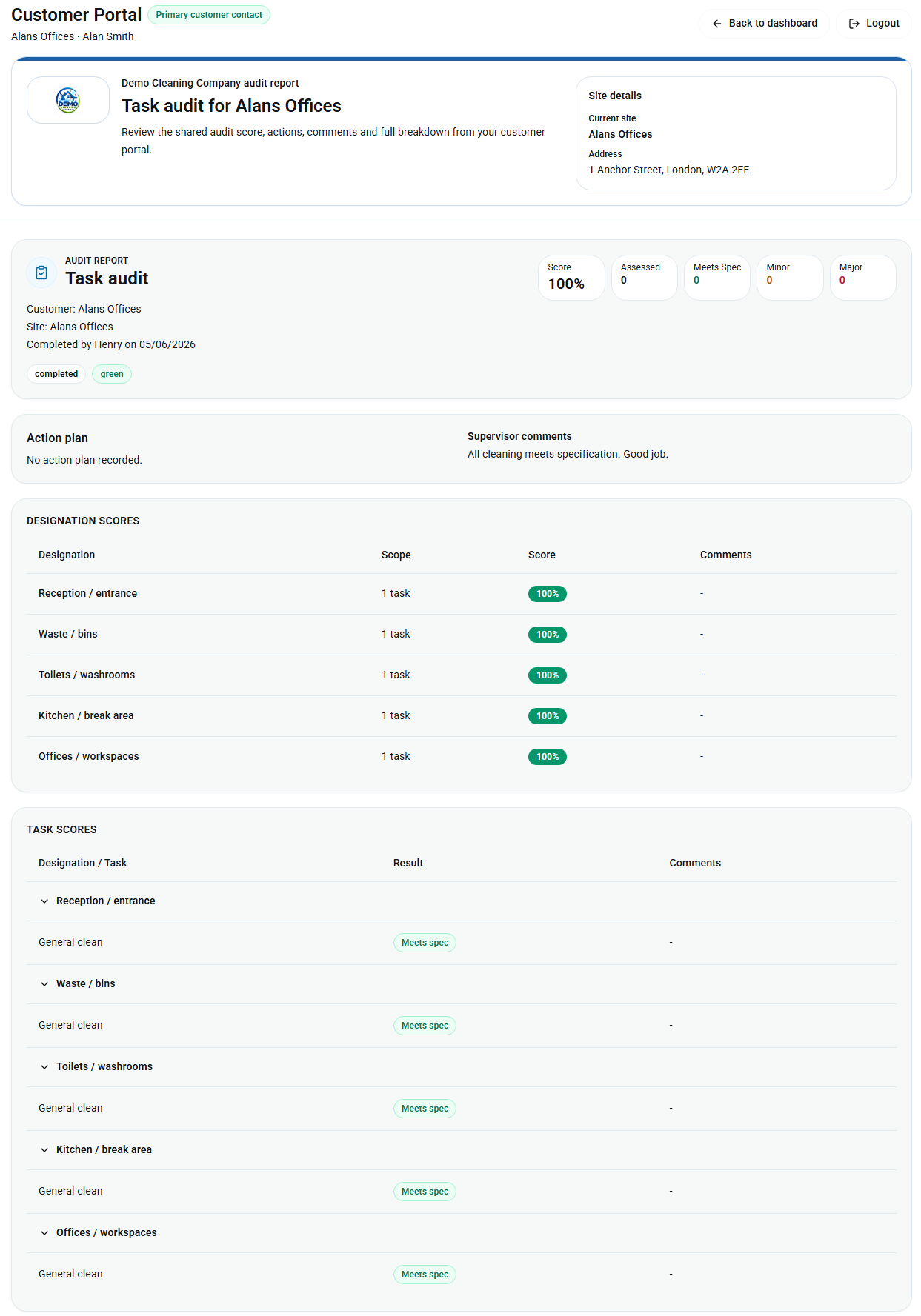
Site and audit detailsWhich customer site was checked, when, and by whom.
Overall resultA clear summary of the standard using agreed score language.
FindingsImportant passes, issues, repeated areas and visible exceptions.
EvidencePhotos or notes that help explain the result without creating noise.
Corrective actionsWho owns the follow-up, what is being done and whether it is open or complete.
Use scoring language customers can understand
Scores need to be consistent before they are customer-facing. If one supervisor uses
amber for a small issue and another uses amber for a failed area, the report becomes
hard to trust. Keep score definitions simple and explain what the score means in
operational terms.
The cleaning audit scores explained
guide covers red, amber, green, minor findings, major findings and trend reporting.
That language should carry through to the customer report.
Do not report an issue without the follow-up route
A failed audit item can damage confidence if the customer only sees the failure. The
report should also show that the business has a route for action. That does not mean
exposing every internal management comment. It means showing that the issue has been
assigned, reviewed or completed.
In KleanFlo, the corrective-action process can be tailored to the business requirement
through process automation.
A failed audit item can start a custom workflow with the actions, owners, review steps,
documents, approvals and completion evidence the cleaning company needs.
Process actions can be shown to the staff member responsible for follow-up.
Staff need visibility too
Customer reporting works best when staff are not left outside the loop. If a cleaner or
supervisor is responsible for fixing an issue, they need to see the relevant feedback
and corrective action where they already work.
KleanFlo can make relevant audit issues, feedback and corrective actions visible in the
staff mobile app. That helps
the business avoid a common problem: the customer has been sent a polished report, but
the people who need to fix the issue are still waiting for a message, spreadsheet or
printed note.
Use customer portal reporting when the audit is ready to share
Emailing PDFs can work for occasional reports, but it becomes harder to control as
customers, sites and audit frequency grow. A cleaning customer portal
gives authorised customer contacts a clearer place to see shared reports, documents
and conversations.
Portal visibility should be controlled. The customer can see useful audit results,
action plans and quality breakdowns, while internal staff records, payroll notes and
management discussions stay inside the business.
Example: reporting a failed washroom audit result
A washroom finding is a practical example because it is visible to customers and often
needs quick action. A weak report says "washroom failed". A stronger customer report
gives the result enough context to build confidence.
Show the site, date, audit type and area checked.
Use a clear score such as red, amber or needs attention.
Add a short comment explaining the finding in plain language.
Attach relevant photo evidence where it helps explain the result.
Create a tailored corrective-action process for the business requirement.
Send the assigned action to the staff member or supervisor responsible.
Update the customer-facing report when the action is completed or reviewed.
What to keep internal
Transparent reporting does not mean exposing everything. Internal notes about staff
coaching, HR records, payroll, pricing, commercial decisions or management discussion
should stay internal. The customer-facing view should focus on service standards,
evidence, agreed actions and progress.
This is the balance that supports customer retention:
enough visibility to prove the contract is being managed, without overwhelming the
customer or weakening internal control.
The result is a stronger quality loop: audits create evidence, evidence explains the
customer report, failed items start tailored actions, staff see the work on mobile and
managers can prove what changed.
What should a cleaning audit report include for customers?
A customer-facing report should include the customer site, audit date, overall score, key findings, useful evidence, corrective actions and the current follow-up status.
Should customers see every audit note?
No. Customers should see the useful service record. Internal coaching notes, staff records, payroll details and management comments should remain internal.
Can corrective actions be tailored to each business?
Yes. KleanFlo process automation can support tailored corrective-action workflows with the actions, owners, approvals and evidence the business requires.
Can staff see their audit issues on mobile?
Yes. Relevant audit feedback, issues and corrective actions can be shown through the KleanFlo staff mobile app so follow-up reaches the people responsible.
Want audit reports that customers and staff can act on?
See how KleanFlo connects customer-visible reports, tailored corrective actions and staff mobile follow-up.

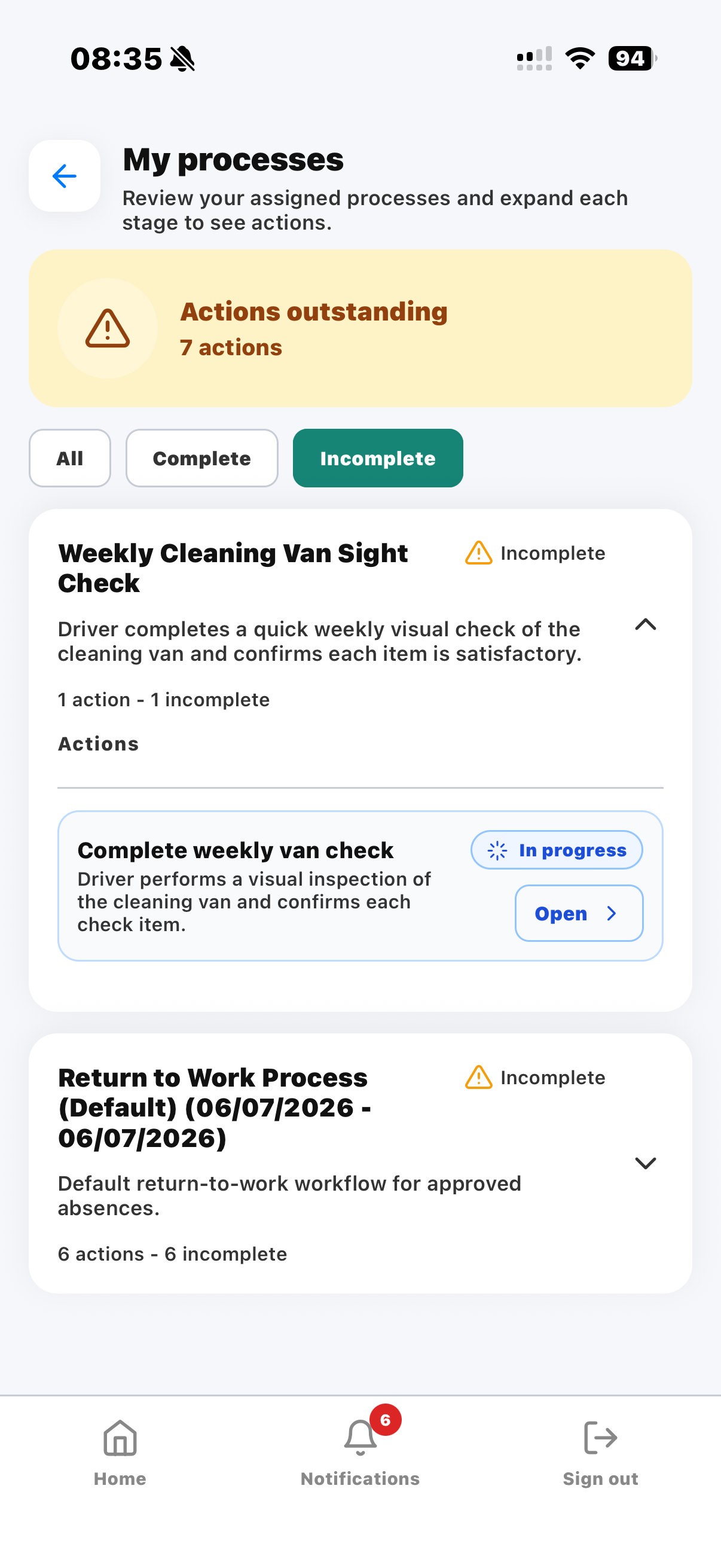 Process actions can be shown to the staff member responsible for follow-up.