
Capture the detail when it is fresh, not from memory later.
KleanFlo On the Move
Cleaning supervisor mobile app.
Your operation, on the move.
Visit the site. Support the team. Move the work forward. Give cleaning supervisors and mobile managers one connected app for schedules, surveys, audits, stock, approvals and follow-up.
Keep the office and the field working from the same KleanFlo records, without saving everything for the end of the day.
For cleaning supervisors, area managers and mobile operations teams. Tools shown depend on your access permissions and enabled features.
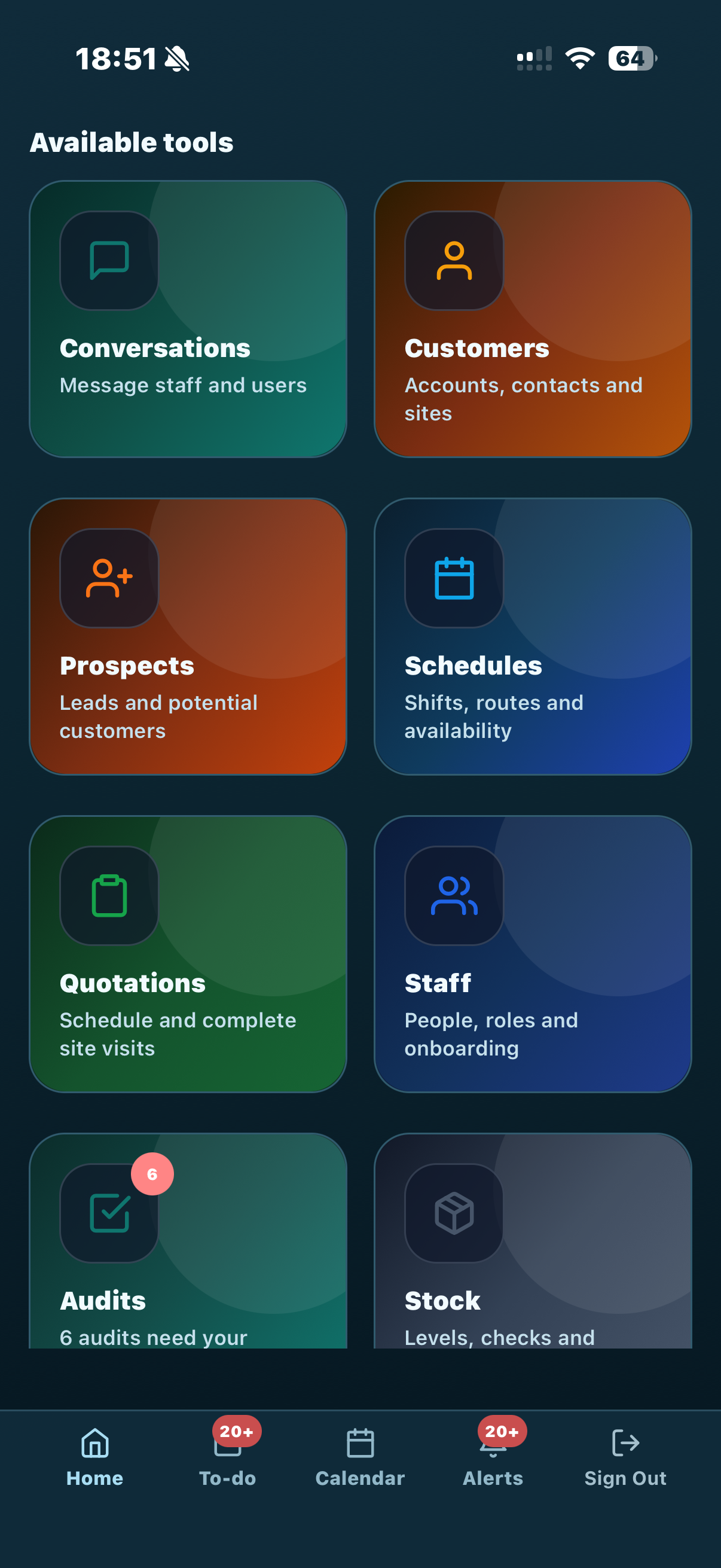
Review requests and assigned work without returning to a desk.
Bring people, quality, stock and customer records together.
Start with what needs attention
Less chasing. A clearer view of the next action.
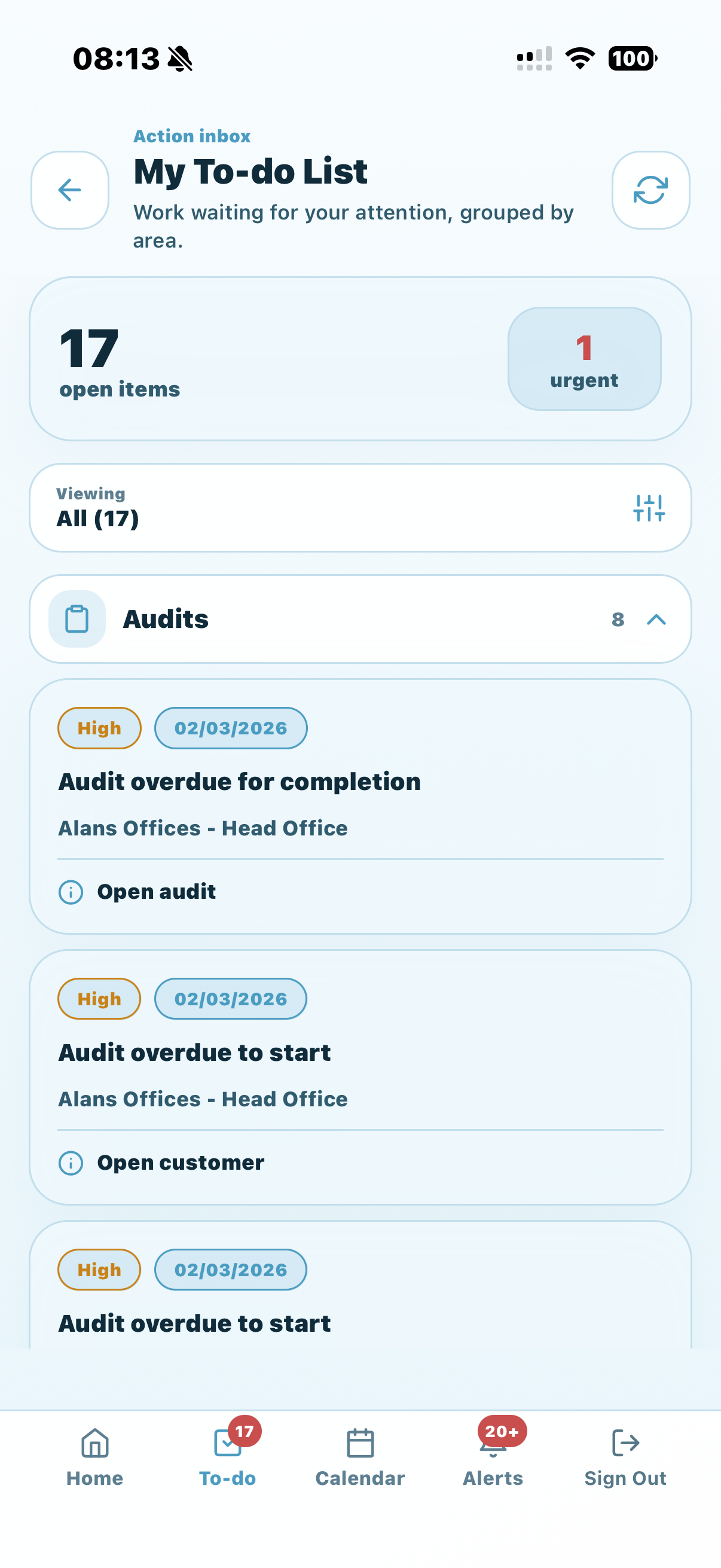
The dashboard brings your available tools together, with today's schedules, upcoming surveys and attention indicators. The My To-do List groups work by area so a supervisor can see what needs a decision or follow-up.
- Review schedule issues, holiday requests, timesheets, audits, incidents, tasks and process actions in one place.
- Open supported review screens directly from the to-do list, including holiday decisions, timesheets, assigned processes and tasks.
- Use the calendar for planned activity and add internal events such as training or administration.
- Find the customer, site, contact or staff record behind the work.
Stock, consumables & deliveries
Turn a site stock check into an organised delivery.
Stock is now a dedicated set of mobile tools—not just a balance to look up. Check what is held in storage, count what is on a customer site, request replenishment and record deliveries against the right location.
- 01 / CHECK
Count what is on site
Select the customer and site. Record stock on hand and the additional quantities requested.
- 02 / REQUEST
Keep replenishment visible
A saved check with requested items creates a pending site delivery for review.
- 03 / REVIEW
Prepare the delivery
Review or edit the delivery, select the source location and approve it where your permissions allow.
- 04 / CONFIRM
Record what arrived
Confirm delivered quantities and add delivery photos, keeping the record connected to the customer site.
Storage & location checks
Search stock levels by location, view item movements and record physical counts at storage locations.
Supplier deliveries
Open sent orders and book stock arriving into storage, with delivery quantities and photo evidence.
Order approvals
Review orders awaiting a decision. Approval, rejection, authorisation requests and sending actions follow the access and status available to you.
Customer product rules apply to site deliveries. Available stock, approval rights and delivery actions depend on your business setup and permissions.
Staff, schedules & decisions
Deal with the people side of supervision while you are out.
A supervisor needs more than a list of names. On the Move connects staff information, planned work, absence and review tasks so decisions can be made with the right context.
Schedules & assignments
Review planned times, staff assignments, customer and site details, notes and work status. Use supervised or wider schedule views where your access allows.
Log absence & arrange cover
Record staff absence from mobile. Where configured, review affected weekend work and allocate available cover rather than leaving a separate note for the office.
Review holiday decisions
Authorised reviewers can inspect the request, affected schedules, approval impact and cover checks before approving or rejecting with decision notes.
Resolve timesheet exceptions
Review planned and recorded times, attendance warnings and available location evidence. Authorised users can confirm payable time or create and approve a missing item.
Keep weekend cover clear
View Saturday and Sunday cover by branch. Eligible users can amend the assigned cover team and record the reason for the change.
Arrange notification cover
Set a period of unavailability and select notification cover where supported, helping operational follow-up continue when a supervisor is away.
Review and approval screens respect the permissions and checks returned by KleanFlo. Mobile access does not automatically give every supervisor authority to approve leave, timesheets or orders.
Quality, evidence & follow-through
Inspect the standard. Keep the follow-up connected.
Carry out cleaning audits at task, designation or zone level. Record findings with comments and photos, then use configured corrective-action processes when work needs attention.
- Review overdue, in-progress, completed and upcoming audits.
- Capture audit scores, notes and photographic evidence against the areas being checked.
- Progress assigned process forms, update action status and add supporting attachments.
- Create and update incidents, with a history that keeps the issue and its follow-up together.
Planned audits, even when the signal drops
Supported native app builds can download eligible planned audits in advance. Complete the downloaded audit with notes and photos offline, then reconnect to synchronise. Keep the app and its saved data until synchronisation is confirmed.
Offline support is specific to downloaded audit workflows. It does not make the whole app offline, and pending uploads or conflicts may need attention before records are fully available to the office.
Explore cleaning audits and corrective actions →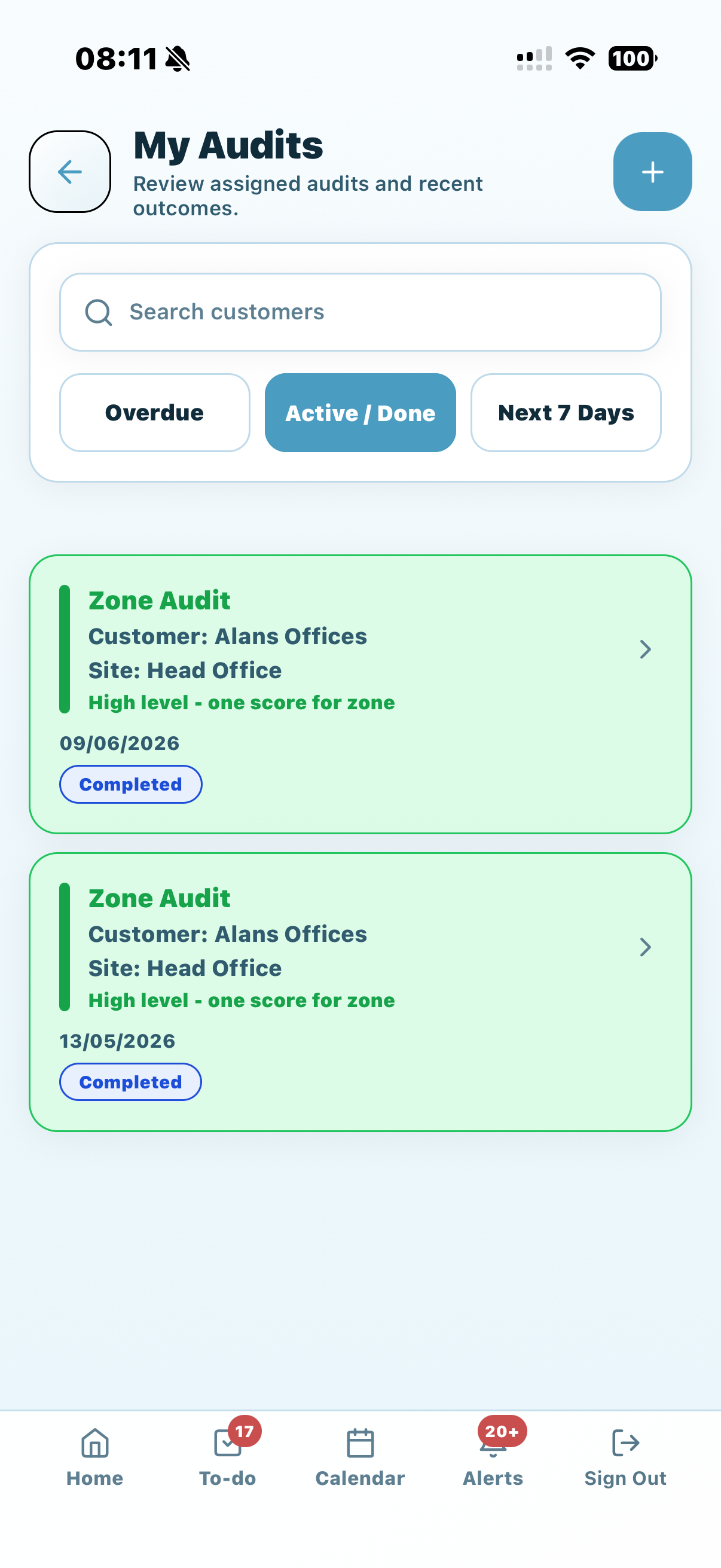
Prospects, surveys & quotations
Capture the building while you are walking it.
Take the survey into the site visit. Review prospect information, open scheduled surveys and record the cleaning requirements directly against the quotation.
- Update customer and site details, existing arrangements and additional information.
- Add cleaning areas or designations and the tasks required within them.
- Specify task actions, equipment, chemicals, frequency and included or optional work.
- Capture attachments, visit schedules, additional services and costing information where available.
The visit contributes to the same quotation record the office works with, reducing the need to recreate the survey from separate notes and photos.
See the connected quotation workflow →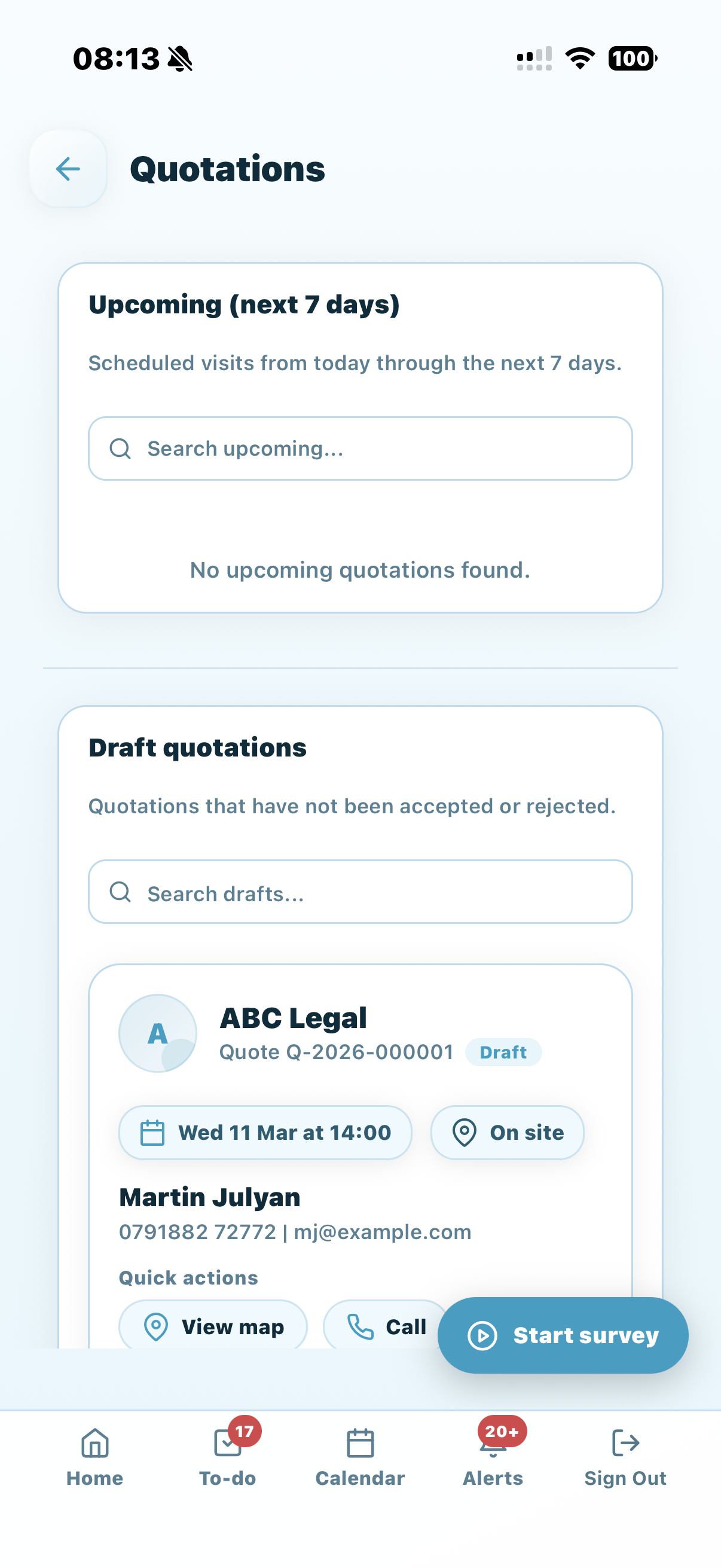
Connected field tools
The rest of the visit, handled.
Use the site record, conversations and supporting tools to keep work moving between buildings—not just during an inspection.
Travel time recording
Where enabled, start and end travel-time recording across the working day and record breaks or personal time. Recorded site and event attendance is excluded from the travel calculation. Travel is not a payable-hours calculation or continuous GPS tracking.
Vehicle records & NFC
Search vehicle registrations, make and model, and see the lead driver. Authorised users can link a vehicle NFC tag. Travel can optionally reference a registered vehicle tag on compatible devices.
Site visits & access details
Find customers, contacts, site information and access details. Record your own site check-in and check-out, including notes, with the location and geofence checks configured for the site.
Site & vehicle tag checks
Scan an NFC tag to identify its accessible customer site or vehicle. Tag identification is separate from linking a tag, recording attendance or starting travel.
Conversations & photos
Message staff, colleagues and available customer contacts. Use conversations or broadcasts where permitted, and attach photos to keep the detail inside KleanFlo.
Documents in the field
Browse available folders and documents so supervisors can find supporting procedures and operational information without asking the office to resend it.
NFC needs a compatible device and app build. Tag lookup and most record, stock and approval tools require connectivity. Travel has its own saved-action sync workflow; saved actions are not confirmed server records until accepted.
Two apps. Different responsibilities.
Built for the people managing the operation.
The Staff app and On the Move connect to KleanFlo, but they serve different roles.
For cleaners & site teams
Focus on the employee's assigned work, attendance and the information needed to complete the working day.
For supervisors & mobile managers
Work across customers and sites, run surveys and audits, manage stock activity and progress the operational decisions your role permits.
Ask for a demo based on your team's responsibilities and access profile.
Questions before you start
About the supervisor app
What can a cleaning supervisor do in On the Move?
Depending on access and enabled features, supervisors can review schedules, customers and staff; complete surveys and audits; manage stock checks and deliveries; handle assigned processes and incidents; communicate; and open holiday, timesheet and order review tools.
Can supervisors check site stock and request replenishment?
Yes. Select a customer site, record quantities on hand and enter the additional stock requested. Saving a check with requested items creates a pending site delivery for review. Delivery preparation, approval and confirmation follow your permissions and business rules.
Can holiday requests and timesheets be reviewed on mobile?
Yes, for authorised reviewers. Holiday reviews show the request and available schedule, impact and cover information. Timesheet reviews show planned and recorded times and available attendance warnings before payable time is confirmed.
Does the whole app work offline?
No. Supported native builds can download eligible planned audits for offline completion and later synchronisation. Travel has a separate saved-action sync workflow. Most other tools, including stock, approvals and tag lookup, need a connection.
Does NFC scanning automatically clock someone in?
No. NFC Check identifies a registered site or vehicle; it does not itself record attendance or start travel. Site attendance and travel have their own confirmation flows. NFC needs a compatible device and app build.
Is travel recording continuous GPS tracking?
No. Travel actions capture location when available; the app does not request continuous background location collection for this workflow. Recorded site or event attendance and breaks are excluded from the working-day travel calculation. Travel totals are separate from payable-hours decisions.
Does every supervisor get every tool?
No. Available tools and actions depend on the account's permissions, enabled business features, app build and connected KleanFlo setup. The app is designed to show the operational areas each user is allowed to access.
See your supervisor's working day in KleanFlo.
Walk through a site visit, a stock request, an audit and the approvals your team handles—with the tools brought together in On the Move.
Keep exploring