Commercial cleaning software

Cleaning management software for UK commercial cleaning companies

Run the work around every cleaning contract in one system: customer records, site surveys, quotations, schedules, staff attendance, audits, stock, payroll preparation and invoicing.

The office manages the records and reviews, cleaners use the Staff app for their daily work, supervisors use On the Move on site and customers can access selected reports and conversations through their portal.

Quotes to contractsComplex shiftsTwo mobile appsQC and auditsPayroll hoursAccounts links
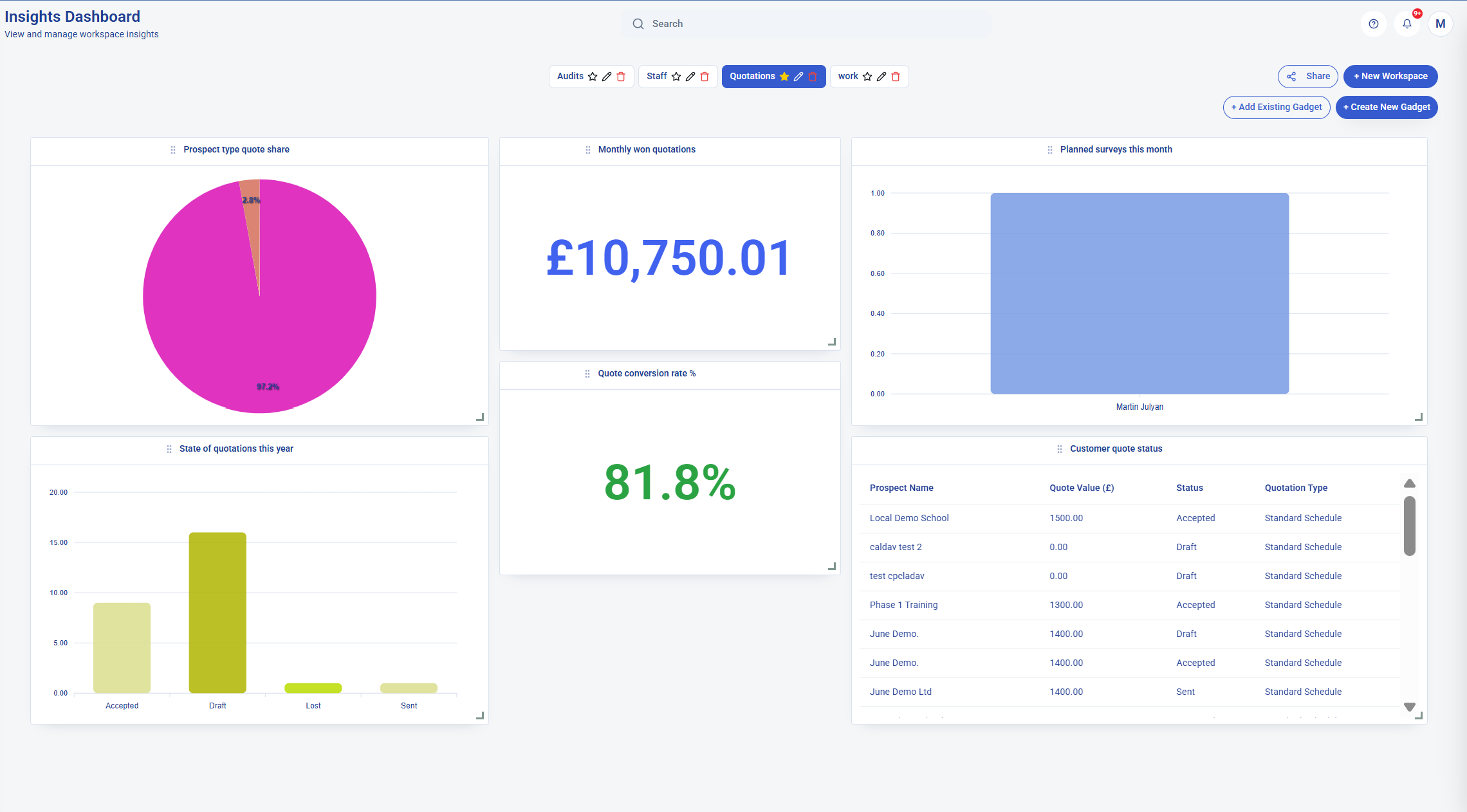
KleanFlo commercial cleaning software dashboard showing operational reporting and performance views

One connected system

What is cleaning management software?

Cleaning management software brings the customer, site, people and work records of a cleaning business into one place. It helps the office organise contracts, the team carry out the work and managers review attendance, service standards and the records needed for payroll and invoicing.

In KleanFlo, the detail starts with the enquiry and site survey, carries into the quotation and cleaning specification, and stays available as you schedule visits, review hours and report back to the customer. Each role works with the information it needs.

From setup to service review

Follow one cleaning contract through the working day

For a recurring office-cleaning contract, the office, cleaners and supervisors need different views of the same work. These examples show how the records and actions fit together.

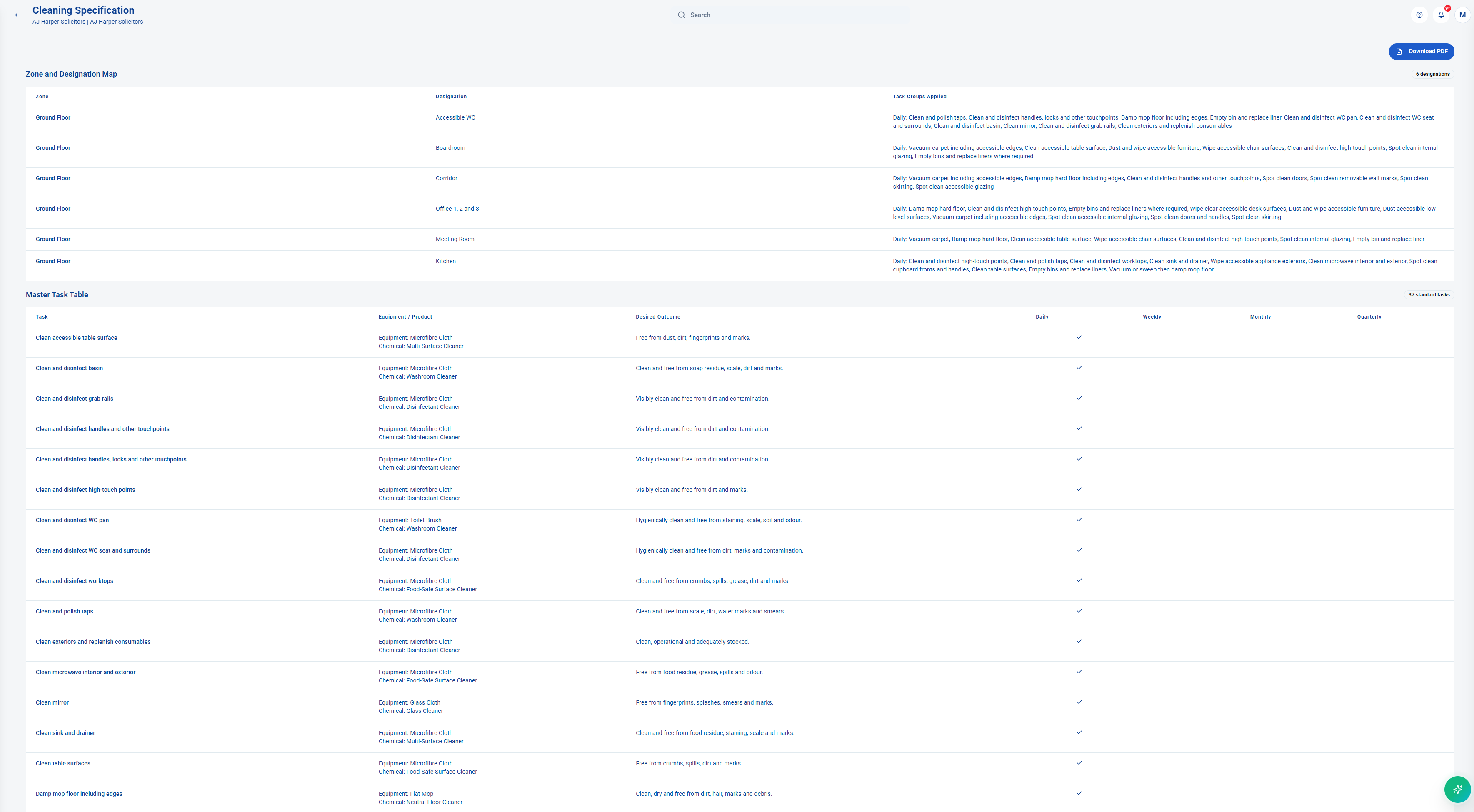
KleanFlo office view of a cleaning specification with areas and cleaning requirements

1. Agree and prepare the work

Record the site survey, build the quotation and prepare the contract. Agreed cleaning requirements can carry into a specification organised by zones, areas, tasks and frequencies, ready for the team to use.

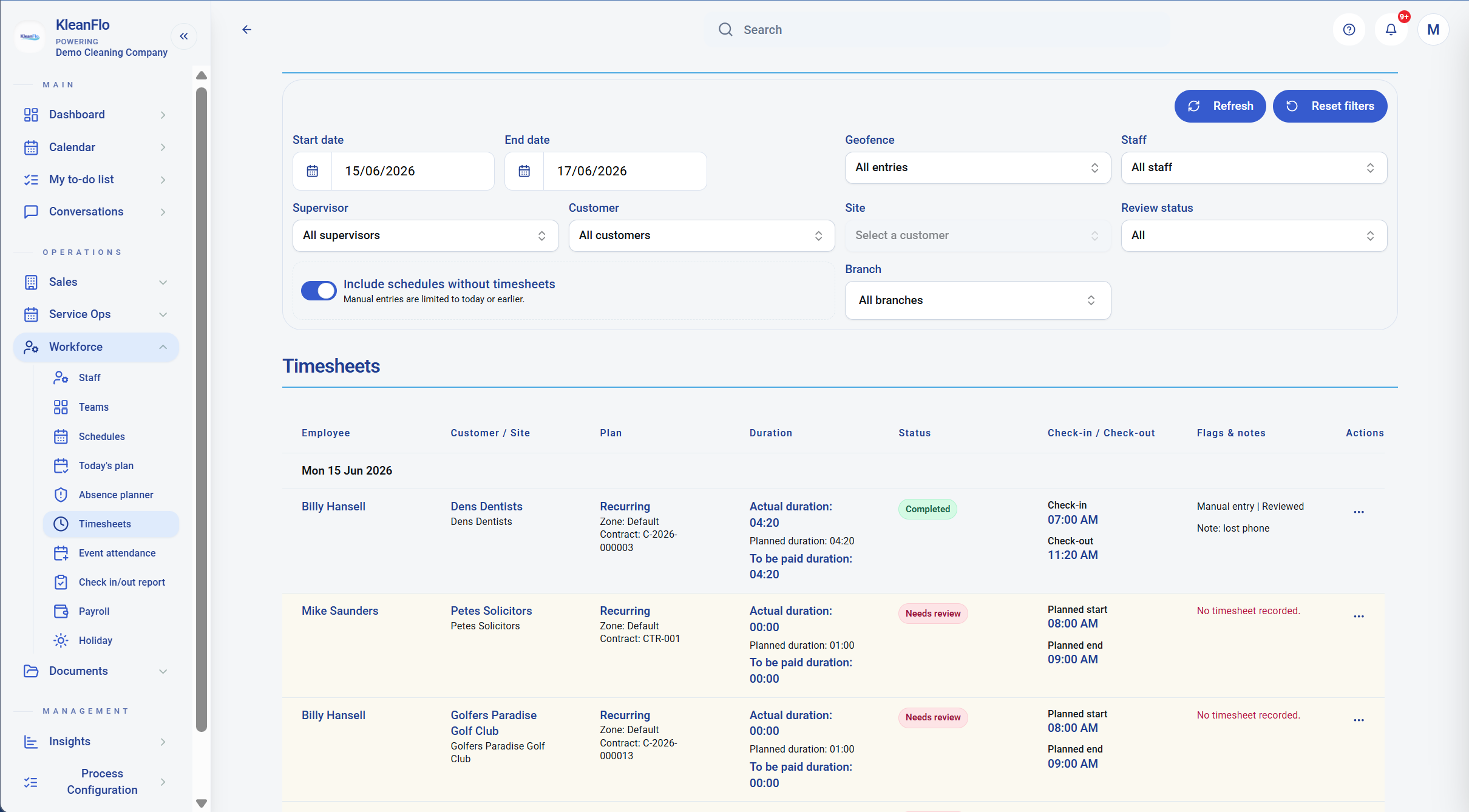
KleanFlo timesheet review showing planned, actual and payable cleaning hours

2. Deliver and review the visit

Schedule the cleaner and arrange cover when needed. The cleaner views the work and checks in through the Staff app. Managers review missing records, attendance exceptions and payable hours before payroll preparation.

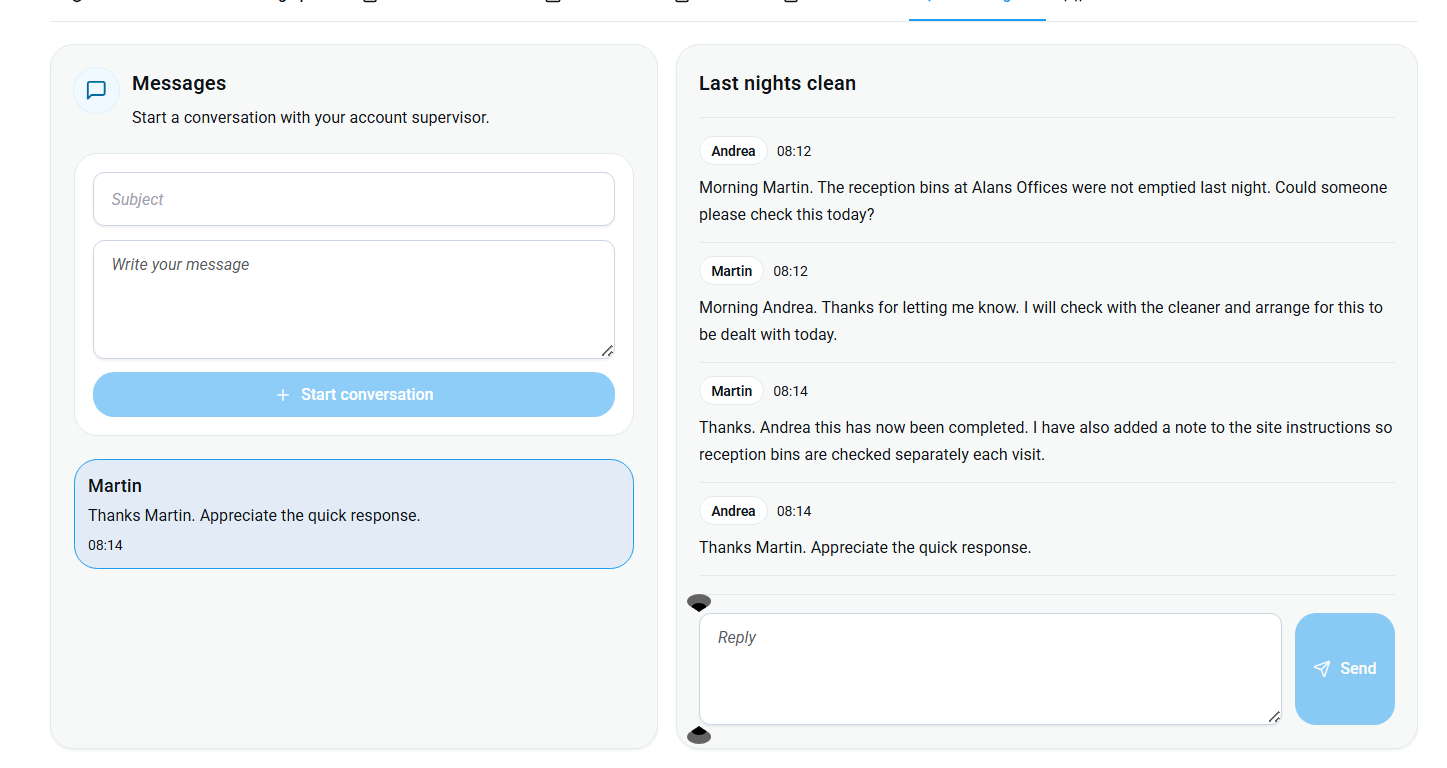
KleanFlo customer portal conversation with a service question and follow-up

3. Check standards and respond

A supervisor records an audit or QC visit, adds photographs and follows up any failed checks. Customers can see selected reports through the portal and discuss service questions in shared conversations.

Operational coverage

Commercial cleaning management software for the full contract lifecycle

Explore the tools for each stage of running a cleaning business, from agreeing the work to checking its delivery and preparing the accounts.

1

Customers, sites and contracts

Keep customer records, sites, contacts, access notes, zones, designations, tasks, documents and contract details together.

2

Quotations and mobilisation

Move from enquiry and site survey into quotation, accepted work, cleaning specification and operational setup without rekeying the same detail.

3

Cleaning rota management

Plan fixed-time shifts, evening keyholder work, weekend-window work, no-set-time visits, recurring schedules, one-off jobs, holidays and absence cover.

4

Two mobile apps

Give cleaners the Staff app for daily work and supervisors the On the Move app for site visits, audits, schedules, incidents, conversations and field control.

5

Attendance and lone-worker checks

Capture GPS, geofence, NFC, QR and IVR attendance, review missing check-ins, check-outs, late finishes and payroll-ready hours.

6

QC visits, audits and inspections

Run quick QC visits or formal audits across tasks, designations and zones, then capture scores, notes, photos and corrective actions.

7

Customer reporting and portal access

Share selected audit reports, service updates, documents and conversations through controlled customer-facing access.

8

Payroll, stock and operations

Review timesheets, absence, payroll periods, incidents, equipment, vehicles, stock, consumables and operational processes.

9

Integrations and imports

Connect Xero, QuickBooks, FreeAgent, Signable, DocuSign, Google, Microsoft 365, OneDrive, Exchange, CalDAV, SMTP and data-import workflows.

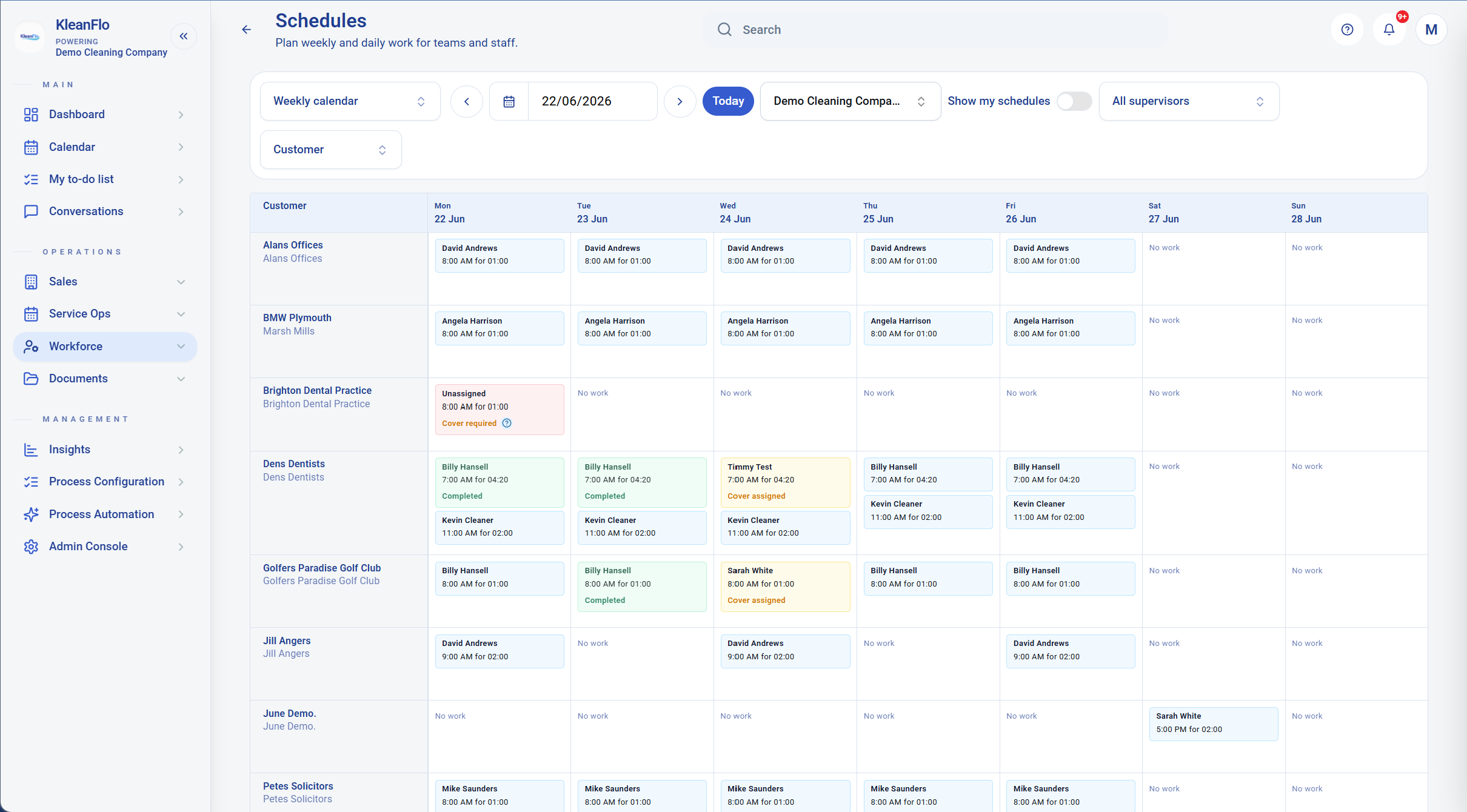
KleanFlo customer schedule view showing planned commercial cleaning work by day Customer and site schedules stay connected to the wider operational record.

Scheduling and attendance

Keep rotas, cover and attendance connected

Cleaning schedules are rarely just neat blocks in a calendar. KleanFlo supports fixed start times, evening keyholder work, weekend cover windows and no-set-time visits, then brings the attendance evidence back into one review process.

Managers can compare planned and actual work, review exceptions, see mobile cover, check missing attendance, and prepare payroll hours without rebuilding the rota in a spreadsheet.

Quality control

Check cleaning standards and share the results

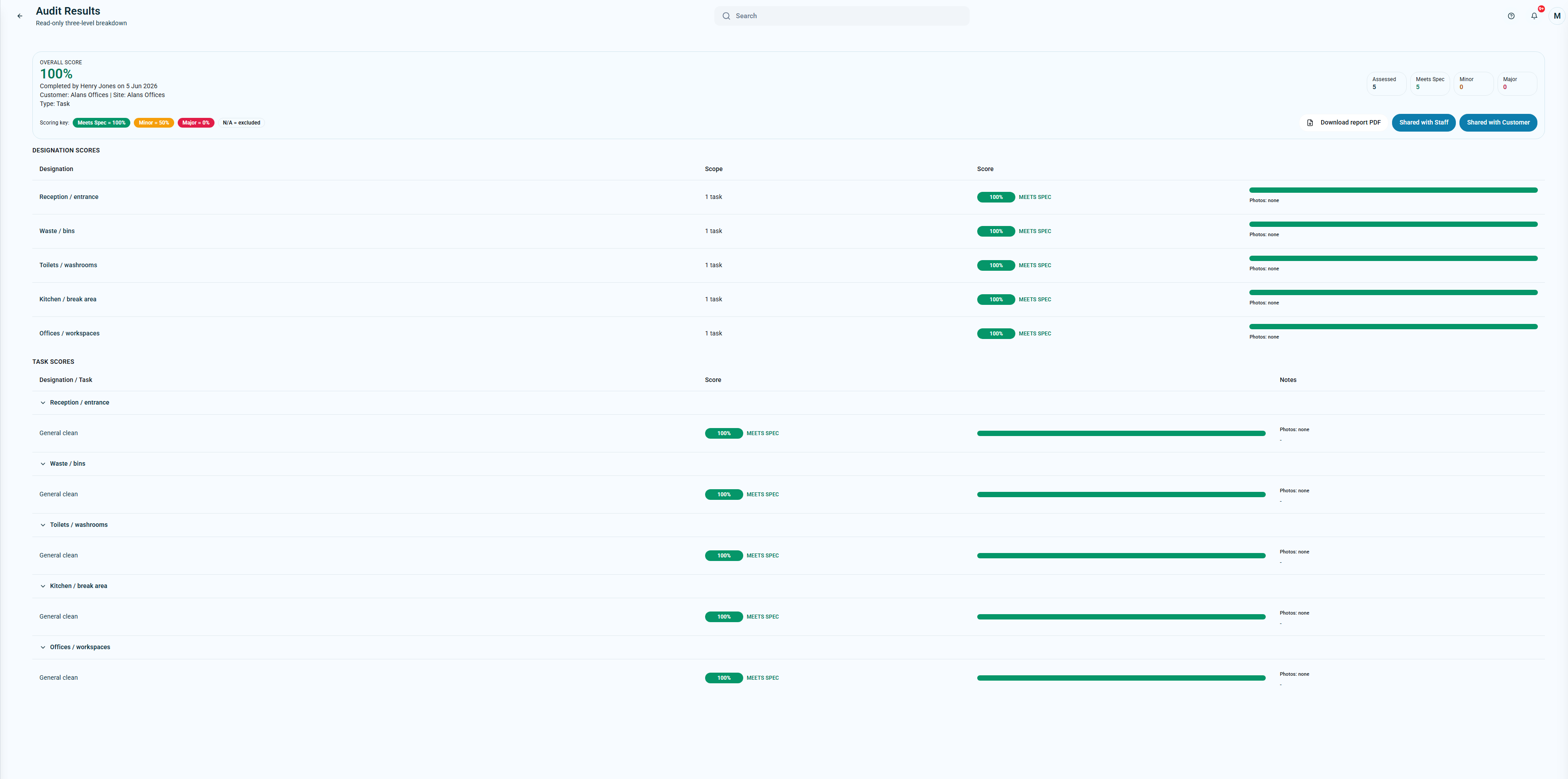
A QC visit is usually an operational check: the supervisor visits the site, checks the standard, records what needs attention and follows up quickly. An audit is usually more formal, scored and often customer-facing. KleanFlo supports both styles through inspection/audit workflows across tasks, designations and zones.

Supervisors can complete checks, record notes, attach photo evidence, review scores, launch corrective actions and share selected reports with customers where appropriate.

KleanFlo commercial cleaning audit results with task scores and customer report options Audit results can be reviewed, followed up and shared with customers where appropriate.

KleanFlo Staff app

The Staff app gives cleaners and site teams the information and actions they need while they are away from the office.

  • QR, GPS, geofence, NFC and offline attendance workflows
  • Planned work, job details, cleaning specification and active job timer
  • Completion photos, incidents, documents, conversations and audit feedback
  • Holiday requests, rota visibility, personal details and process actions

On the Move supervisor app

On the Move is for supervisors and mobile managers who need live field control without returning to the office system.

  • Dashboard, customers, sites, prospects, survey visits and quotation work
  • Supervisor schedules, site attendance, NFC site setup and my to-do work
  • Audits, corrective actions, incidents, processes, documents and conversations
  • Staff, holiday/timesheet review, weekend cover and operational follow-up

Back office depth

Bring reviewed hours, stock and invoicing into the office workflow

The mobile apps matter, but the office still needs clean records, review workflows and handovers into accounts, payroll and customer service.

P

Payroll review

Review timesheets, planned versus actual hours, payroll periods, adjustments and export/posting routes before cleaner hours are treated as final.

A

Accounts packages

Use branch-level Xero, QuickBooks and FreeAgent connections for customer/staff imports, reconciliation and selected finance/payroll workflows.

S

Stock and consumables

Track suppliers, stock items, locations, movements, physical counts, transfer requests, orders and site material rates.

I

Incidents and follow-up

Log incidents from office or mobile, attach photos, keep history and connect follow-up work to processes, sites and people.

D

Documents and signatures

Manage document folders, staff/customer files, generated documents, Signable, DocuSign and OneDrive-backed storage workflows.

W

Process automation

Build custom workflows for onboarding, return to work, failed audit follow-up, customer complaints, equipment, vehicles and contract mobilisation.

For recurring contracts, multiple sites and mobile teams

KleanFlo is strongest when a cleaning business has recurring contracts, multiple customers, multiple sites, mobile cleaners, supervisors, audit/QC requirements, customer reporting expectations and spreadsheets that are starting to creak.

  • Office and commercial cleaning contracts
  • School cleaning and term-time work
  • Facilities management cleaning operations
  • Multi-site customers and growing cleaning teams
  • Contracts where attendance, proof, cover and customer reporting matter

Useful when spreadsheets are no longer enough

Many cleaning companies start with spreadsheets, WhatsApp messages and paper checklists. KleanFlo helps move that information into live customer, site, staff, schedule, attendance, audit, QC, incident and document records so the business can operate with fewer disconnected handovers.

Why choose KleanFlo?

Built around the detail of running a cleaning company

KleanFlo is built around the awkward details of running cleaning contracts, not just generic jobs in a calendar.

U

Modern UX

Office teams, supervisors and cleaners get clear screens for the work they actually need to complete, review or follow up.

M

Two mobile apps

The Staff app supports frontline cleaners. On the Move supports supervisors with customer, site, survey, schedule, audit and incident tools.

C

Customer portal

Give customers controlled visibility of selected audit reports, service updates, documents and conversations without exposing the whole back office.

Q

Audit and QC depth

Run formal audits or practical QC visits across tasks, designations and zones, with evidence, scoring and corrective-action follow-up.

I

Integrations

Connect accounting, e-signature, calendar, email, storage and import workflows so operational records do not have to be typed twice.

UK

UK-native workflows

Support UK cleaning realities including school terms, annualised hours, keyholder work, weekend cover, payroll review and multi-site contracts.

FAQs

Commercial cleaning software questions

What is commercial cleaning software?

Commercial cleaning software helps cleaning companies manage customers, sites, quotes, recurring contracts, shift patterns, staff mobile access, attendance evidence, QC visits, audits, incidents, documents, customer communication, payroll review and reporting.

How does cleaning management software differ from a scheduling app?

A scheduling app focuses on when work happens and who is assigned. Cleaning management software also covers the customer and site records, quotations, contract requirements, quality checks, stock and financial administration around those visits. In KleanFlo, scheduling and cover are part of that wider workflow.

Can KleanFlo replace cleaning spreadsheets?

Yes. KleanFlo can help cleaning companies move customer, site, staff and schedule information from spreadsheets into live operational records. Start by reviewing your existing files and mapping the information into KleanFlo. Our spreadsheet setup guide explains the import and assisted setup options.

Does KleanFlo support QC visits as well as audits?

Yes. KleanFlo can support quick supervisor QC visits and more formal cleaning audits. Teams can check tasks, designations or zones, record notes and photos, score standards and create corrective actions.

Does KleanFlo support keyholder and weekend cleaning shifts?

Yes. KleanFlo supports real commercial cleaning shift patterns including fixed start times, evening keyholder work, weekend-window cover and no-set-time visits.

Does KleanFlo have two mobile apps?

Yes. KleanFlo Staff supports frontline cleaners and site teams. KleanFlo On the Move supports supervisors and mobile managers with schedules, customers, surveys, audits, incidents, conversations and field workflows.

Does KleanFlo support mobile attendance proof?

Yes. KleanFlo supports GPS, geofence, NFC, QR, IVR and offline-aware attendance workflows, depending on how the cleaning company configures the site and working pattern.

Does KleanFlo connect with accounting software?

Yes. KleanFlo supports branch-level connections for Xero, QuickBooks and FreeAgent, including import, reconciliation and selected finance or payroll handoff workflows.

Does KleanFlo work for school cleaning contracts?

Yes. KleanFlo includes school cleaning workflows for term dates, non-term work, school closures, zones, designations and annualised-hour planning.

Ready to see how KleanFlo fits your cleaning operation?

Start with a demo or send the spreadsheet, rota or setup you currently use. We will show how it could map into KleanFlo.

Book a Demo