
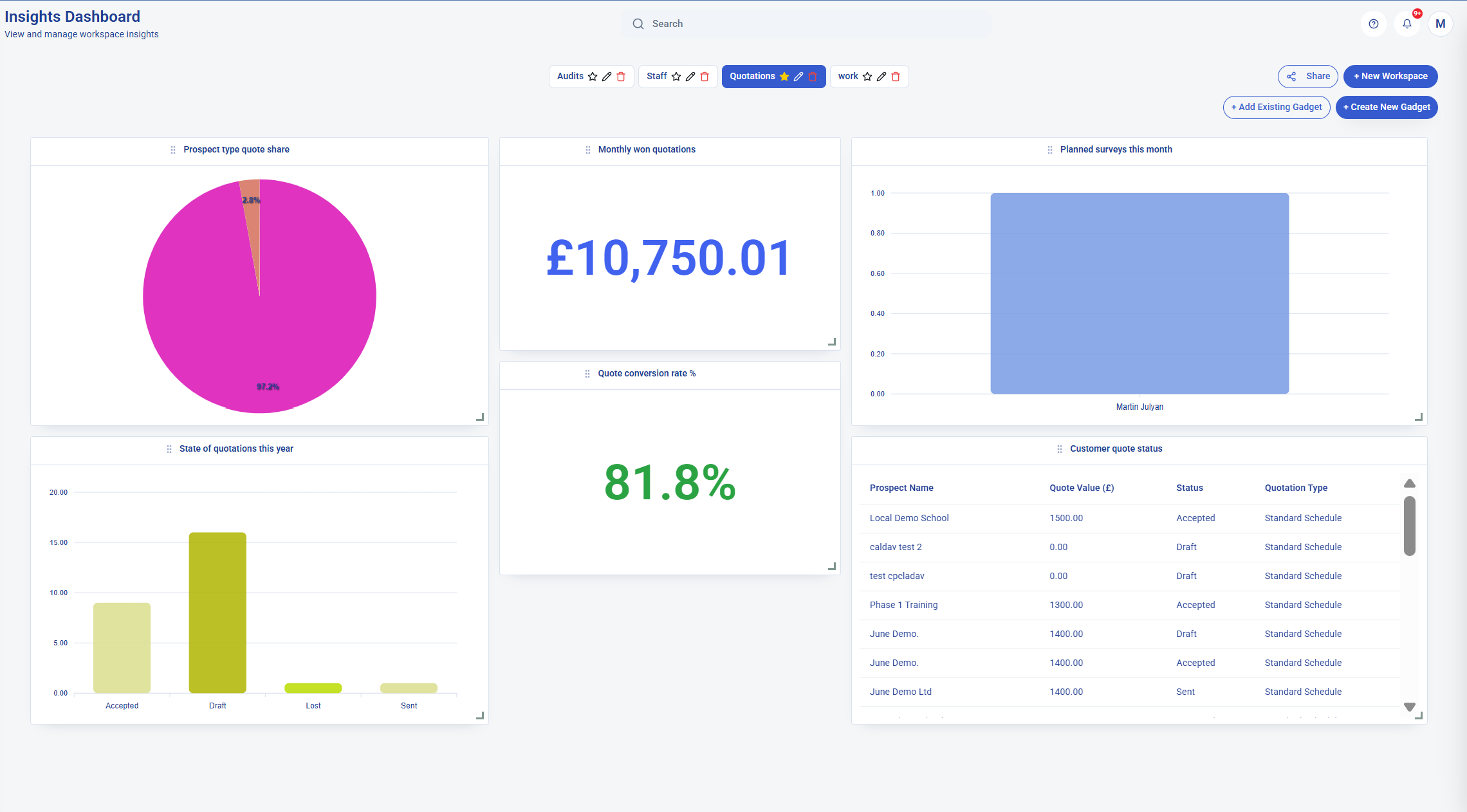
Why cleaning companies compare KleanFlo and Swept
If you are managing several cleaning sites, the everyday questions are familiar: is each shift covered, did the cleaner attend, has the supervisor checked the work, and does the customer know what has been done?
You may also want to cut the admin around those jobs. A new contract needs a quotation, a cleaning specification and a schedule. An extra clean needs instructions and an invoice. A delivery of consumables needs a stock record and, sometimes, a customer charge.
That is why it helps to compare the whole journey. Think about which tasks you want in your cleaning software and which you are happy to keep in other tools.
If you are choosing between us, use a real customer and site in both demos. Follow the work from setup through to completion, then check what the office still has to do by hand.
What Swept offers
Swept publishes three plans: Launch, Optimize and Scale. Its plan comparison groups scheduling and time tracking as core features, inspections and geofencing under Optimize, and supply requests, client communication, profitability reporting and one-time work orders under Scale. Check the plan you would need for your business. Compare Swept plans.
Two useful features to look at are translation into more than 100 languages and its location-based approach to managing work. Swept also describes mobile inspections with offline syncing, so supervisors can complete checks without a connection. Languages and plans; mobile inspections.
KleanFlo as a Swept alternative
We bring prospects, customers, sites, quotations and contracts together with the daily cleaning operation. The office can manage schedules, cover, timesheets, quality checks and invoices, with the customer and site records alongside the work.
Cleaners use our Staff app for their shifts, job details, cleaning specifications, attendance, photos, incidents and messages. Supervisors use On the Move for site visits, surveys, audits, corrective actions, staff cover, approvals and timesheet review.
Our stock and consumables tools cover supplier catalogues, orders, deliveries, stores, vans, transfers, physical stock checks and chargeable consumables. Availability depends on your package, permissions and setup, so we will show you the options that fit your team.
KleanFlo vs Swept feature comparison
| What you need | KleanFlo | Swept's published features |
|---|---|---|
| Build your own process | Our process builder lets you create your own steps, owners, forms, documents, signatures and approvals for staff, vehicles, sites and corrective actions. Start processes manually or through configured automation rules. | Published tools cover location checklists and one-off work orders. These pages do not describe a general process builder for HR and vehicle workflows. Checklists; work orders. |
| Start the process automatically | Configure starts from record changes, dates, repeating schedules or another process finishing. Set matching records, due-date rules and duplicate/ownership controls, then test before publishing. See the automation example. | The reviewed checklist and work-order pages do not explain date or event rules starting a custom HR or vehicle process. Confirm that workflow in a demo. Checklists; work orders. |
| Work through actions on mobile | Staff and supervisors can update actions from their apps. Our example shows instructions, required questions, saved answers, action status and process stages. See the mobile example. | Cleaners use location checklists and see assigned work-order instructions on mobile. Confirm the experience for processes outside those workflows. Mobile checklists; work orders. |
| Create a cleaning specification | Cleaning requirements from the site survey and quotation carry into the contract specification, organised by zones, areas and tasks, with frequencies, equipment, products and expected outcomes. See the finished example. | Managers create location checklist tasks, with required and optional items. The page does not describe generating a contract specification from a quotation. Checklists. |
| Give the team access to the specification | Available in the office system, in the Staff app and as a downloadable PDF. The phone example shows a specification made available offline on that device. View the full PDF. | Location checklists are available when the shift starts; task photos can be added in the mobile app. Completed checklist results can be downloaded as PDFs. Checklist access and reports. |
| Set up a new contract | Prospects, site surveys, quotations and contracts, with cleaning specifications built around zones, areas and tasks. | The pages reviewed focus on managing live cleaning locations. Ask Swept to show how a survey and quotation become a contract and schedule. |
| Plan regular cleaning | Recurring schedules, staff and team assignments, with set-time, evening keyholder, weekend-window and no-set-time shift rules. | Recurring shifts, cleaner assignments and calendar, location and team views. Scheduling. |
| Arrange cover | Absence planning, cover assignments, weekend rotas and supervisor amendments. | Mobile time-off requests, manager approval, visibility of affected shifts and reassignment of cover. Time off and cover. |
| Record attendance | QR, GPS/geofence and NFC attendance, offline attendance syncing and planned versus actual timesheet review. | Mobile clock-in/out, GPS/geofencing, attendance alerts and payroll exports. Time tracking. |
| Check cleaning quality | Scheduled and ad hoc audits, QC visits, scores, photos, customer reports and corrective-action follow-up. | Custom inspection templates, checkpoint ratings, photos, offline mobile inspections and shareable reports. Inspections. |
| Keep people informed | Conversations between office users, staff and customer contacts, plus customer portal access and audit reporting. | Location messages, direct and client messaging, announcements and read visibility, depending on plan. Communication. |
| Manage supplies | Supplier catalogues and orders, stock locations, van stock, transfers, site deliveries, counted quantities, variances and chargeable consumables. | Approved product lists, mobile supply requests, approvals, delivery tracking and location stock/cost reporting. Supply management. |
| Handle one-off jobs | Customer/site setup, price, deposit, staff assignment and scheduling in one flow, with completion and invoice workflows. | Work orders with cleaner instructions, scheduling, hourly or fixed billing calculations, status tracking and PDF/CSV reports. Work orders. |
| Prepare payroll and accounts | Timesheet review, payroll preparation and accounting connections including Xero, QuickBooks and FreeAgent. The available posting workflow depends on the provider and setup. | Approved employee hours sent to QuickBooks Online as time entries; payroll is processed in QuickBooks. QuickBooks payroll integration. |
| Understand site costs | Quotation costing, planned/actual time, payroll preparation and stock cost records. Ask us to show the reports you need. | Location profitability reporting with contract value, recorded labour costs, cost variance and margins. Profitability reports. |
| Manage branches and a franchise network | Our Network option supports multi-branch and franchise cleaning groups, with branch oversight, territory controls, governance and tailored rollout planning. See Network. | Multi-Company supports switching between company profiles on web and mobile, with roles per company; franchise use is explicitly described. Confirm the oversight and territory controls needed. Published features. |
| Manage school term contracts | Term dates, term-time schedules, non-term contracted hours, closure planning and annualised-hour review. School cleaning software. | Its scheduling page describes recurring shifts; it does not explain school term calendars, non-term hour balances or annualised-hour planning. Scheduling information. Confirm those workflows in a demo. |
How contract setup differs
In KleanFlo, our quotation workflow connects the site survey to contract setup. Customer and site details, costing and cleaning requirements can carry into the contract and its cleaning specification. You can then set up the schedule and assign the work.
Swept describes recurring schedules aligned with service agreements and cleaner instructions for each location. See its scheduling workflow.
If you want survey, quotation and contract setup in the same system, ask Swept to demonstrate those steps too. The pages reviewed do not establish that full workflow. Use one new contract in both demos and check which details need entering again.
How cleaning specifications are created and shared
In KleanFlo, the cleaning requirements you build during the site survey and quotation carry into the contract specification. Organise the work by zone and area, with each task's frequency, equipment, chemical or product and expected finish.
The office can view the specification and download it as a PDF. Cleaners can see the task details in our Staff app. Our phone example is marked "Available offline", showing that the specification has been made available on that device without a connection. See the office and phone screens, or read the full eight-page PDF example.
Swept describes manager-created checklist tasks assigned to locations, with required and optional items available when a shift starts. Cleaners and supervisors can add task photos through the mobile app, and managers can download completed checklist result reports as PDFs. See Swept checklists. A completion report is different from the specification of agreed work. Ask Swept to show whether quotation details can create the checklist and how equipment, products, frequencies and expected outcomes are recorded.
In both demos, use the same site and follow the instructions from setup to the cleaner's view. Check what is generated from existing information, what needs entering separately and which details appear in the shared document.
How cleaning audits and inspections compare
Both systems cover inspections. Swept describes templates organised by area, photos, scores and client reports. See its inspection features.
In KleanFlo, we also connect failed checks to corrective actions and follow-up. For an owner managing several sites, the useful question is: who fixes the problem, when is it due, and how do you know it has been dealt with? Ask both systems to show that part of the process.
Build the process around your business
Your process. Your steps. Your way of working. Our process builder lets you design the workflow your business needs, rather than simply use a preset checklist. Choose the actions, who is responsible, the forms and documents, and the review or approval steps.
You can build a flow yourself or use AI-assisted creation for a first draft, then review and adjust it. Processes can start manually or through configured automation rules. Staff can update actions in the Staff app, while supervisors can work from On the Move or the office system.
- Vehicle checks: build your check form, assign the review and include follow-up actions for anything needing attention.
- Personalised onboarding: include your own documents, acknowledgements, site preparation and manager checks. See our onboarding guide.
- Offboarding: create steps for returning keys, uniform and equipment, with the reviews your company requires.
- Return to work: use your questions, supporting records and manager review steps.
- Corrective actions: tailor the follow-up to the issue, with an owner, supporting records and a review before closing it.
Swept publishes location checklists and one-off work orders with instructions, assignment and status tracking. See checklists; work orders. The reviewed pages do not describe a general builder for processes such as employee offboarding or return-to-work reviews. Ask it to show those workflows with your own documents, owners and approvals before deciding how well it fits.
One example, from setup to the person doing the work
Build your process, decide when it starts, and put the actions in your team's hands. These screens show a weekly van-check example at three stages: less remembering and less chasing, with your own checks and review steps.
1. Build your checks
Choose the questions, required answers and who can complete the action. This workflow includes the van check and a separate review step.
See the builder example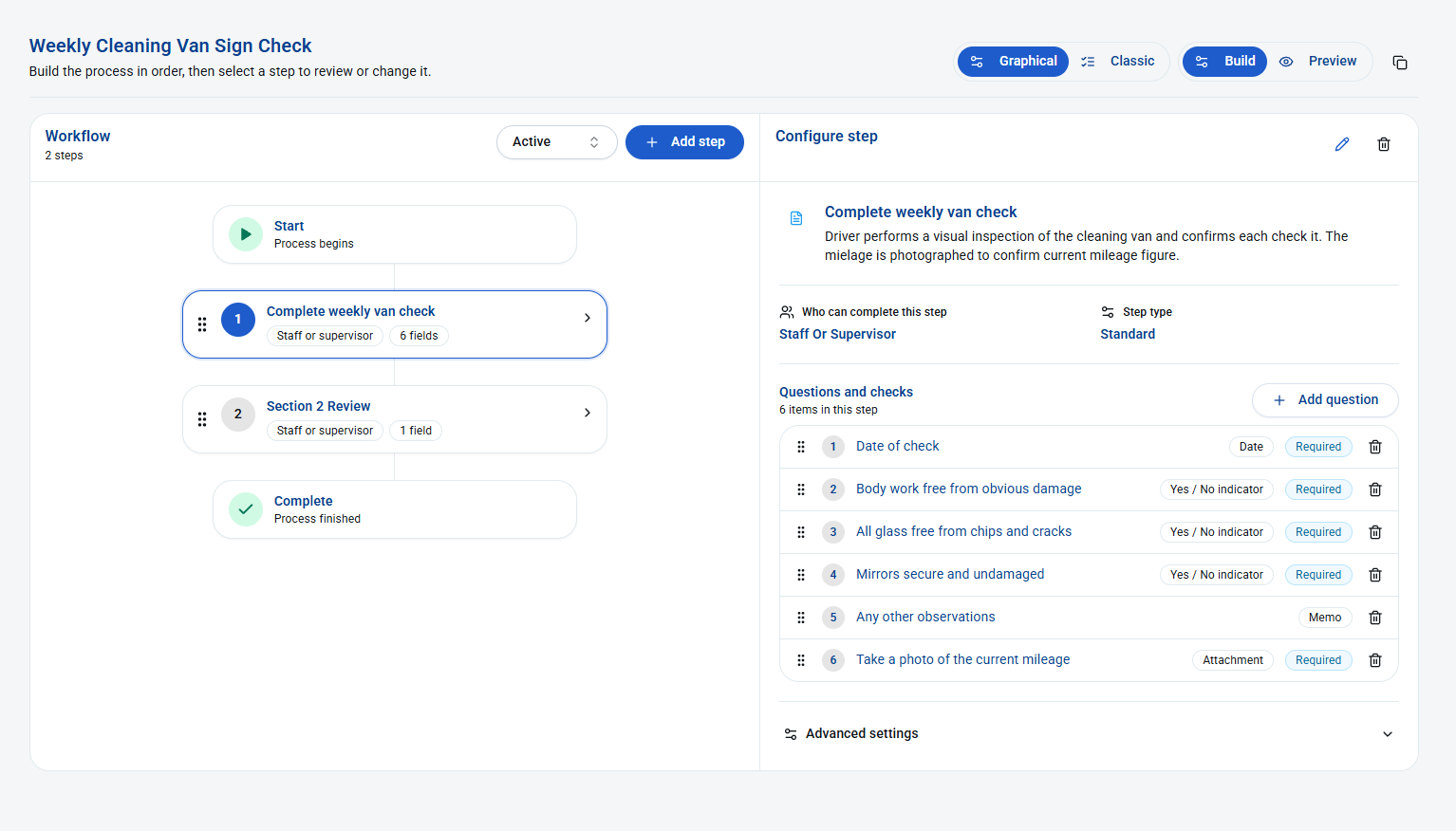
2. Set when it starts
The draft automation uses a weekly schedule for vehicle records. Configure matching records, due-date rules and safety settings, then test and publish. Your team still performs the check.
See the automation example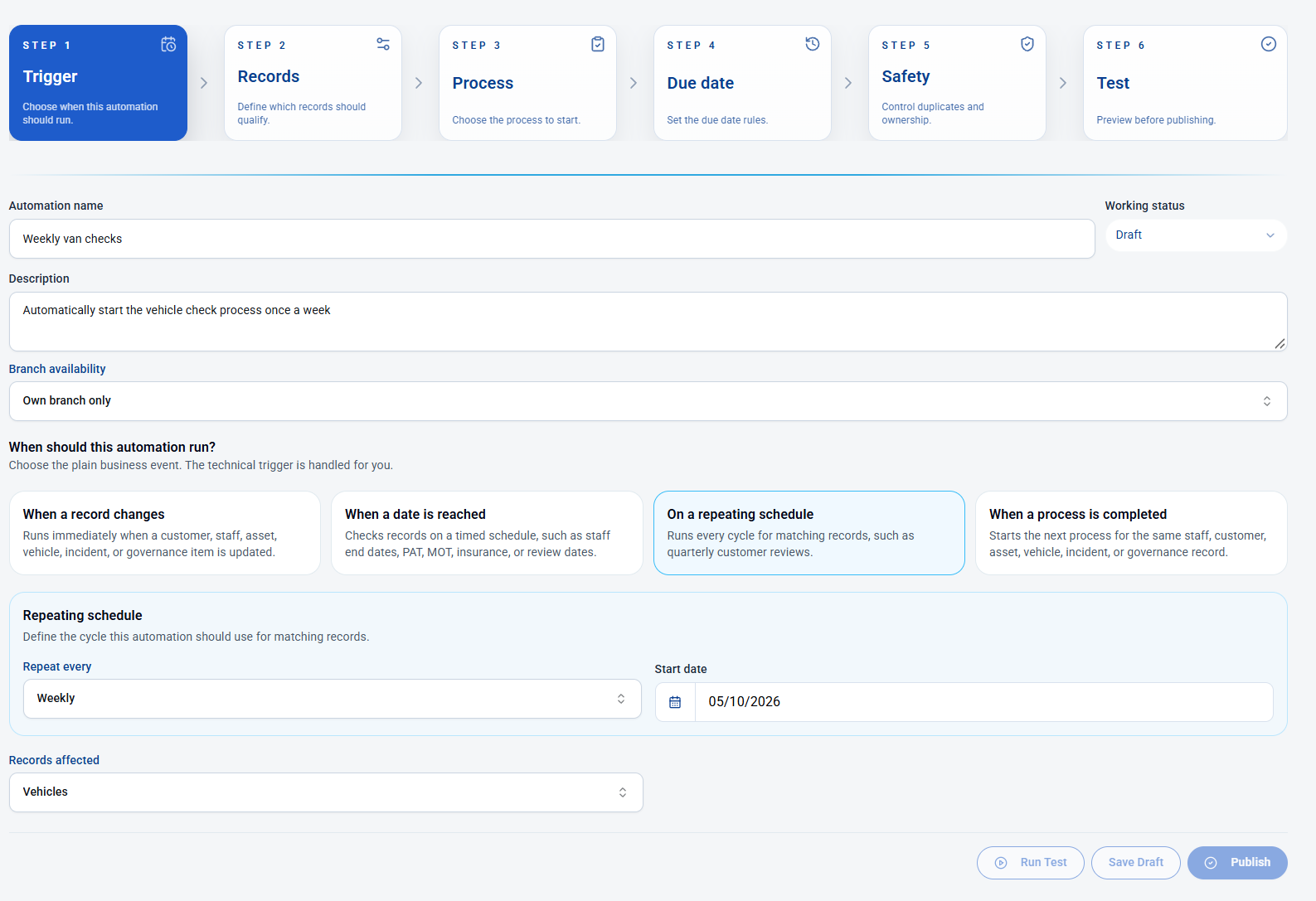
3. Work through it on a phone
The person doing the check sees the instructions and required questions, can save answers and update status. This example is Not Started and shows process stages including Awaiting Review and Blocked.
See the mobile example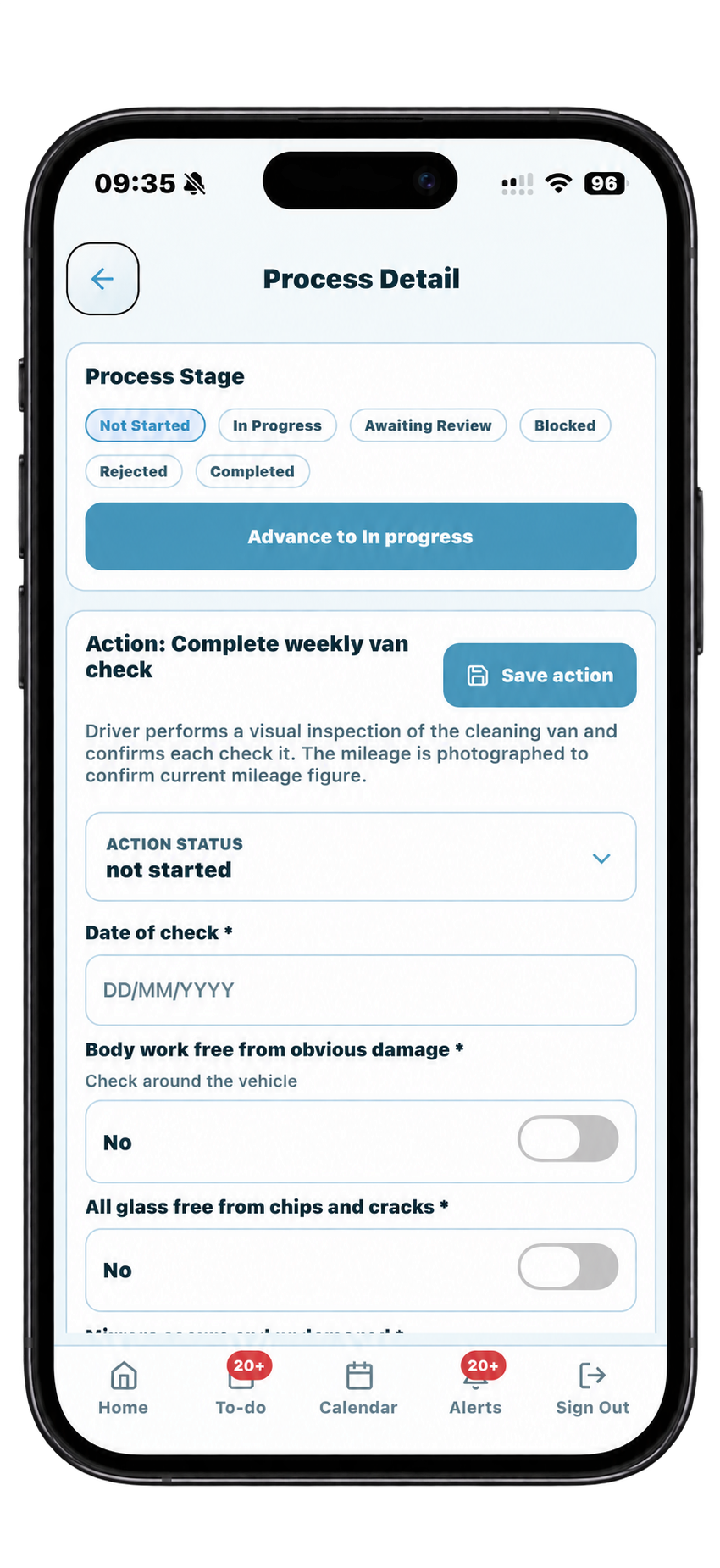
Bring a process you already use to the demo. We will show how its steps fit into the builder, so you can check that it works your way.
How stock control and consumables compare
Swept describes cleaner supply requests, manager approvals, stock visibility and delivery confirmations. See its supply workflow.
Our stock workflow lets you follow supplies from the supplier into a store or van, then out to a customer site. You can count what is left, record a variance and review the movement history. Where consumables are chargeable, delivery records can be used in the invoicing workflow. See our stock control page.
Use a simple demo example: receive ten boxes, move four to a van, deliver two to a site, then count the van stock. Ask each system to show the remaining quantities, the history and any customer charge.
How one-off jobs and invoicing compare
Swept's work orders cover assignment, instructions, billing calculations and reports that can be used for invoicing. See its work-order workflow.
Our one-off job screen can create a customer or site, capture the job and deposit, schedule the cleaner and send the instruction. When the job is completed, the invoice workflow can generate the invoice and post it to Xero or QuickBooks where integrated.
Ask both providers to show a new customer's job from the first phone call to the final invoice, including a deposit. Check which steps are automatic and which need someone in the office.
KleanFlo vs Swept pricing: what to check
Swept prices by plan and location band, with an entry band covering up to 15 locations and a choice of billing frequency. Check its current pricing.
Our pricing is organised by package and employee count, with supervisor options and other setup charges where applicable. Compare the total for your sites, staff and required features, including VAT, billing currency and any commitment. A starting price alone will not tell you what your setup costs.
Is KleanFlo the right Swept alternative for your business?
Swept is worth considering if your priorities are location-based workforce management, multilingual communication, inspections, supply requests and site profitability reporting. Its published features give you plenty to test in a demo. Swept plans; profitability reporting.
We are worth considering if you want to bring the work before and after the clean into the same system: surveys, quotations, contract setup, specifications, cover, cleaner attendance, supervisor visits, corrective actions, stock and invoicing.
The best fit depends on how you run your business. Bring a recurring contract, an absence, a failed quality check and a one-off job to both demos. You will learn more from those examples than from a long list of ticked boxes.
When you run branches, franchises or school contracts
Your day-to-day cleaning work still comes first. If you also run several branches or a franchise network, our Network option supports branch oversight, territory controls, governance and tailored rollout planning. Bring your branch structure to a demo so we can show the setup you need.
Multi-Company supports switching between company profiles on web and mobile, with roles per company; franchise use is explicitly described. Confirm the oversight and territory controls needed. See the competitor's published details. Multiple sites, multiple companies and franchise governance are different requirements; compare the structure and access your business actually needs.
School contracts need more than a repeating weekly shift. Our school cleaning tools cover term dates, term-time schedules, closures, non-term contracted hours and annualised-hour review. See term-time scheduling and annualised hours.
Its scheduling page describes recurring shifts; it does not explain school term calendars, non-term hour balances or annualised-hour planning. See the scheduling details. Ask both systems to show one school contract through term time, a closure and holiday cleaning, including the hours remaining to plan.
About this comparison
This page was prepared on 5 October 2026 using the Swept pages linked above, our office and mobile app feature documents, our quotation workflow and our stock and consumables guide. Swept's descriptions are their published claims. We have not independently tested their software. Where a workflow was not clear in the pages reviewed, we have suggested asking for a demonstration.