Already have your cleaning business in Excel? We'll import it for you.
Published: 13 July 2026Reading time: 7 minutes
Do not waste hours reformatting spreadsheets. Upload the Excel or CSV files you already use and KleanFlo's AI Migration Assistant helps understand your data, map it to the correct fields and prepare it for import.
No fixed templateAI field mappingDone-for-you migrationLive schedules fast
What this page covers
How KleanFlo removes the pain of switching systems
How the AI Migration Assistant reads the files you already have
How customers, sites, staff and schedules are mapped for review
How KleanFlo can migrate everything for you
How one existing customer contract can still be set up in minutes
How accounting integrations with Xero, QuickBooks and FreeAgent help
Prefer the PDF?
The downloadable setup guide is still available, but this page explains the setup process in more detail.
The barrier is not interest. It is the pain of switching
Most cleaning businesses start with spreadsheets. The successful ones eventually outgrow them.
Cleaning company owners usually know when spreadsheets are starting to hold the business back. Schedules become harder to maintain, contract details sit in several places, payroll hours need too much checking, customer records are incomplete and staff updates depend on manual messages.
The hesitation is understandable. Moving to a new system can feel like another project on top of the real work: managing customers, covering sites, supporting supervisors, handling payroll and keeping cash moving. Nobody wants to spend evenings forcing their own data into somebody else's rigid import template.
KleanFlo is designed to reduce that switching pain. Instead of asking every cleaning company to reformat data the same way, the AI Migration Assistant helps read the spreadsheets the business already uses, map the data, highlight issues and prepare the import for review.
We do not expect you to adapt your data to KleanFlo. KleanFlo adapts to your data.
Upload whatever you currently use
Every cleaning company stores its data differently. One business may have a customer sheet, a staff sheet and a separate rota. Another may have one large spreadsheet with sites, contacts, cleaner names, day columns, hours and notes all mixed together.
That should not block the move to better software. KleanFlo can work from the files you already use, including Excel workbooks, CSV files and Google Sheets exports. No fixed template is required.
1
Upload
Send the spreadsheets you already use: Excel files, CSV files or Google Sheets exports.
2
Analyse
KleanFlo AI reviews the structure and recognises customers, sites, staff, schedules, contacts and notes.
3
Review
You check the field mapping before anything is imported, with the option to change or exclude records.
4
Import
Your customers, staff, sites and schedules move into KleanFlo ready for live setup and operation.
The AI Migration Assistant does the heavy lifting
A normal SaaS import asks the customer to match a predefined template. That creates friction because cleaning businesses do not all use the same column names, structure or terminology. A column called Cleaner, Operative, Employee or Staff Member may mean the same thing. Monday, Mon, M, Day 1 or a combined weekly pattern may all describe schedule information.
KleanFlo's AI Migration Assistant is built to understand that variation. It can identify likely record types, suggest mappings and warn about missing or inconsistent information before the import is committed.
Detect duplicate customers or repeated site records.
Recognise addresses and split site address fields where needed.
Identify recurring schedule patterns and weekly day columns.
Split combined names where a contact or staff name is stored in one field.
Standardise phone number formats and flag unusual entries.
Validate email address formats before import.
Warn about missing customer names, site addresses, staff assignments or schedule hours.
Suggest improvements before the data becomes live operational records.
Review the mapping before importing
The AI does not silently push uncertain data into the system. It prepares a suggested mapping so the business can review how spreadsheet columns will become KleanFlo fields.
Customer NameMaps to CustomerThe trading or account name used for the cleaning contract.
CleanerMaps to EmployeeThe staff member assigned to scheduled cleaning work.
Weekly HoursMaps to Scheduled HoursThe planned time expected for the contract or recurring visit.
AddressMaps to Site AddressThe location where the cleaning work is carried out.
MonMaps to Monday ScheduleA day-specific schedule column used to build the weekly plan.
Everything can be changed before importing. If a column is wrong, unclear or not needed, it can be corrected before KleanFlo creates the records.
Two ways to migrate
Some owners want to stay close to the data and review the import themselves. Others simply want the job handled for them. KleanFlo can support both routes.
A
Upload and review
Upload your spreadsheets, let AI prepare the import, review the mappings, then approve the records into KleanFlo.
B
Done-for-you migration
Email us your spreadsheets and we will migrate everything for you. This migration support is included with your subscription.
Today spreadsheets, tomorrow other cleaning software
The first priority is helping cleaning companies move from Excel, CSV files and Google Sheets exports because that is where most operational data starts. The longer-term direction is broader: if a cleaning company is moving from another platform, they should be able to upload an export and let KleanFlo prepare the migration instead of starting again manually.
Moving from Jobber, ZenMaid or Housecall Pro? Upload your export. The same migration approach can help turn old system data into useful KleanFlo records.
Start with one real contract, not a blank system project
A good setup process should not begin with months of abstract configuration. It should begin with a real contract that the business understands: one customer, one main site, the service start date, the schedule, the staff involved and the basic designations or areas being cleaned.
KleanFlo's fast existing contract setup is built around that idea. It walks through the practical building blocks needed to turn an existing customer into live KleanFlo records: customer, site, contract, schedule, staff, designations and review.
For a simple existing contract, this can be five minutes of focused work. Enter the customer and site, add the contract basics, create the weekly schedule, assign the staff member, add the key designations and review before going live. Once the record is created, the schedule exists in the planner and the assigned staff member can see the work immediately in the staff mobile app.
This gives the team a faster path to a working example. Once one real contract is set up, the business can see how the pieces connect: the customer record, site details, planned schedule, staff assignment, mobile work, attendance review, audits, documents and reporting.
In practical terms, one existing customer can move from spreadsheet row to live KleanFlo schedule in minutes. The office has a schedule, the staff member has the job in the mobile app, and the business has started using live operational records.
The seven-step existing contract setup
The setup flow keeps the work tight because each step captures only what is needed to create a usable live contract. It does not ask the business to model every edge case before the first schedule exists.
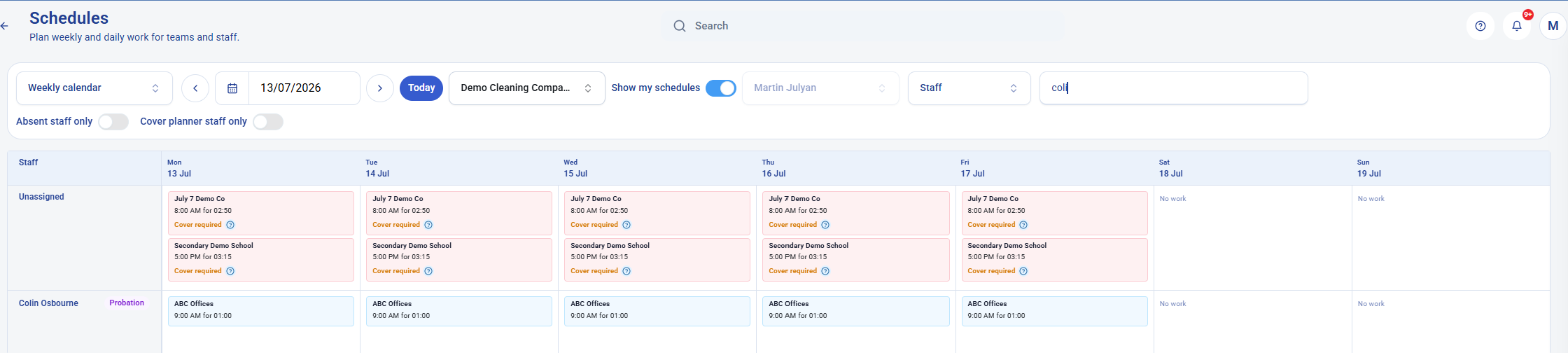
1. Customer: record the customer, main contact, email, phone and address.2. Site: confirm the working site, site contact and access notes.3. Contract: add the service start, reference, billing frequency and monthly charge.4. Schedule: create the first live schedule, such as Monday to Friday from 09:00 to 10:00.5. Staff: assign an existing cleaner now, or leave the schedule unassigned for cover planning.6. Designations: add the main cleaning areas, rooms or zones for the first site.7. Review: check the customer, site, contract, schedule, staff and designations before creating live records.Done: the weekly schedule is now in the planner and ready for the staff mobile workflow.
The finished result: ABC Offices appears on the live weekly schedule for Colin Osbourne, so the office and mobile staff workflow can start immediately.
Why this matters for staff adoption
Setup only matters if the team can use the result. When the schedule is created and a staff member is assigned, the work is no longer trapped in a spreadsheet or onboarding exercise. It becomes part of the live operational plan.
That means the office can review the schedule, supervisors can see what is planned, and the cleaner can see the job through the staff mobile app. The move to KleanFlo becomes practical quickly because staff are not waiting for a large back-office setup to finish before they see useful work.
Accounting integrations with Xero, QuickBooks and FreeAgent
Switching is easier when operational records fit the way the business already runs accounts. KleanFlo can support integrations with Xero, QuickBooks and FreeAgent so customer and billing-related records can align with the wider business process.
What the KleanFlo team helps with
Software setup should not be left entirely to the customer. Support and advice are part of the KleanFlo service, including spreadsheet review, AI-assisted import, done-for-you migration, accounting integration advice and fast existing contract setup.
Upload your files and review the suggested mappings yourself.
Email us your spreadsheets and let the KleanFlo team migrate them for you.
Set up one real contract quickly so the team can see live schedules straight away.
Related setup resources
Use these pages alongside the migration guide to plan the workflows that should go live first.
No. Upload your existing Excel, CSV or Google Sheets exports and KleanFlo's AI Migration Assistant can help map customers, sites, staff, contacts, schedules and notes ready for review.
Do we need to use a fixed import template?
No. The migration process is designed around the files you already use. The AI suggests mappings even when column names are different, and everything can be changed before import.
Can we start with one customer?
Yes. Starting with one real existing contract is often the best way to prove the workflow before expanding across the business. A simple contract can be set up quickly with customer, site, contract, schedule, staff, designations and review steps.
Can staff see the schedule straight away?
Yes. Once the schedule is created and the staff member is assigned, the planned work can be visible in the staff mobile app so the team can start using the live workflow immediately.
Can KleanFlo connect to our accounts system?
KleanFlo can support integrations with Xero, QuickBooks and FreeAgent, helping setup fit around the way the business already manages accounting and billing-related records.
Will the KleanFlo team help us set this up?
Yes. Support and advice are part of the service, including AI-assisted import, done-for-you migration, contract setup, integrations and rollout order.
Do our spreadsheets need to be perfect first?
No. Upload what you have. The migration process can flag duplicates, missing information and suggested improvements before anything is imported.
Want us to look at your current spreadsheets?
Ask for a free review. Tell us what you use today and we will show how your customers, sites, staff and schedules could move into KleanFlo.

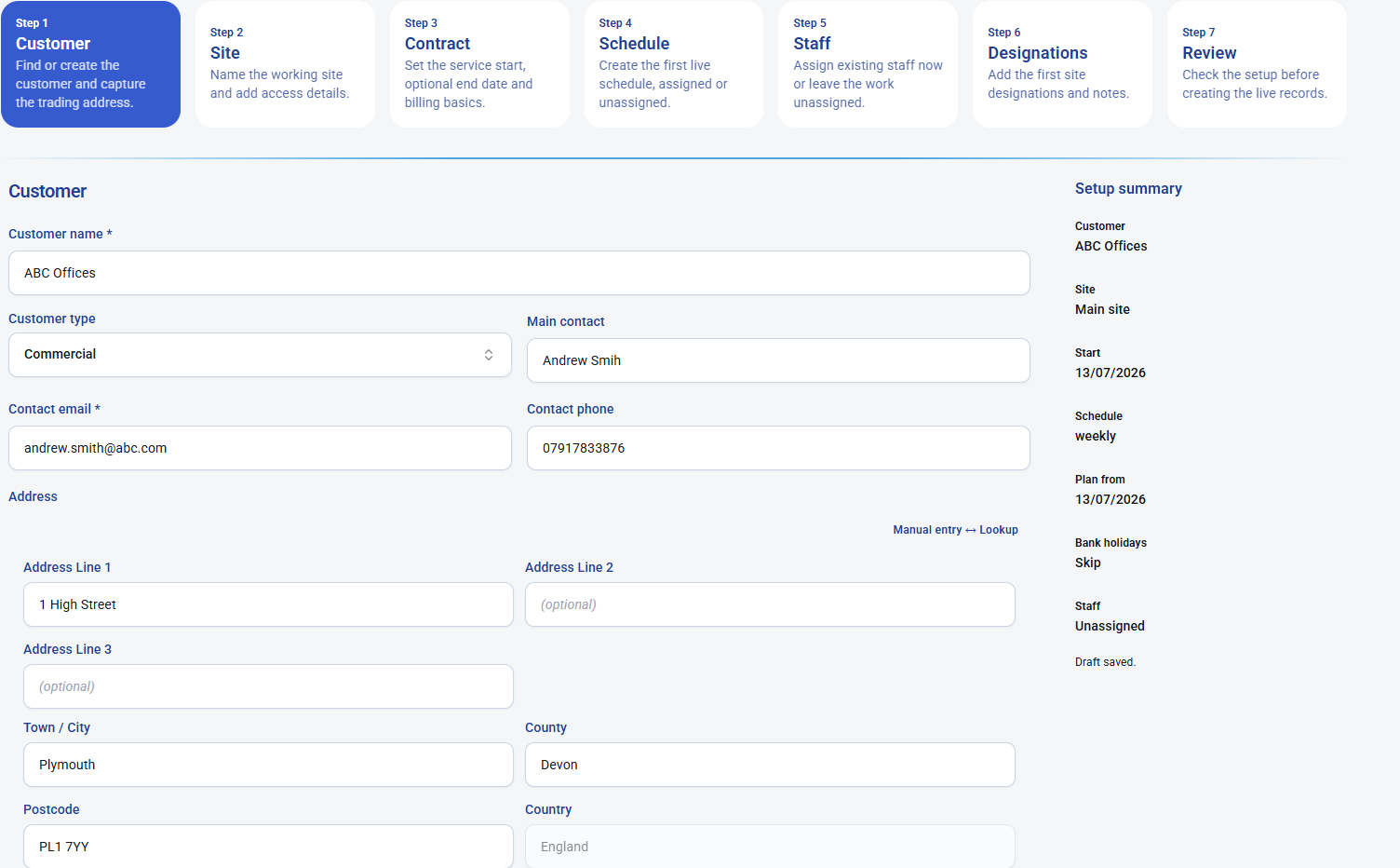 1. Customer: record the customer, main contact, email, phone and address.
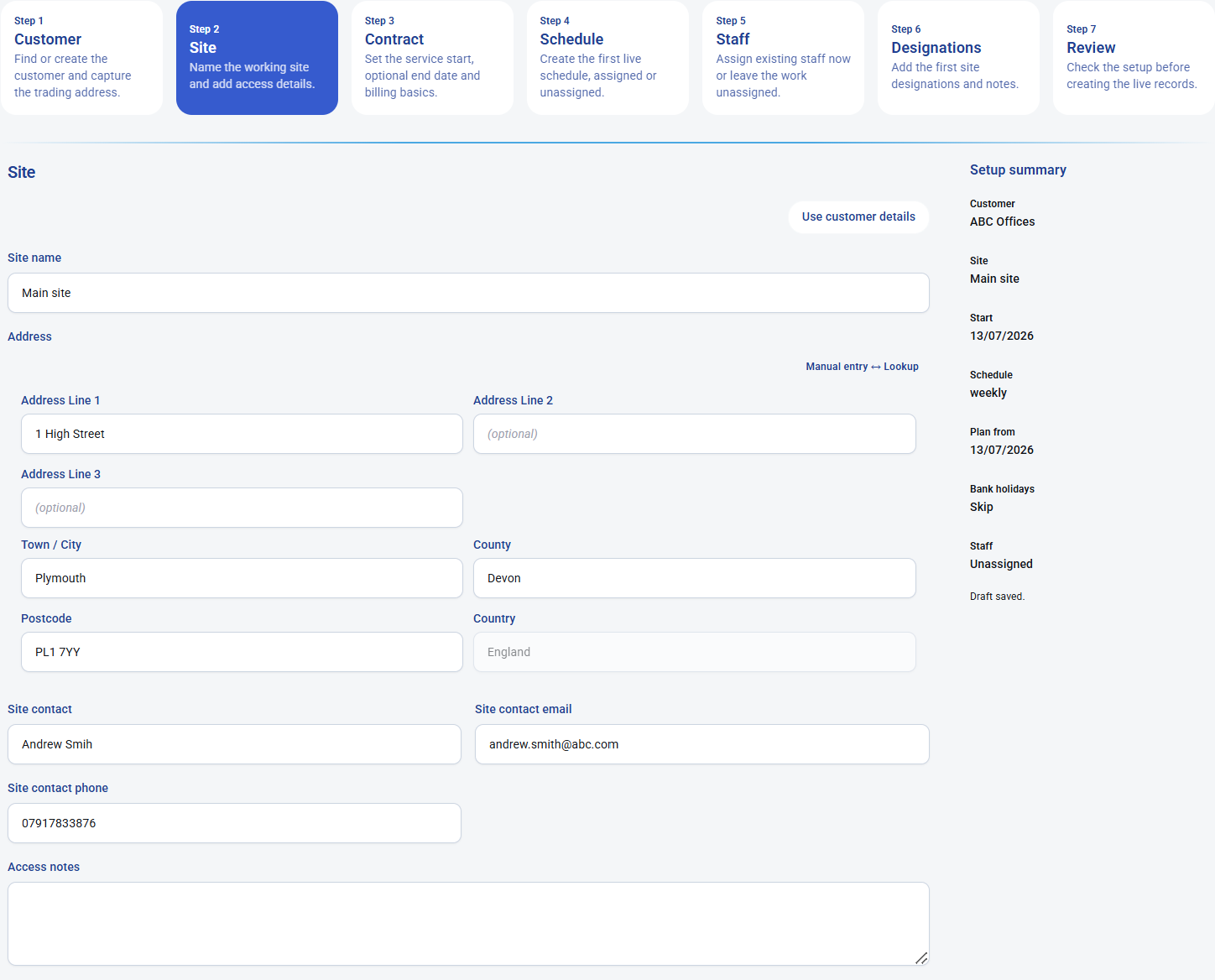 2. Site: confirm the working site, site contact and access notes.
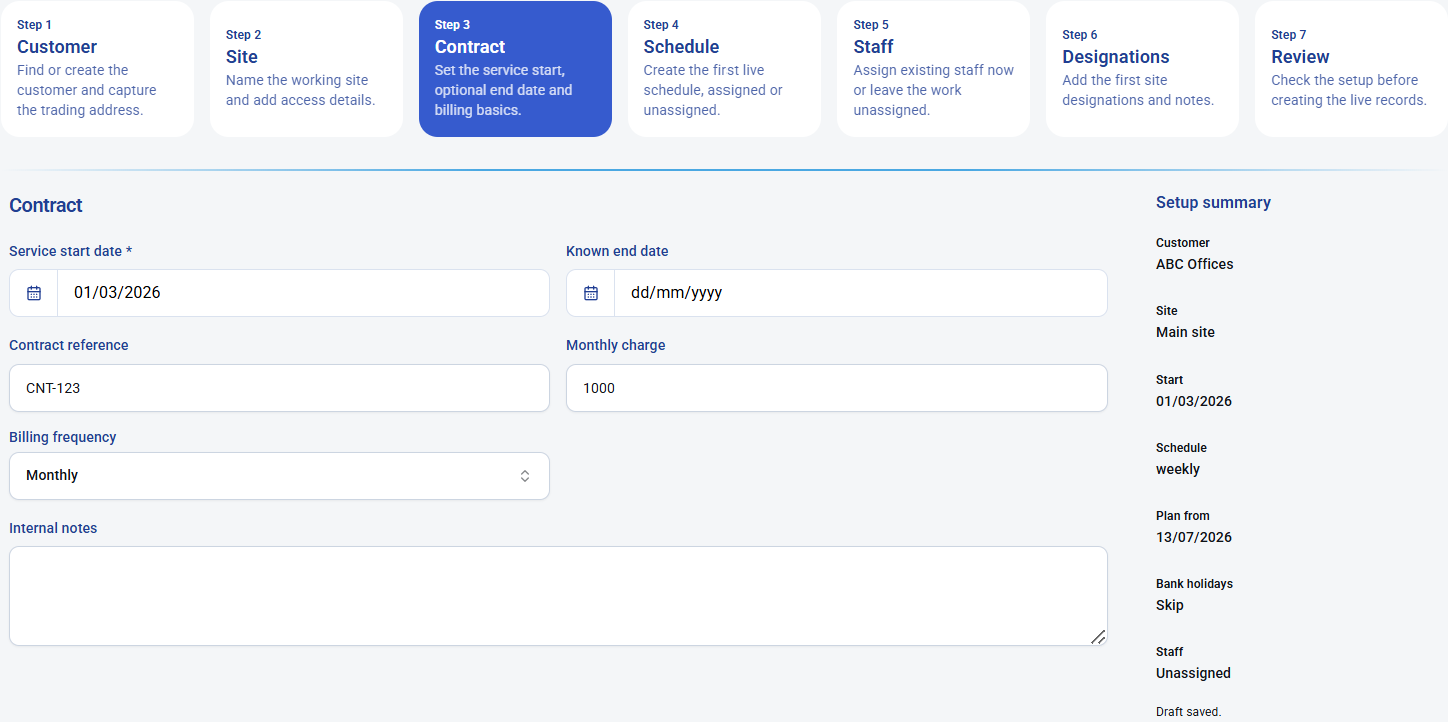 3. Contract: add the service start, reference, billing frequency and monthly charge.
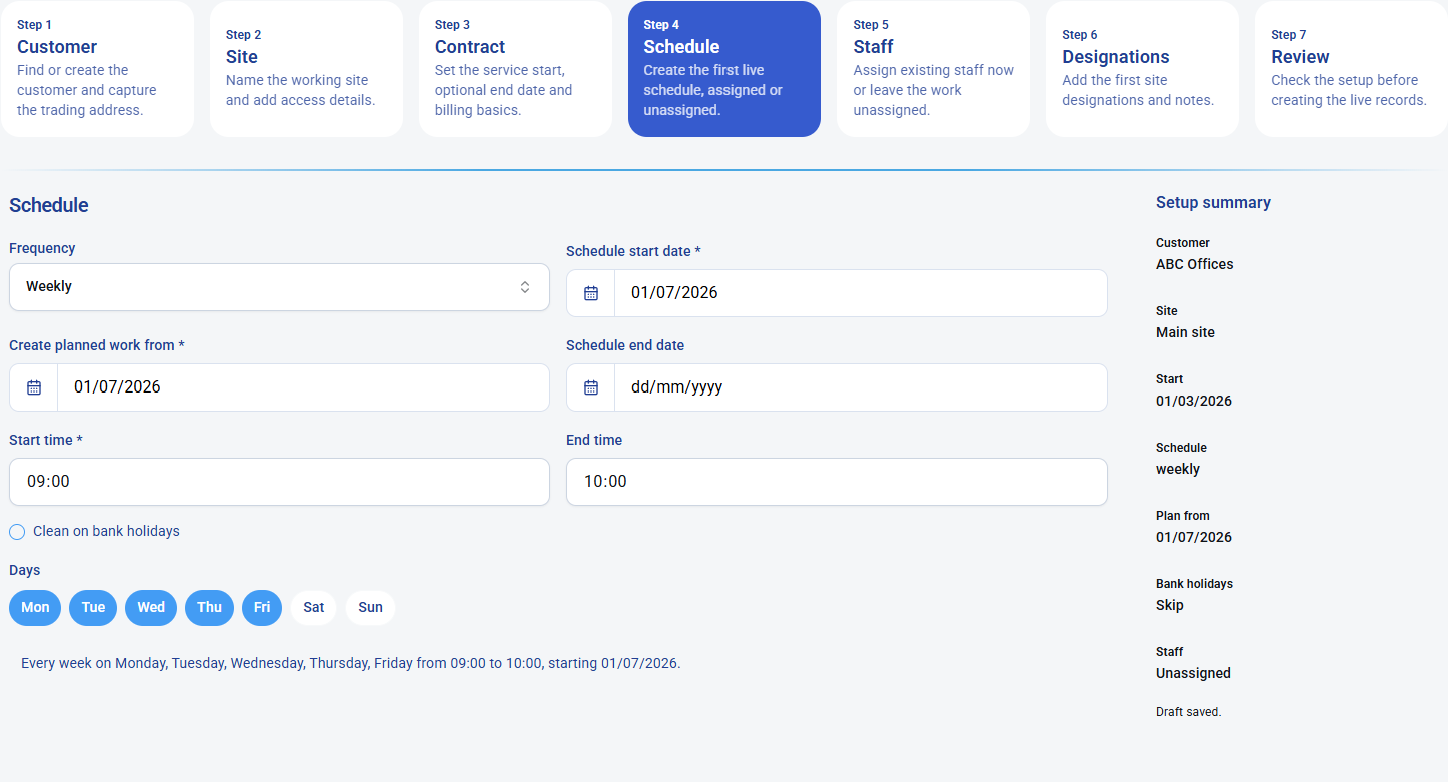 4. Schedule: create the first live schedule, such as Monday to Friday from 09:00 to 10:00.
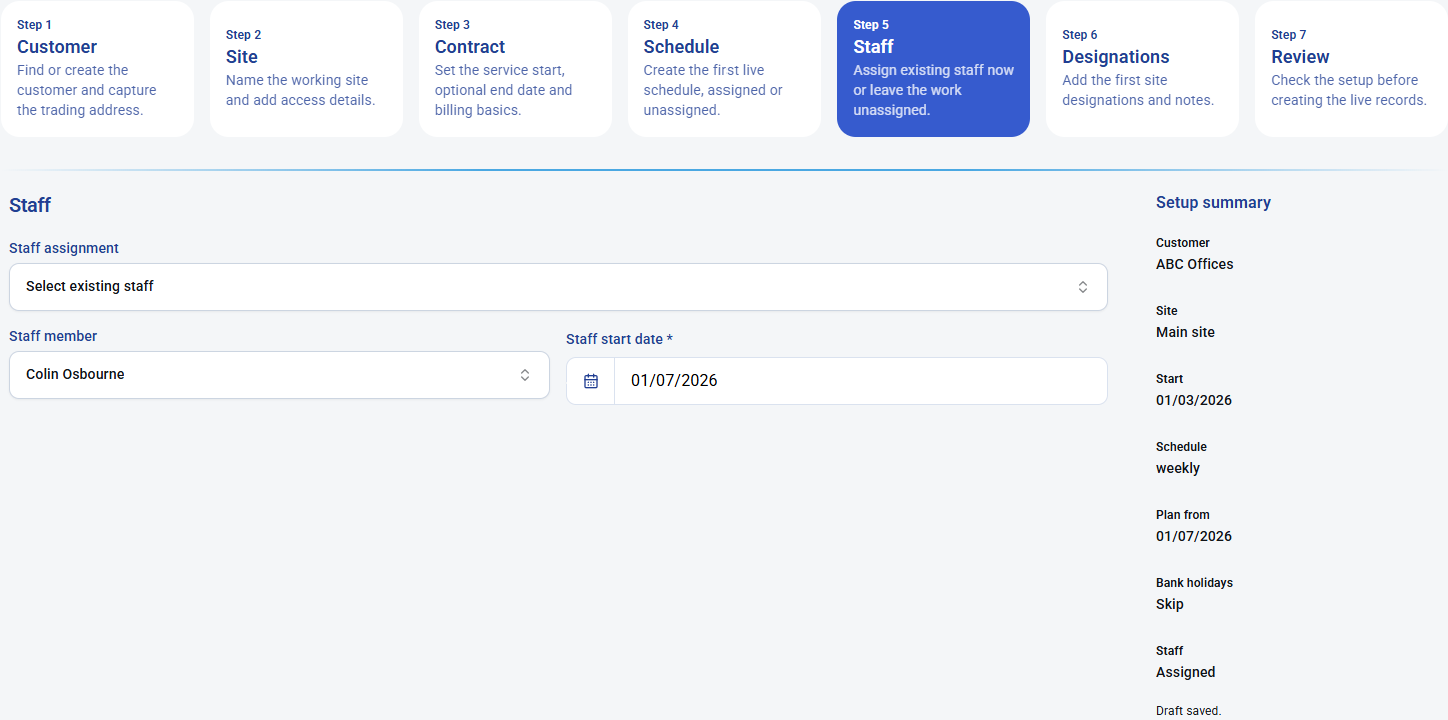 5. Staff: assign an existing cleaner now, or leave the schedule unassigned for cover planning.
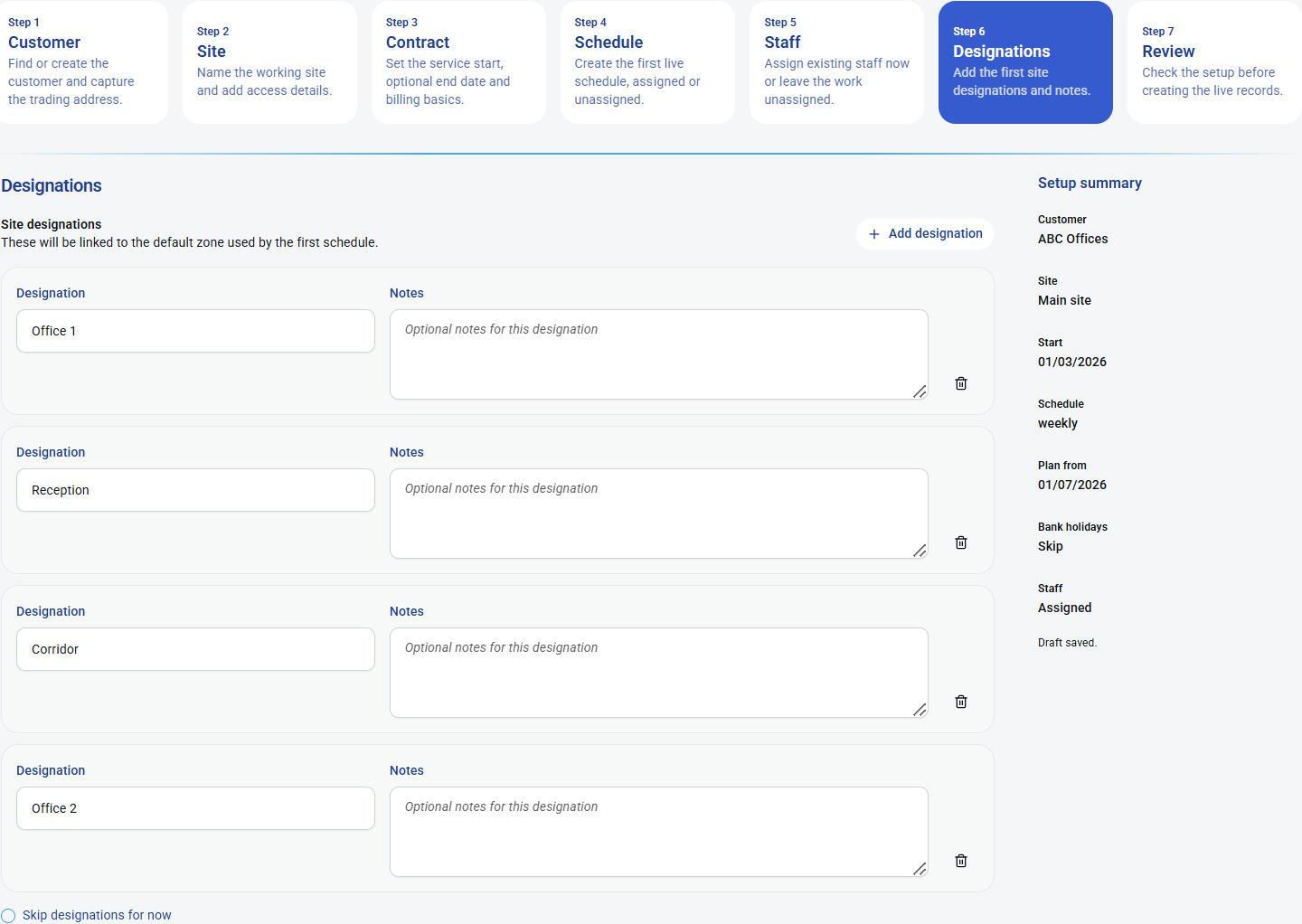 6. Designations: add the main cleaning areas, rooms or zones for the first site.
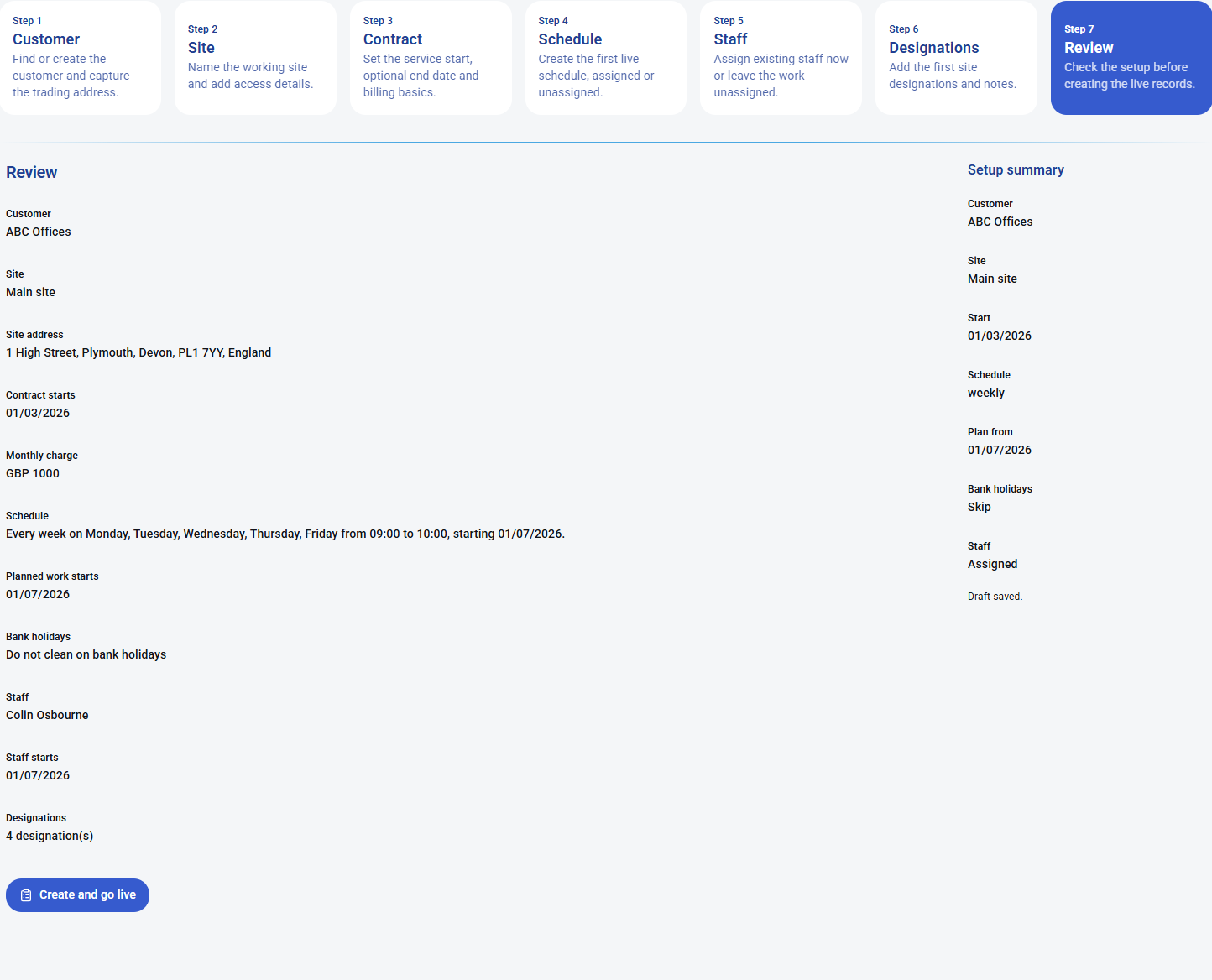 7. Review: check the customer, site, contract, schedule, staff and designations before creating live records.